
Digital Marketing
·
April 10, 2026
How SaaS Companies Handle Billing Disputes & Chargebacks
Learn how SaaS billing disputes happen, what triggers chargebacks, and how both sides can resolve them faster.

Outdated B2B contacts drain revenue, waste reps' time, and harm deliverability; learn stats, operational impacts, and fixes like automated job-change tracking.


Outdated contact data is more than an inconvenience - it’s a costly problem that eats into time, revenue, and productivity. Here’s what you need to know:
The solution? Regular data cleanup, real-time updates, and tools like KeepSync to automate job change tracking and CRM updates. Investing in data quality can recover lost revenue, boost productivity, and improve sales performance. Let’s break it down further.
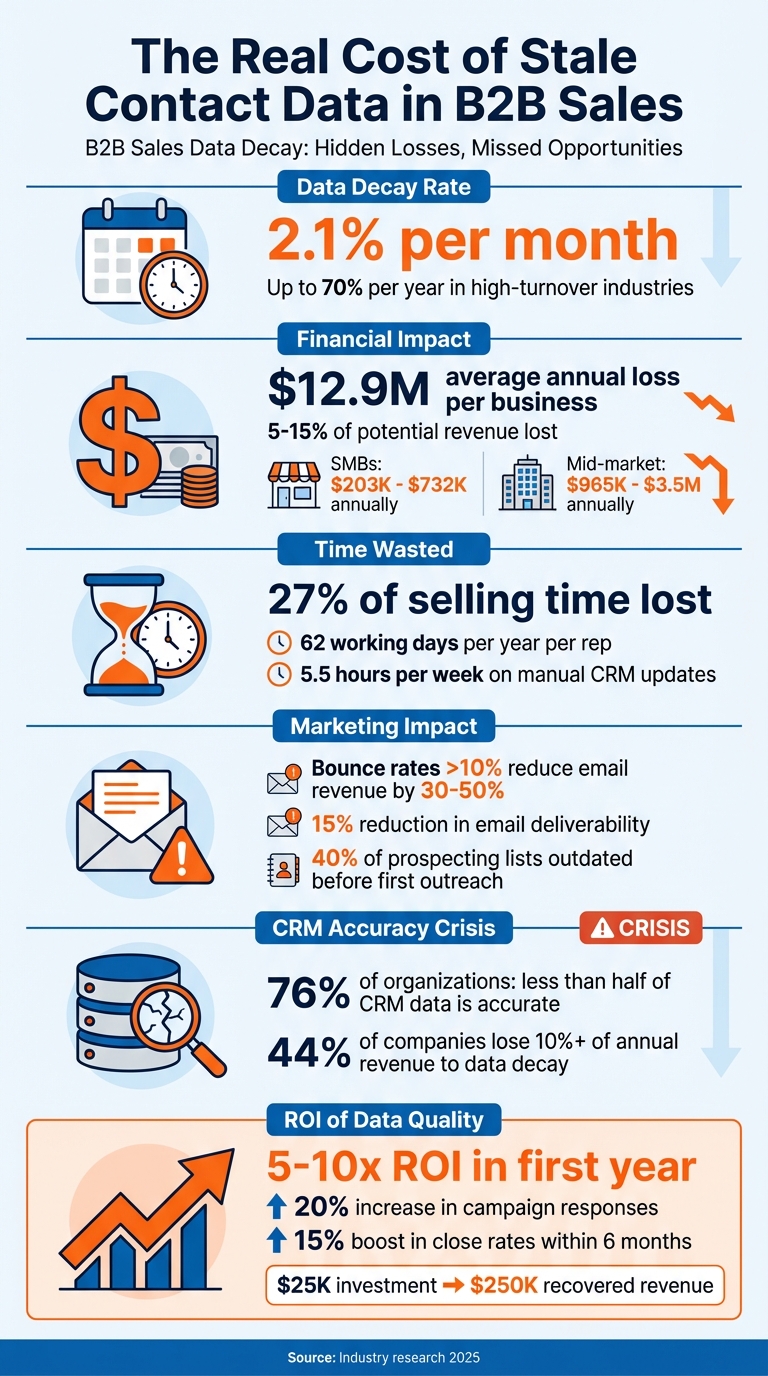
The True Cost of Outdated B2B Contact Data: Key Statistics
Outdated contact data can seriously sabotage sales efforts. When key prospects change companies or significant events like funding rounds occur, sales teams often miss these signals. Instead of connecting with decision-makers, they waste time chasing outdated leads.
Here’s a staggering fact: 40% of prospecting lists are outdated before the first outreach happens [11]. That means nearly half of your pipeline could be unreliable. Companies typically lose 5–15% of potential revenue due to pipeline leaks caused by unreachable prospects [4]. For a business aiming for $10 million in annual revenue, that’s a loss of $500,000 to $1.5 million - simply because the right contacts aren’t being reached.
Sales Development Representatives (SDRs) also feel the pinch. On average, they lose 27% of their potential selling time - more than one workday per week - because of bad data [10][5]. Over a year, that adds up to 62 working days per rep [3][12].
Consider Tradeshift’s experience in 2026: they struggled with high costs and inefficiencies due to outdated data. Once they automated their data cleansing, they achieved 10x better resource efficiency and eliminated compliance risks [5][10].
The takeaway? Beyond just revenue loss, outdated contact data creates inefficiencies that sap productivity and balloon costs.
Bad data doesn’t just cost you sales - it also drains your marketing budget. Emails sent to invalid addresses are money down the drain, and many CRMs or marketing platforms charge based on the number of stored contacts. This means you're paying for thousands of records that are no longer valid [10][5]. Over time, this silent expense keeps growing.
Here’s another alarming stat: bounce rates over 10% can slash email-influenced revenue by 30–50%. They also hurt your sender reputation, reducing email deliverability by 15% or more [2][4]. As the Cleanlist Team aptly explains:
Bad data doesn't send you an invoice. It drains revenue through bounced emails, wasted rep time, missed opportunities, and broken automations [2].
The financial impact varies depending on company size. Small and medium-sized businesses (SMBs) can lose between $203,000 and $732,000 annually, while mid-market companies may see losses ranging from $965,000 to $3.5 million per year [4]. However, the solution doesn’t have to be costly. For instance, a 50-person company that invests $25,000 in data quality tools could recover $250,000 in lost revenue - a return of 10x [4].
Here’s a breakdown of where these costs hit:
| Cost Category | Annual Impact |
|---|---|
| Bounced Emails | Wasted platform spend + damaged sender reputation [4] |
| Wrong Phone Numbers | 15–30 minutes of wasted rep time per day [4] |
| Duplicate Records | Paying multiple times for the same contact [4] |
| Sales Research | 20–30% of rep salary spent on non-selling tasks [4] |
| Pipeline Leakage | 5–15% of potential revenue lost [4] |
| Reputation Damage | 10–15% reduction in email deliverability [4] |
The math is simple: addressing outdated data costs far less than the revenue it quietly erodes.
Poor data quality doesn’t just hurt your bottom line - it disrupts sales operations, causing pipeline delays and throwing forecasting off track.
Outdated or incorrect contact data can bring sales efforts to a grinding halt. Imagine this: a sales rep spends time reaching out to a contact, only to discover they’re no longer the decision-maker. Now, they have to backtrack, find the right person, and start the conversation all over again. This kind of delay stretches sales cycles and clogs up the pipeline [4][5].
The inefficiencies don’t stop there. Sales reps lose an average of 5.5 hours every week manually updating CRM records - time that could be spent selling. That’s 14% of their workweek gone, leaving them with just 28% of their time to focus on actual selling tasks [6][7]. And when CRM data is unreliable, it messes with lead scoring and prioritization. Teams end up wasting time on low-potential leads while overlooking valuable opportunities [7][5].
The frustration of dealing with wrong numbers and bounced emails takes a toll, too. In fact, 37% of sales staff admit to falsifying CRM data just to bypass roadblocks in the process [6][5]. To make matters worse, if your team uses AI-driven sales tools, poor data quality can multiply these issues by automating flawed decisions at scale [5].
These inefficiencies don’t just slow things down - they contribute to revenue loss and weaken strategic decision-making, especially when it comes to forecasting and reporting.
When your CRM is full of duplicate records and outdated contact info, the reports it generates can’t be trusted. Sales leaders are left with unreliable forecasts, leading to bad decisions, misaligned go-to-market strategies, and wasted resources [7][5].
Here’s a staggering stat: 76% of organizations say less than half of their CRM data is accurate and complete [6]. And the consequences are steep - 44% of companies report losing 10% or more of their annual revenue due to CRM data decay [13]. In some cases, data decay rates reach as high as 70.3% [13].
Bad data doesn’t just skew forecasts - it disrupts critical processes like territory planning and lead scoring. Incomplete or inaccurate firmographic data can lead to poorly planned territories, while missing data fields make it harder to assess pipeline health or predict conversion trends [5]. When deals fall through because prospects are unreachable, revenue predictions suffer from major blind spots [4].
Accurate CRM integration is non-negotiable if you want to avoid these pitfalls. As ZoomInfo highlights:
Forecasts based on incomplete pipeline data miss the mark. Territory planning built on bad data misallocates resources, and forecasts based on incomplete pipeline data miss the mark [5].
The reality is stark: 94% of businesses believe their customer and prospect data is inaccurate. This systemic issue makes reliable sales forecasting nearly impossible [13].
You don’t need to wait for bad data to wreak havoc on your pipeline. Tools like HubSpot CRM can help you quickly spot and fix issues before they snowball into larger problems.
Start by filtering contacts based on their engagement history. In HubSpot, you can create lists using properties like "last marketing email open date", "recent conversion date", or "recent sales email replied date." If a contact hasn’t interacted in six months or more, it’s a sign that the data may be outdated [14].
HubSpot’s Data Quality Command Center provides a clear snapshot of your database health. By heading to Data Management > Data Quality, you can identify duplicate records, formatting errors, and missing details (like job titles or company data). These "enrichment gaps" highlight records that lack critical information [26, 28].
For email cleanup, you can create active lists to flag contacts with an "Email hard bounce reason." This helps you quickly remove invalid email addresses. It’s worth noting that about 30% of CRM records become outdated each year as people switch jobs, change emails, or update phone numbers [14].
Once you’ve identified outdated contacts, the next step is cleaning and updating your database efficiently.
Remove duplicate contacts: Use HubSpot’s AI tools, like Breeze, to scan for duplicate contact and company records. Fuzzy matching can help detect similar entries - for example, recognizing that "John Smith" and "J. Smith" might be the same person based on shared company or phone data [8].
Standardize your data: Set up workflows to automatically format phone numbers in the E.164 standard (e.g., +1XXXXXXXXXX) whenever records are saved. HubSpot’s "Fix and automate" feature can also correct common formatting errors, such as inconsistent capitalization in names [18].
Enrich your records: Configure HubSpot to automatically update new records as they’re added to your system [19]. Additionally, schedule a quarterly database enrichment process to capture updates like job changes or company restructures. This is especially important since 60% of people change roles within their companies annually, making job title data particularly prone to becoming outdated [15].
Automate cleanup workflows: Set triggers to clear outdated property values when emails bounce or when records remain inactive for 180 days. You can also automate lifecycle stage updates, ensuring contacts move from Lead to MQL based on actual engagement. This keeps your reporting accurate and actionable [15].
Proactive data cleaning not only protects your revenue potential but also makes your sales operations more efficient, addressing the challenges of outdated information head-on.
| Cadence | Task | Owner | Tool |
|---|---|---|---|
| Daily | Duplicate detection on new records | Automated | CRM native rules |
| Weekly | Data quality scorecard review | Data steward | CRM dashboard |
| Monthly | Email verification sweep | Marketing ops | NeverBounce / ZeroBounce |
| Quarterly | Full enrichment run | Revenue ops | Apollo / ZoomInfo / Breeze |

Keeping up with fast-changing B2B contact information is no easy task, and manual data updates just can't keep up. Sales teams need automation to stay ahead of the curve.
KeepSync takes the guesswork out of tracking job changes by monitoring your HubSpot contacts weekly across 30+ data sources. When one of your contacts changes roles, you'll get real-time alerts through Slack, email, or directly in HubSpot. This instant visibility helps your team act quickly on fresh opportunities.
With a 94% accuracy rate, KeepSync avoids the pitfalls of "synthetic confidence" - a common issue in many data tools where AI predicts email formats (like [email protected]) without verifying them. Instead, KeepSync uses multi-source verification to ensure contact details are accurate before updating your CRM. This reduces bounce rates and improves email deliverability, making your outreach more effective.
Best of all, setup takes just five minutes. Thanks to its native HubSpot integration, there's no need for complex migrations. Once you're up and running, KeepSync's job-change alerts help streamline your sales process from day one.
KeepSync works hand-in-hand with HubSpot workflows to automate tasks triggered by job changes. For example, when a contact moves to a new company, the system can automatically assign them to the right sales rep, kick off personalized outreach, or update their record with verified contact and company details.
This automation cuts the time reps spend on manual data tasks from 20-30% down to just 5-10% [4]. Instead of wasting hours on research, your team can focus on selling. KeepSync also tracks key opportunities like former champions, closed-lost deals, and competitor activity, turning your CRM into a goldmine of qualified leads.
KeepSync’s features are available through flexible pricing plans that grow with your team’s needs.
| Plan | Price | Contacts/Month | Key Features | Overage Cost |
|---|---|---|---|---|
| Starter | $79/mo | 1,000 | Weekly monitoring, email alerts, webhooks, email support | N/A |
| Team | $149 | 5,000 | Everything in Starter + Slack alerts, API access, priority support | $0.02/contact |
| Agency | $399 | 20,000 | Everything in Team + white label, dedicated CSM | $0.015/contact |
Annual plans come with discounted pricing: $1,490/year for the Team plan and $3,990/year for the Agency plan. All plans include the same core monitoring technology, with differences in contact volume and support features. The Starter plan is a great way to test the platform with real data before committing to a paid option.
A one-time data cleanup might feel satisfying, but it’s far from enough. B2B contact data deteriorates at an alarming rate - about 2.1% per month, which can add up to 70% annually in fast-paced industries [1][21]. Without consistent upkeep, outdated data can quietly sabotage your sales efforts over time. To keep your sales pipeline healthy and productive, daily attention to data hygiene is a must.
Think of data hygiene as a daily routine, not a one-off chore. Start by standardizing data entry with tools like HubSpot's validation rules and dropdown menus. This avoids inconsistencies, such as using "CA" in one place and "California" in another [21]. Assigning a RevOps Lead or CRM Manager to oversee data governance ensures these standards stick.
Here’s a simple maintenance schedule to follow:
To make this process easier, configure HubSpot's Data Quality Digest to send weekly email updates. These reports flag issues like duplicates and formatting errors, keeping your team informed and proactive [16].
"CRM data hygiene isn't an admin task. It's the foundation that every revenue-critical function depends on: forecasting, lead routing, territory design, pipeline reporting, and marketing attribution."
– Jordan Rogers, RevOps Leader [21]
Daily routines are great for catching errors, but automation takes it a step further by keeping your data accurate in real time. With manual updates, your team is always playing catch-up, especially in industries where roles and responsibilities shift rapidly. Automation bridges this gap by updating records as soon as changes occur [20].
For example, tools like KeepSync monitor over 30 data sources weekly, flagging job changes or outdated titles in real time. This saves your team countless hours spent verifying bounced emails or tracking down updated contact information.
You can also set up automated triggers in HubSpot for key events, such as new record creation, email bounces, or transitions from MQL to SQL [17]. When a job change is detected, the system can automatically reassign the contact, initiate personalized outreach, and update verified details.
The cost of outdated data is steep, with the average organization losing $12.9 million annually due to stale contact information [2][9]. When sales reps spend around 27.3% of their time chasing bad leads or verifying outdated details, the damage extends far beyond wasted hours - it's a direct hit to revenue. Each bounced email, disconnected phone number, or missed job change represents a missed opportunity.
Improving data quality isn’t just about cutting losses - it’s about driving gains. Organizations that prioritize data quality can see a 5–10x ROI in the first year, a 20% increase in campaign responses, and a 15% boost in close rates within six months [8][13].
"B2B contact data quality is not a one-time project. It is an ongoing operational challenge that directly affects pipeline generation, sales productivity, and revenue." – Salesmotion [7]
This highlights the importance of moving away from periodic data cleanups and embracing real-time monitoring. Static databases are no match for the rapid decay of B2B contact data, which can quickly render them obsolete. Tools like KeepSync simplify this process by automating job change tracking across more than 30 data sources with 94% accuracy, freeing up your team to focus on selling instead of manual data updates.
A continuous approach to data quality benefits the entire sales process. To build a reliable strategy, focus on standardizing data entry, automating validation at the point of capture, and maintaining a regular update schedule. Keeping your CRM accurate isn’t just a best practice - it’s essential for healthy pipelines, precise forecasting, and stronger sales performance. Your bottom line depends on it.
You can gauge the revenue impact of outdated CRM data by examining costs linked to missed opportunities, flawed forecasts, and inefficiencies in your sales pipeline - factors that typically account for 15–25% of revenue loss. Pinpoint specific problems like bounced emails, outdated contact information, and inaccurate records. These issues not only waste valuable sales efforts but also result in missed renewals, ultimately affecting your ROI and overall sales performance.
Keeping your contact database clean and accurate is essential, and HubSpot offers several ways to identify outdated information:
By using these strategies, you can maintain a reliable and up-to-date database.
Keeping your B2B contact database up-to-date is crucial. Ideally, aim to clean and update it every three months. Why? Because data tends to degrade quickly - around 22.5% of it becomes outdated each year. Regular updates help maintain accuracy, ensuring your sales and marketing efforts are built on reliable information.