
Digital Marketing
·
April 10, 2026
How SaaS Companies Handle Billing Disputes & Chargebacks
Learn how SaaS billing disputes happen, what triggers chargebacks, and how both sides can resolve them faster.

A 6-stage framework to identify, map, and engage buying committees so sales teams align stakeholders, remove blockers, and close enterprise deals faster.


Enterprise sales today is more complex than ever. With 89% of buying decisions involving multiple departments, sales teams must engage diverse stakeholders to close deals successfully. On average, 13 stakeholders are involved in B2B purchases, spanning roles like IT, Finance, Legal, and Operations. Yet, most salespeople only map 2.3 stakeholders per deal, leading to stalled decisions and missed opportunities.
To navigate this, you need a clear process to identify, engage, and align decision-makers. A 6-stage framework - Define, Discover, Map, Validate, Orchestrate, and Measure - helps you build accurate buying committee maps, address concerns early, and avoid roadblocks. Deals with full stakeholder mapping close 23% faster and are 34% more likely to succeed.
Key points:
The goal? Understand each stakeholder's priorities, tailor your messaging, and build consensus across departments to close deals faster and more effectively.
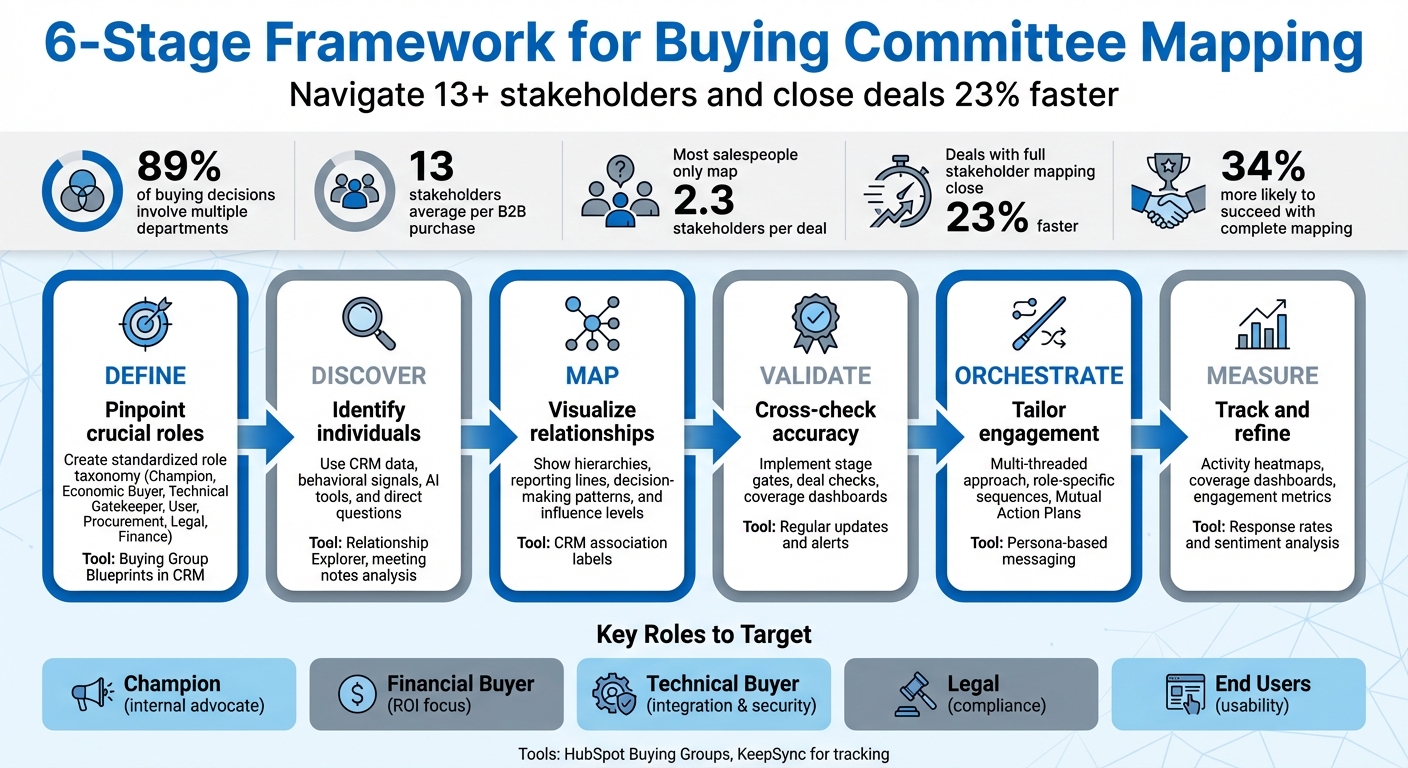
6-Stage Framework for Buying Committee Mapping in Enterprise Sales

Today, the average B2B purchase involves 13 stakeholders, reflecting the complexity of enterprise sales [2]. To navigate these intricate deals, understanding the structure of buying committees is essential. This knowledge serves as a foundation for the six-stage mapping framework covered later.
Every buying committee comprises distinct roles, each with unique priorities and varying levels of influence. Let’s break them down:
"We won't let our sellers qualify an opportunity and move it into full pipe unless they can tick off the people that fit all of these roles."
– Kyle Healy, Senior VP of Sales Enablement, NFP [6]
Buying committees bring together representatives from diverse functions - IT, Finance, Legal, Operations, and end-user teams. Each group comes with its own priorities:
This mix creates a hierarchy of influence. Certain members, like IT or Legal, may act as gatekeepers who can halt a deal over technical or compliance issues. Meanwhile, roles like CFOs or CROs often hold the final say on budgets [2][1]. Identifying these key players early can help avoid last-minute deal roadblocks.
The challenge? Each department speaks a different "language." For instance, Finance may respond to clear ROI metrics, while IT prioritizes technical compatibility and system performance [6].
"You need to understand those different languages, because if you speak the wrong language to the wrong person, your message isn't going to resonate."
– Bryan Hamblin, CRO at Muck Rack [6]
Buying committees rarely operate in a straight line. Instead, their process is iterative, with stakeholders revisiting earlier stages of research and evaluation as new concerns or participants emerge [2]. Surprisingly, buyers spend just 17% of their overall purchasing time meeting with vendors. The majority of their time is focused on independent research and internal discussions [2].
Deals often stall not because of product issues but due to internal friction. For example, one department may be ready to proceed while another raises concerns about compliance or implementation. These delays often stem from failing to address a stakeholder’s priorities early in the process.
Committees also tend to be risk-averse.
"Our job is to de-risk the decision for them... nobody believes in the euphoric future. Instead, you need to understand what their worst-case scenario is, and determine steps you can take together to avoid that."
– John Barrows, Founder of JB Sales [6]
This "Fear of Messing Up" (FOMU) drives committees to search for potential risks, often stalling decisions to avoid disruption or failure. To overcome this, you must tackle these fears directly with detailed rollout plans, solid case studies, and realistic benchmarks. These dynamics are crucial to understanding before diving into the structured mapping framework outlined in the next section.
Mapping a buying committee is an ongoing process that evolves throughout the sales cycle. This six-stage framework offers a step-by-step approach to identify, engage, and track the 13+ stakeholders often involved in enterprise deals[2]. It builds on earlier structural insights to streamline your committee mapping efforts.
Start by pinpointing which roles are crucial in your buying committee. Develop a standardized role taxonomy that reflects the decision-makers you frequently encounter. Typical roles include Champion, Economic Buyer, Technical Gatekeeper, User, Procurement, Legal, and Finance[9].
To simplify this, create Buying Group Blueprints in your CRM. These templates, based on your Ideal Customer Profile (ICP), outline the standard committee structure and include specific qualification criteria[7]. For example, a security software vendor might always include roles like CISO, IT Director, Compliance Manager, and CFO in their blueprint.
In January 2024, insurance firm NFP introduced a strict qualification process that requires sellers to identify key roles before advancing deals into the pipeline. This ensures teams aren't overly reliant on a single champion and are prepared to engage with the 11+ stakeholders typically involved in their deals[6].
"We won't let our sellers qualify an opportunity and move it into full pipe unless they can tick off the people that fit all of these roles."
– Kyle Healy, Senior VP of Sales Enablement, NFP[6]
Once roles are defined, the next step is identifying the individuals who fill those roles within your target account. Use first-party data from your CRM, such as titles from form submissions, email engagement, and meeting attendee lists[9]. Pay attention to behavioral signals, like visits to pricing or security pages, to gauge which departments are researching your solution.
AI tools can help analyze meeting notes and call transcripts to uncover hidden decision-makers[4]. Features like Relationship Explorer can highlight warm connections within an account based on shared networks[6]. Directly ask your internal champion questions like, "Has anyone new joined the evaluation process?" or "Who typically challenges this type of purchase?"[3]
After identifying key stakeholders, visualize their relationships and influence within the committee. Go beyond the typical org chart to reveal the "deal reality" - who genuinely influences decisions versus who holds a title[3][6]. Use CRM association labels to connect contacts to specific deals and roles, making it easier to assess support levels[9][2].
Your map should detail hierarchies, reporting lines, and decision-making patterns. For instance, knowing whether an IT Director reports to the CTO or COO can clarify who has the final say on technical decisions. Tracking how information flows between departments can also uncover bottlenecks, especially when certain individuals hold veto power. Before moving forward, confirm the accuracy of your map.
Even the most thorough mapping can miss critical stakeholders. Cross-check your map with frontline teams to identify any gaps, and implement stage gates to verify its accuracy before advancing the deal.
Set up "deal checks" to ensure key roles - like Champion, Economic Buyer, and Security representative - are tagged in your CRM before moving to evaluation or procurement stages[9]. Coverage dashboards can alert deal owners if essential roles are missing, acting as an early warning for at-risk deals.
In longer sales cycles, update your map regularly to avoid working with outdated information[3][4]. Tools that provide alerts when contacts change roles or leave the company can help prevent delays caused by turnover[5].
With a validated map, tailor your engagement strategy to each stakeholder's role. A multi-threaded approach ensures your messaging addresses the unique priorities of each persona[3][6]. For example, Finance may focus on ROI, IT may need security details, and end-users care about usability and workflow impact.
Launch role-specific sequences to deliver relevant value to each stakeholder[9]. For example, persona-based sequences can help you engage different roles effectively[8].
Develop a Mutual Action Plan (MAP) to outline milestones like legal review, technical validation, and budget approval. This helps clarify each stakeholder's role and fosters accountability[9].
"We talk about needing to speak multiple languages in the context of multithreading, meaning the language a manager uses is different from the language a director uses versus the language an end-user uses."
– Bryan Hamblin, CRO, Muck Rack[6]
This stage focuses on tracking engagement and improving based on what works. Use activity heatmaps to visualize stakeholder interactions with your sales and marketing content over time[7]. Coverage dashboards ensure all essential roles are included, and you can analyze whether deals with broader committee involvement close faster[9].
Track metrics like response rates to role-specific sequences, time spent on shared content, and sentiment from emails and call transcripts[4]. Adjust your messaging based on engagement data. For instance, if IT raises security concerns late in the process, involve them earlier in future deals.
Refine your Buying Group Blueprints by analyzing closed-won and closed-lost deals. Identify which roles were present in successful deals and which missing stakeholders caused delays. Use these insights to update your definitions and discovery process, ensuring your blueprint evolves alongside committee dynamics.
Your CRM is more than just a database - it's the nerve center for managing and engaging buying committees. By combining the six-stage mapping framework with CRM capabilities, you can track stakeholders and execute strategies in real time. Tools like HubSpot, with its native features and automated workflows, transform static contact lists into dynamic, evolving maps that adapt throughout the deal cycle. The key? Automating processes to keep stakeholder data accurate without constant manual updates.
HubSpot's Buying Groups feature, available in Sales Hub and Service Hub Enterprise, allows you to create visual org charts directly on company records. You can build these charts using:
Customization takes these charts to the next level. Add color-coded lines to highlight relationships and influence patterns that go beyond basic reporting structures. Assign roles like Decision Maker, Influencer, or Blocker, and use association labels to clarify each stakeholder's function in the decision-making process.
"With the increase of individuals involved in a buying decision, having a clear, accurate view of the key stakeholders and of the interrelationships is critical."
– Rosalyn Santa Elena, Founder, The RevOps Collective[5]
To keep these maps current, leverage HubSpot Workflows. For example, you can automate role assignments based on job title patterns, ensuring your committee map evolves as stakeholders change.
With buying committees now averaging 11 people per deal - and stakeholders frequently changing roles or companies - keeping your CRM data accurate is no small task. In fact, inaccurate data can cost organizations around $13 million annually[5]. This makes automation essential.
KeepSync integrates seamlessly with HubSpot, offering 94% accuracy in tracking job changes across your contact database. If a key contact is promoted or moves to a new company, you'll get immediate alerts via Slack, email, or HubSpot notifications. KeepSync monitors your records weekly, using over 30 data sources to enrich profiles with verified email addresses, phone numbers, and updated company details - all without leaving your CRM.
For even more precision, LinkedIn Sales Navigator's "Bulk CRM Actions" feature syncs job changes and profile updates directly into HubSpot. This ensures that your relationship maps reflect the most up-to-date, self-reported data. Pair this with HubSpot's Continuous Enrichment tool, which updates records monthly, and you’ll always have fresh, reliable committee insights.
Once automated updates are in place, you can focus on refining your data enrichment strategies to further improve your CRM's effectiveness.
HubSpot's Breeze tool simplifies data enrichment by automatically populating contact and company properties, such as job titles, seniority levels, and industries, using external commercial datasets. For this to work effectively, ensure your contacts have business email addresses (not personal ones like Gmail) and that companies have valid domain names.
Set your overwrite rules carefully:
This approach ensures your data reflects real-time changes, such as promotions or role shifts, without overwriting critical static details.
Another handy feature is HubSpot Documents, which includes an option to "Require email address to view." When your primary contact forwards a proposal or presentation, this tool captures the email addresses of previously unknown stakeholders who view the document. These new contacts can then be enriched and added to your buying group map.
Finally, use insights from data enrichment to refine your Buying Group Blueprints. Look for gaps - such as missing key roles like CFO, CISO, or Compliance Manager - that could stall deals. Analyze successful deals to identify which roles were critical and adjust your blueprints accordingly to improve your mapping and engagement strategies.
Once you've mapped out your buying committee, the next step is to engage each stakeholder effectively. With the average B2B purchase now involving 13 stakeholders and 89% of decisions spanning multiple departments [2], tailored strategies are more important than ever.
Different stakeholders care about different things. CFOs want to see ROI, IT leaders are focused on security and integration, and end users prioritize usability. Your messaging should align with these priorities.
"We talk about needing to speak multiple languages in the context of multithreading, meaning the language a manager uses is different from the language a director uses versus the language an end-user uses."
– Bryan Hamblin, CRO, Muck Rack [6]
Hamblin's team simplifies complex discovery data into just a few slides for final presentations, connecting specific problems to strategic goals. This approach helps executive sponsors feel confident in their decisions.
To engage effectively, identify key roles early and create sales materials that speak to their unique concerns. For instance:
Here’s a quick breakdown of common stakeholder roles and how to engage them:
| Stakeholder Role | Primary Concern | Engagement Strategy |
|---|---|---|
| Executive Sponsor | Business outcomes & KPIs | Tie the solution to company-wide strategic goals |
| Financial Approver | ROI & payback periods | Share ROI calculators and cost-offset models |
| Technical Buyer | Security & integration | Provide SOC 2/compliance packets and API docs |
| End User | Usability & workflow | Offer hands-on demos and user testimonials |
| Legal Reviewer | Risk & liability | Address Data Processing Agreements proactively |
Beyond these tailored strategies, coordinating multiple touchpoints across the organization is key.
Relying on a single champion to close a deal is risky. Single-threaded deals are fragile, and even small disruptions can cause them to fall apart. For deals over $50,000, multi-threaded engagement leads to win rates up to 130% higher, while deals with four engaged contacts can see win rates soar by 546% [11].
To strengthen your position, engage 4–5 key contacts across departments early. This ensures strategic influence without overwhelming the process. Use your CRM's activity heatmaps to identify disengaged stakeholders and focus re-engagement efforts [7].
Another useful metric is "time-to-power", which measures how many days it takes to connect with a VP or C-level budget owner after the initial contact. Reducing this time can speed up deal cycles and prevent deals from stalling in middle management [11]. Even if you can’t meet all stakeholders in person, reaching out via LinkedIn or email ensures they’re familiar with your name before key decision meetings [6].
Even with strong engagement, deals can stall due to internal friction - often unrelated to your product. Research shows that 74% of buyer teams experience internal conflict during the decision process, and 86% of B2B purchases stall at some point because a stakeholder’s concerns weren’t addressed early [2][11].
To avoid this, identify the "Final Authority" - the person with veto power - as early as possible. This could be a CISO, Head of Compliance, or Legal Reviewer who might block the deal over concerns about risk or privacy. Engage them proactively and address their concerns with detailed rollout plans.
Buyers are often more afraid of failure than they are excited about potential gains. John Barrows, Founder of JB Sales, sums it up well:
"Our job is to de‑risk the decision for them... nobody believes in the euphoric future. Instead, you need to understand what their worst‑case scenario is, and determine steps you can take together to avoid that."
– John Barrows, Founder of JB Sales [6]
To help your champion build consensus internally, provide clear rollout plans, social proof, and concise assets like 2–3 slide summaries, objection-handling documents, and ROI calculators. Since B2B buyers spend only 17% of their purchasing time meeting with vendors, your champion will need these tools to drive alignment during the remaining 83% [2][11].
Work with your champion to create a decision roadmap that outlines what each department - Finance, IT, Legal, Procurement - needs to see to approve the deal. Teams that achieve internal alignment are 2.5 times more likely to report a high-quality outcome [11]. Keep your stakeholder maps updated to reflect any changes in influence and ensure your strategy stays aligned.
A strong buying committee map can make all the difference in enterprise sales. It's not just a nice-to-have - it’s a must to keep deals moving forward instead of stalling. Knowing who holds influence in the decision-making process and addressing their concerns early is critical. The six-stage framework - Define, Discover, Map, Validate, Orchestrate, and Measure - offers a clear, repeatable process to identify stakeholders, understand their needs, and build organizational consensus.
The framework - Define, Discover, Map, Validate, Orchestrate, and Measure - is designed to help sales teams connect with multiple decision-makers and reduce the risks of relying on just one or two contacts. Jill Konrath puts it perfectly:
"If you're only well connected to one or two people at a company, you're vulnerable if something happens to them." – Jill Konrath [10]
Tools like HubSpot's CRM, with features like Buying Groups, association labels, and activity heatmaps, streamline the process of tracking stakeholders. Automated workflows can assign roles based on job titles and online behavior. Additionally, KeepSync’s job change alerts, which boast 94% accuracy, help sales teams stay ahead of potential disruptions when key contacts change roles. This combination of strategy and technology creates a solid foundation for success.
To turn these insights into action, sales teams should focus on the following:
Mastering committee mapping doesn’t just speed up deal closures - it gives sales teams a strategic edge.
To effectively navigate a buying committee, it’s essential to understand the key roles involved. These typically include decision-makers, influencers, technical experts, and end-users. Start by researching the target organization’s structure and hierarchy to uncover the individuals who may influence the decision-making process.
Leverage first-party data - like email engagement, meeting participants, or form submissions - to identify potential stakeholders. CRM tools can be incredibly useful here, helping you tag roles, map out contacts, and spot gaps in your stakeholder coverage. Pay close attention to behavioral cues, such as interest in pricing information or technical specs, to better understand each person’s role in the process.
For a clearer picture of the buying committee’s dynamics, consider using visual relationship maps. These tools allow you to track the structure and influence patterns within the group over time. By doing so, you can focus your efforts on engaging the right people, increasing your likelihood of success in complex enterprise sales.
One way to address hurdles in enterprise sales is by mapping the buying committee. This means pinpointing the key decision-makers and influencers within the organization. Understanding their roles and how they interact is crucial. Tools like relationship maps can make this process easier by visually laying out these connections. This ensures you engage the right people early on and avoid delays caused by missing key stakeholders.
Another approach involves using automation and data enrichment tools to stay updated on changes within your target accounts. For instance, tracking job changes can alert you to new decision-makers or help you reconnect with contacts who’ve shifted roles. This keeps your sales efforts on track and minimizes disruptions. By blending thorough mapping with automation and timely outreach, sales teams can better navigate complex organizational structures and keep deals progressing smoothly.
The six-stage framework simplifies the enterprise sales process by providing a structured way to handle the complexities of large buying committees. It emphasizes identifying and engaging key players - like sponsors, champions, and technical buyers - while addressing their specific needs and concerns. This focused approach allows sales teams to concentrate on activities that make the biggest impact, cutting down on unnecessary delays.
With the integration of CRM tools and automation techniques, such as tracking job changes and mapping relationships, the framework keeps sales efforts aligned with real-time changes within an organization. For instance, if a contact transitions to a new role, reaching out promptly can create fresh opportunities. This proactive strategy not only speeds up deal progression but also improves the chances of closing deals successfully.