
Digital Marketing
·
April 10, 2026
How SaaS Companies Handle Billing Disputes & Chargebacks
Learn how SaaS billing disputes happen, what triggers chargebacks, and how both sides can resolve them faster.

Automate job-change tracking to reconnect former customers within their first 90 days, boosting response rates, shortening sales cycles, and improving conversions.


Former customers can be your best leads when they move to new companies, bringing trust in your product with them. Yet, many teams miss these opportunities by not tracking job changes. Here's what you need to know:
Timing is critical - new hires make most purchasing decisions within their first 90 days. With automated job-change alerts, enriched contact data, and personalized outreach, you can reconnect with former customers at the perfect moment, turning missed opportunities into a reliable revenue stream.
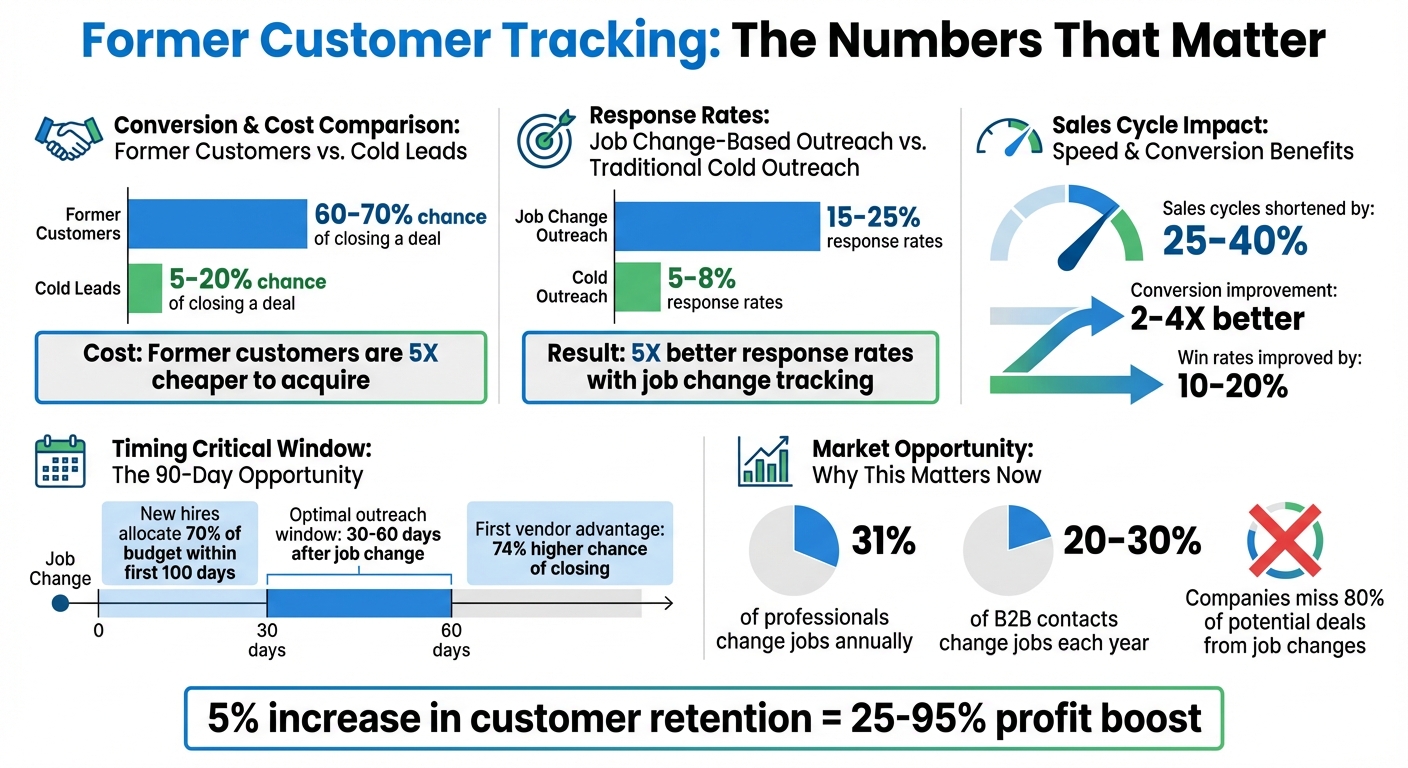
Former Customer Tracking: Key Statistics and Response Rates for B2B SaaS
Job change tracking is transforming the way B2B SaaS companies approach outreach. Instead of cold-calling strangers, your team can reconnect with individuals who already trust your product. When a former customer moves to a new company, they bring that trust along with them - eliminating the uphill battle of proving your solution’s worth. This creates a perfect opportunity to engage at just the right moment.
Here’s why timing is everything: new hires typically have about 90 days to establish their tech stack[6]. During this "honeymoon" phase, they’re actively making decisions and driving change within their new role[6]. Former customers often skip the demo and proof-of-concept steps, which can shorten sales cycles by 25-40%[6]. Reaching out within 30-60 days of their job change significantly increases your chances of securing early budget allocation[6].
The numbers back it up. Outreach tied to job changes sees 15-25% response rates, compared to just 5-8% for traditional cold outreach[6]. Plus, these leads convert 2-4x better because you’re reconnecting with someone who already knows your product, rather than interrupting a stranger’s day[6].
Real-time alerts make this process even more effective. Instead of wasting time manually scanning LinkedIn, automated tools notify your team as soon as a key contact changes roles. For example, KeepSync updates contact records automatically, adds verified email addresses and phone numbers, and even initiates personalized outreach. This gives your sales team the insights they need to craft messages that reference past successes and align with the contact’s new goals.

Getting started with KeepSync is quick and straightforward. Start by installing the KeepSync app from the HubSpot marketplace. Once installed, authenticate your CRM access using OAuth. This step ensures KeepSync can seamlessly monitor your contacts and automatically update their records.
Next, import your contact lists. You can use dynamic active lists for ongoing tracking or static lists for one-time monitoring. Prioritize your "Champion" lists - these include former customers, power users, and decision-makers who have already seen success with your product. To fill in any gaps in contact details, you can enable data enrichment through services like Apollo or ZoomInfo.
The final step is to set your tracking criteria. KeepSync tracks two types of job changes: inbound (new hires joining your target accounts) and outbound (existing contacts moving to new companies). Many teams focus on outbound changes first since former customers often represent the best opportunities to reengage.
Once your contact data is synced and your tracking preferences are set, you can move on to configuring how your team will receive alerts about these changes.
After syncing your contacts, it's time to set up custom properties in HubSpot to capture job change details. Create fields such as "Job Change Date", "Previous Company", and "New Role." These fields will store the information KeepSync discovers and serve as the backbone for your automated workflows.
Next, choose how you want your team to receive alerts. Options include email notifications, Slack messages, or alerts directly within HubSpot. For high-priority contacts, like key decision-makers, consider setting up real-time Slack alerts. Reaching out to these individuals within 24–48 hours of their job change can increase your chances of closing a deal by 74% [11].
"If you only have budget for one program this year, let it be this one [job change tracking]. Best of all? It's under $10k." - Brooke Hattie, Lean Layer [4]
To ensure no opportunities slip through the cracks, configure automated tasks in HubSpot. These tasks can assign follow-up actions to the appropriate sales representative as soon as a job change is detected.
Alerts are only as good as the data they rely on, which is why accuracy is key. This is where KeepSync’s multi-source verification comes in.
KeepSync achieves a 94% accuracy rate by cross-referencing job change information across more than 30 data sources every week [1]. Instead of depending solely on LinkedIn updates, the platform verifies changes using company announcements, press releases, and even email headers [9][10].
Additionally, KeepSync links new job records to existing ones in your CRM. This allows your sales team to instantly access a lead's previous relationship and history with your product. The system also enriches contact records with verified email addresses and phone numbers, eliminating the need for manual research and speeding up your team’s response time.
Considering that 20% to 30% of B2B contacts change jobs annually [11], this level of automation and precision isn’t just helpful - it’s essential for staying ahead in a competitive market.
When KeepSync identifies a job change, you can activate HubSpot workflows using a straightforward trigger–filter–action setup [7]. Start with the job change alert as the trigger, then apply a filter to confirm the individual is a former customer or champion. Once verified, automatically enroll them in a tailored outreach sequence or assign a follow-up task. To make the outreach feel natural, route these leads to the sales rep who already has a relationship with the contact. This approach builds on existing trust and familiarity, making the interaction feel more like a reconnect than a cold pitch.
"We're essentially talking about serving your sales team net new prospects that have already tried your product, love your product, don't even need a demo... and are ready to champion your product." - Brooke Hattie, Revenue Leader [4]
It’s also crucial to set un-enrollment criteria. For instance, once a contact responds or books a meeting, they should be removed from the sequence to prevent redundant follow-ups [13].
Trigger-based workflows are only as effective as the data behind them. Before launching automated sequences, enrich each contact record with verified email addresses and phone numbers tied to their new company [12]. Make sure enrichment tools are enabled to maintain accurate and up-to-date contact details.
Leverage HubSpot’s custom properties to store key insights like “Previous Company,” “Past Product Usage,” and “New Role” [7]. This data allows you to personalize your messages. For example, if a former power user has moved to a VP role at a larger company, acknowledge their promotion and focus on enterprise-level challenges rather than individual contributor pain points.
Personalized outreach pays off - response rates can increase by 7.8% or more when messages are tailored using accurate, relevant data [8]. Avoid generic greetings like "Hi [First Name]." Instead, reference specific features they relied on, problems they solved, or results they achieved in their previous role.
Once your triggers are set and contact data is enriched, the next step is rolling out a multi-channel outreach strategy. A 10-day automated sequence with five touchpoints works well to keep your outreach consistent and effective. Here’s a proven framework:
| Touchpoint | Channel | Timing | Objective |
|---|---|---|---|
| Touch 1 | Day 1 | Address a key pain point for their new role | |
| Touch 2 | Day 3 | Send a connection request referencing the email | |
| Touch 3 | Day 5 | Share a case study or other social proof | |
| Touch 4 | Day 8 | Engage lightly (comment or send a voice note) | |
| Touch 5 | Day 10 | Offer a meeting request with an opt-out option |
Here’s why this works: 80% of sales require five or more follow-ups, but 92% of sales reps stop after the fourth contact [14]. By automating this workflow, you ensure no opportunities fall through the cracks due to a busy schedule or human oversight.
For even better results, send emails from the name of the specific Customer Success Manager or Account Manager the contact knows, rather than a generic company address [8]. This personal touch can significantly boost open rates since recipients are more likely to engage with someone they recognize and trust.
Your former customers already know your product delivers results. Instead of starting from scratch, focus on their previous successes. For example, you might ask, "Would it make sense to replicate the success you achieved at [Previous Company] here at [New Company]?" [4] This shifts the tone from a cold pitch to a warm reconnection.
Congratulate them on their new role and include specific metrics they achieved with your help. Avoid generic statements like "we helped your team succeed." Instead, say something like, "We helped you reduce onboarding time by 40% at [Old Company]. Could I speak with your team about achieving similar results here?" [2]
"We're essentially talking about serving your sales team net new prospects that have already tried your product, love your product, don't even need a demo of your product and are ready to champion your product." - Brooke Hattie, Lean Layer [4]
These contacts already understand your product's value and don’t need a full demo or proof of concept [4]. Instead, focus on how you can support them during their first 90 days in their new role [1], presenting yourself as a trusted resource rather than just another vendor.
Building on their past wins, use data to make your outreach even more relevant. Personalization goes beyond just using their name. Tap into enriched data from KeepSync to reference specific actions they’ve taken. For example, "You downloaded our Instagram guide at [Previous Company]; here’s an updated version with the latest features" [3].
Store important details in HubSpot custom properties, such as “Previous Company,” “Past Product Usage,” and “New Role,” to craft more targeted messages. If someone has moved from an individual contributor role to a VP position, acknowledge their promotion and adjust your messaging to focus on higher-level, enterprise challenges. For customers who’ve been inactive for six months or more, highlight what they’ve missed, like new features, integrations, or solutions to previous pain points [3][5].
Offer value upfront by sharing exclusive content, early access to webinars, or tailored data digests based on how they previously used your product [3][15]. Plain-text emails from a familiar account manager often outperform polished, branded templates in terms of engagement [15].
Once your outreach is personalized, it’s time to measure its impact. KeepSync’s pipeline analytics allow you to track key metrics like response rates, meeting bookings, and account expansions [1]. Compare these warm leads to cold prospecting efforts to see how much more efficient it is. After all, acquiring a new customer costs five times more than retaining an existing one [3][5], and former customers often skip the awareness and consideration stages entirely when they move to new roles [4].
Keep an eye on metrics like click-through rates, deliverability, and conversions to evaluate your outreach performance [1][15]. Segment your CRM data by inactivity periods - 30, 60, 90, and 180+ days - to find the right messaging cadence for each group [3]. Create a "VIP" list in HubSpot for past buyers and set up automated alerts for their job changes to ensure timely re-engagement [2].
"A mere 5% increase in customer retention can boost your profits by an impressive 25-95%." - David Bromberg, Lantern [1]
Shifting your approach from reactive to proactive prospecting can transform your sales strategy, and tracking former customers plays a key role in this shift [6]. By combining KeepSync's automated job change monitoring with HubSpot's workflow tools, you can focus on prospects who already trust your product and know its value. These individuals are three times more likely to convert [11][16] because they’ve already experienced the benefits of your solution firsthand.
Cold outreach typically sees response rates of just 5–8%, but job change–based outreach significantly outperforms it, delivering response rates of 15–25%. It also speeds up deal closures by 25–40% and improves win rates by 10–20% [6].
"When a former customer or champion moves to a new company, they bring their trust in your solution with them. This eliminates the biggest barrier in B2B sales: building credibility with new prospects." - Boomerang AI [6]
Timing is everything. New executives allocate 70% of their budget within their first 100 days [11][16], and being the first vendor to engage can boost your chances of closing the deal by 74% [11]. KeepSync’s 94% accuracy and real-time alerts ensure you never miss these opportunities. Plus, with its quick 5-minute setup and seamless HubSpot integration, you can start targeting warm leads immediately - no complicated implementation required.
With roughly 31% of professionals changing jobs every year [11], many companies lose out on 80% of potential deals from contacts who move on to new roles [11]. KeepSync turns these missed chances into a powerful pipeline of opportunities, helping you connect with the right people at the right time. Don’t let former customers slip through the cracks - start converting warm leads today.
Tracking job changes can be a goldmine for B2B SaaS teams. When a former customer or advocate steps into a new role, they’re often in an exploratory phase, searching for solutions to make an impact in their new position. This "honeymoon period" is the perfect time to reconnect, as these individuals are significantly more likely to engage. In fact, outreach during this window can yield response rates that are 2–4 times higher than traditional cold emails.
Reaching out to these familiar contacts not only opens the door to stronger engagement but also shortens the sales cycle. With tools like CRM alerts and tailored messaging, you can make your outreach more efficient and turn these warm leads into tangible results, maximizing your ROI in the process.
To start using KeepSync, begin by connecting your CRM for smooth integration. Next, enable job change tracking to stay updated when your contacts move to new roles. Set up automated notifications to receive alerts about these changes, and organize your contacts based on their updated job statuses. This allows you to craft personalized outreach workflows and adjust your messaging to align with their new roles. Finally, monitor response rates and fine-tune your approach to boost engagement and improve your return on investment (ROI).
The first 90 days in a new role are a crucial period for new hires. During this time, they’re figuring out solutions, establishing workflows, and forming vendor relationships. It’s a phase where they’re especially receptive to tools and services that can help them excel in their new position.
Engaging with them early allows you to present your product or service as a helpful resource while they’re still weighing their options. This not only improves the chances of a positive response but also lays the groundwork for a lasting professional relationship.