
Digital Marketing
·
April 10, 2026
How SaaS Companies Handle Billing Disputes & Chargebacks
Learn how SaaS billing disputes happen, what triggers chargebacks, and how both sides can resolve them faster.

Use job-change signals and HubSpot workflows to re-engage closed-lost champions, personalize outreach, and convert past prospects into new revenue.


When a deal is marked as "closed-lost", it’s easy to assume the opportunity is gone. But here’s the twist: when a key contact (your champion) changes jobs, it can open the door to new opportunities. Why? They already trust your product, know its value, and may face similar challenges at their new company. Acting quickly is critical - most new executives allocate 70% of their budget within the first three months.
Here’s how to re-engage these champions effectively:
Former champions are five times more likely to convert than cold leads. By leveraging job change alerts and timely outreach, you can turn lost deals into new revenue opportunities.
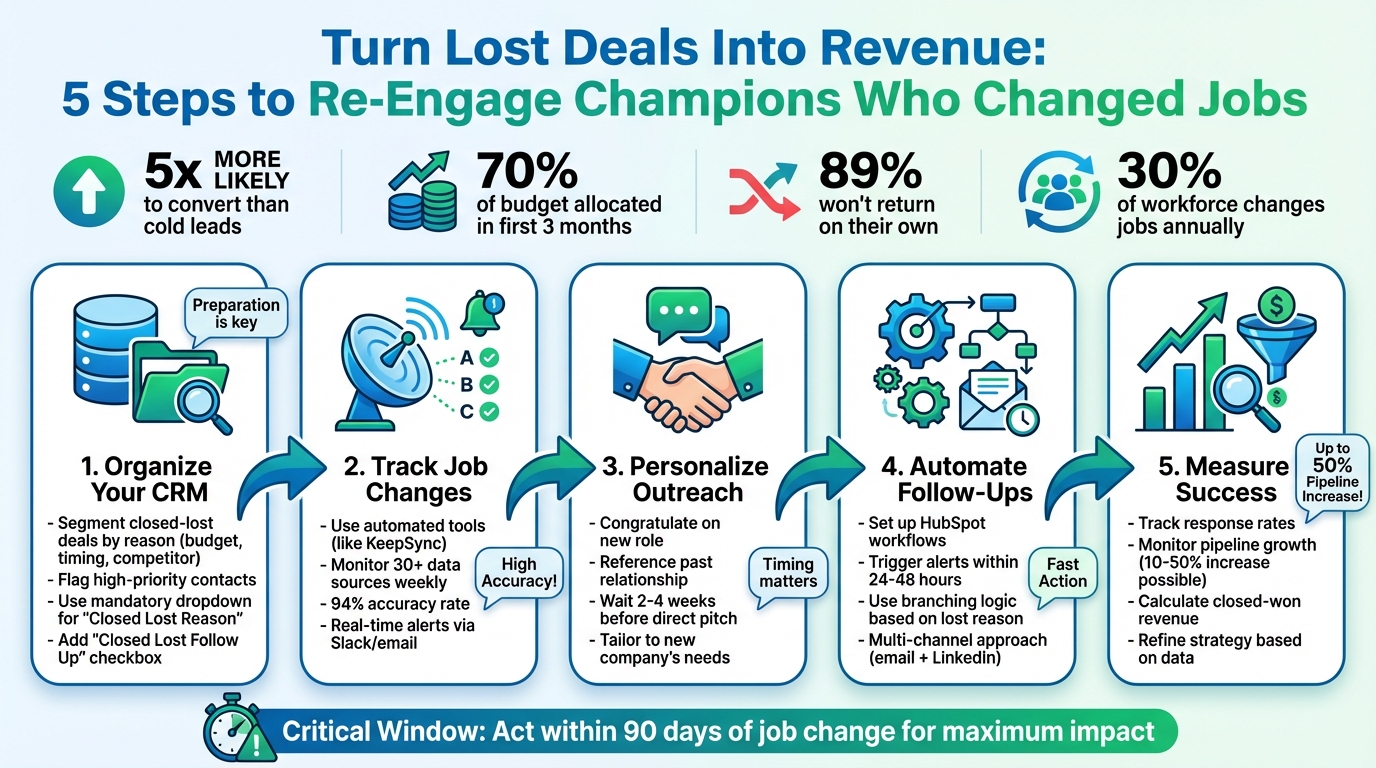
5-Step Process to Re-Engage Closed-Lost Deals When Champions Change Jobs
Reconnecting with champions who have moved to new roles can open doors to fresh opportunities. To make this process efficient, you need a solid system for tracking job changes and acting on them quickly.
Before you can re-engage effectively, it's important to organize your data for easy segmentation. Start by structuring your HubSpot CRM to capture detailed information about closed-lost deals. For instance, use a mandatory dropdown menu for the "Closed Lost Reason" field to categorize why deals fell through (e.g., Budget, Competitor, Timing, Missing Features) [6][7][8]. Making this field mandatory ensures no data slips through the cracks [6][7].
You can also add a "Closed Lost Follow Up" checkbox and a "Last Stage Before Lost" property. These help flag qualified deals and identify champions who were deeply engaged, like those who reached critical stages such as "Contract Sent" or "Decision Maker Bought In" [6][7].
Here’s a quick breakdown of key properties to track:
| Property Name | Field Type | Purpose |
|---|---|---|
| Closed Lost Reason | Dropdown Select | Categorizes why the deal failed |
| Closed Lost Reason Details | Single Line Text | Adds qualitative details for context |
| Closed Lost Follow Up | Checkbox | Flags contacts for potential re-engagement |
| Last Stage Before Lost | Single Line Text | Identifies the furthest stage reached |
Once your data is structured, tag contacts with tiered classifications to prioritize outreach. For example, reserve "Tier 1" for high-value contacts like buying committee members, executive leaders, and key personas [9]. Additionally, identify "Champions" (those who saw clear value in your product) and "Power Users" (contacts with high engagement or strong NPS scores) [9]. Don’t overlook "Detractors" either - when a detractor leaves an account, it might signal an opening to reconnect with their former company [9].
With segmented data in hand, the next step is to monitor job changes in real time.

Once your HubSpot data is organized, tools like KeepSync make tracking job changes seamless. Relying on manual methods isn’t practical - after all, 89% of previous customers never return on their own [1]. That’s why proactive tracking is a must.
KeepSync integrates directly with HubSpot, using 94% accurate monitoring to track job changes across your contact lists. It scans over 30 data sources weekly, including LinkedIn and social platforms, and sends real-time alerts via Slack, email, or directly in HubSpot when a contact changes roles or companies. When a job change is detected, KeepSync automatically updates the contact’s record with verified details like their new email, phone number, company, and title - keeping your CRM up-to-date without any manual effort.
Setting up KeepSync is quick and straightforward. Simply create a list in HubSpot of your closed-lost champions, filtered by the "Closed Lost Follow Up" checkbox and "Tier 1" classification. Then, connect this list to KeepSync for monitoring. Configure alerts to notify your SDRs, AEs, and territory VPs whenever a Tier 1 contact from a closed-lost deal changes jobs [9].
This allows your team to reach out during the critical first three months of a new executive’s role, a period when they’re actively evaluating solutions and allocating budgets. Acting during this window gives you a head start, positioning your solution before competitors can make their pitch.
When someone takes on a new role, it’s a perfect chance to reconnect. But to make that connection meaningful, your outreach needs to be precise, timely, and personal. Striking the right balance between automation and authenticity ensures your message feels relevant - not like it came from a robot.
Here’s how to streamline re-engagement using HubSpot workflows. When KeepSync updates a contact's record (like marking "Closed Lost Follow Up" or noting a change in job title or company), you can automatically enroll them in a re-engagement workflow [7].
This workflow can do several things:
For high-value contacts, add a human touch. The workflow can generate a draft message - using enriched data from KeepSync - and send it to Slack for the sales rep to review and tweak before sending. This way, the message feels personal while still leveraging automation.
You can also use branching logic to make your follow-ups more relevant. For example:
Once the workflows are in place, the goal is to make every interaction feel tailored and informed by enriched data.
Automation is just the starting point. To truly stand out, your outreach needs to feel personal. This is where enriched data from KeepSync comes in handy - providing verified email addresses, phone numbers, and details about their new company.
Start with a warm congratulatory message. Mention their new title and company, but don’t rush into a pitch. Instead, wait 2–4 weeks before following up with a more direct ask.
Use HubSpot's historical data to make your message even more relevant. For instance:
"I remember you used our analytics dashboard at [Previous Company] to track campaign performance. Are you facing similar challenges at [New Company]?"
Go a step further by researching their new company. Look for recent funding news, executive hires, or job postings to find a timely angle. If they previously passed on your product because of a missing feature that you’ve since added, lead with that update [5].
In 2024, Taimoor Tariq showcased a workflow for Blinkist that automated tracking of champions using a "waterfall" enrichment approach. By combining GPT-4o and LinkedIn models, the system pulled historical HubSpot data - like past products used and deal history - to create personalized messages. These drafts were sent to Slack for sales rep approval before deployment through HubSpot and HeyReach [3].
"Past buyers are 5x more likely to convert into closed-won revenue than cold leads." - Stuart Balcombe, ConnectedGTM [1]
Finally, don’t limit yourself to just one channel. Combine automated email sequences with LinkedIn connection requests, and consider sending a small gift or token of appreciation during their first week in the new role [2]. With this multi-channel approach, you can turn previously lost deals into real revenue opportunities.
Once you’ve implemented strategies to reconnect with former champions, the next step is to measure how well those efforts are working. Tracking performance is essential to understand the return on investment (ROI) and to identify which closed-lost deals have revenue potential. It also helps reveal how much revenue you’re generating from champions who have transitioned to new roles.
To streamline tracking, consider creating a custom "Intent" object in HubSpot rather than relying on tasks. Tasks can be tricky to report on, but a custom object allows you to monitor job changes over time and tie them directly to deals and companies [1]. This setup makes it much easier to measure how much pipeline value stems from job movement signals.
When re-engaging a closed-lost deal, create a new deal instead of reopening the old one. Use a custom property to tag it as a "returning opportunity." This approach keeps your historical data intact while providing a clear view of how re-engaged deals are performing [10].
"If it's closed lost, it's closed lost. It cannot be un-closed-lost the same way you can't un-lose a game. In that case, you would create a new deal." – Karsten Köhler, HubSpot Freelancer & RevOps Consultant [10]
To effectively monitor performance, focus on building three key reports:
Here’s a breakdown of these reports:
| Report Type | Data Sources | Key Metrics | Purpose |
|---|---|---|---|
| Response Rates | Sequences + Intents | Count of replies | Assess the effectiveness of outreach for job change signals |
| Pipeline Generated | Deals + Companies | Sum of Deal Amount | Calculate the value of opportunities created from job signals |
| Closed-Won ROI | Deals + Companies | Sum of Closed-Won Amount | Determine revenue generated from re-engaged champions |
Once you’ve quantified the performance through these reports, you can refine your strategy by prioritizing high-potential opportunities using lead scoring.
Lead scoring is a powerful way to focus on the most promising job changes. By assigning scores based on factors like the seniority of the champion’s new role, their company’s fit with your ideal customer profile, and the strength of your past relationship, you can zero in on high-value opportunities [1].
For instance, champions who move into senior roles at companies that align with your target market should earn higher scores. Imagine a former champion becoming VP of Sales at a Series B SaaS company - this individual would rank higher than someone moving to a smaller, less relevant organization.
To maximize results, monitor key metrics like BDR and SDR activation rates to ensure timely follow-ups on job change alerts. Prompt action can lead to a 10–50% increase in pipeline from job change signals [1]. Keep in mind that new executives typically spend 70% of their budget within their first three months, so acting quickly is crucial [1].
Finally, track discussion-to-opportunity conversion rates for job change outreach. Champions who already know your product or service are three times more likely to convert than cold prospects, giving you a significant advantage [11]. If your conversion rates don’t reflect this, it may be time to tweak your messaging or timing.
Closed-lost deals aren't dead ends - they're untapped opportunities waiting to be revived. Think about it: when former champions of your product switch jobs, they already know your value. These individuals have a proven track record of converting into customers [1]. But here’s the catch - nearly 89% of them won’t come back to you on their own [1]. That’s where targeted job change intelligence becomes a game-changer.
The stats paint a clear picture. Every year, around 30% of the corporate workforce changes jobs [4]. Companies that act on these job change signals can see a 10–50% boost in their sales pipeline [1]. Timing is everything, though - you’ve got a critical 90-day window before these individuals settle into new preferences.
Relying on manual tracking for these opportunities is like trying to catch a train with a bicycle - inefficient and frustrating. Automated job change alerts, like those from KeepSync, are a smarter solution. These alerts, boasting 94% accuracy, update your CRM in real-time and trigger personalized workflows. This means your team spends less time on tedious tracking and more time turning dormant data into active revenue.
Start by segmenting your closed-lost deals in HubSpot and setting up automated, personalized workflows. This approach combines segmentation, automation, and precise measurement to transform how you handle lost deals. Focus on key metrics like response rates, pipeline growth, and closed-won revenue from re-engaged champions. By building this infrastructure now, you’ll be well-equipped to turn past losses into future wins, over and over again.
To stay on top of job changes for your key decision-makers, it's smart to integrate job-change tracking directly into your CRM, like HubSpot. Start by ensuring all contact records are complete with key details: name, title, company, and LinkedIn profile. Using an enrichment tool can make this process seamless by automatically updating records whenever a contact’s job or title changes.
Next, set up automated workflows to keep your team informed. For example, create triggers that send real-time alerts when a job change is detected. These alerts can automatically tag the contact, assign follow-up tasks to the right team member, and notify them immediately. Always verify the new role through LinkedIn or other trusted sources to confirm the contact still aligns with your target audience.
Once verified, take action within the first 90 days of their new position. Send a personalized message congratulating them on the move and referencing the value you provided at their previous company. This is a great way to re-establish the relationship and potentially turn their new role into a fresh opportunity.
To reconnect effectively with former champions who have transitioned into new roles, focus on creating a personalized approach that emphasizes the value you’ve delivered in the past while aligning with their current goals. Start by gathering relevant details about their new position - such as their title, company, and responsibilities - using your CRM or job-change insights. Use this information to craft a tailored message. Begin with a congratulatory note, like "Congratulations on your new role as VP of Product at Acme Corp!" and reference specific successes you achieved together previously, such as, "We helped save $250,000 in costs at your former company."
From there, adjust your value proposition to fit their new role. Highlight how their current responsibilities connect to relevant use cases for KeepSync, such as enhancing data synchronization or simplifying onboarding processes. Include a concise example that directly ties to potential challenges they might face, making your outreach feel relevant and actionable. A short, well-planned sequence - starting with an email, followed by a video message, and a LinkedIn connection - can help you stay on their radar without coming across as intrusive.
To streamline this process, consider using automation tools like HubSpot, but keep the messaging dynamic and personal. Incorporate specific details from past interactions, like webinars they attended or case studies they downloaded, to show your ongoing engagement. A thoughtful and well-timed approach can help rebuild the relationship and turn a previously lost opportunity into a fresh revenue stream.
You can gauge success by looking at the new revenue and pipeline growth achieved through your re-engagement efforts. For instance, track the additional pipeline value generated (like $800,000 in three months) and observe changes in closed-won rates after your outreach (such as improved win rates following a 90-day follow-up).
Keeping an eye on these metrics gives you a clear picture of how well your strategies are working and highlights areas where you can tweak your approach to achieve even stronger outcomes.