
Digital Marketing
·
April 10, 2026
How SaaS Companies Handle Billing Disputes & Chargebacks
Learn how SaaS billing disputes happen, what triggers chargebacks, and how both sides can resolve them faster.

Organize HubSpot contacts with active lists, custom properties, lead scoring, and automated workflows to improve lead prioritization, routing, and data accuracy.


Managing your HubSpot CRM effectively can transform how your sales team works. Here’s the bottom line: organized, accurate contact data leads to better sales outcomes. Poor data quality can cost you - 47% of organizations report losing at least 25% of revenue due to bad data. By following proven practices, you can boost conversion rates by up to 70%.
Key Takeaways:
When your CRM is clean and automated, your sales team spends less time on admin work and more time closing deals.
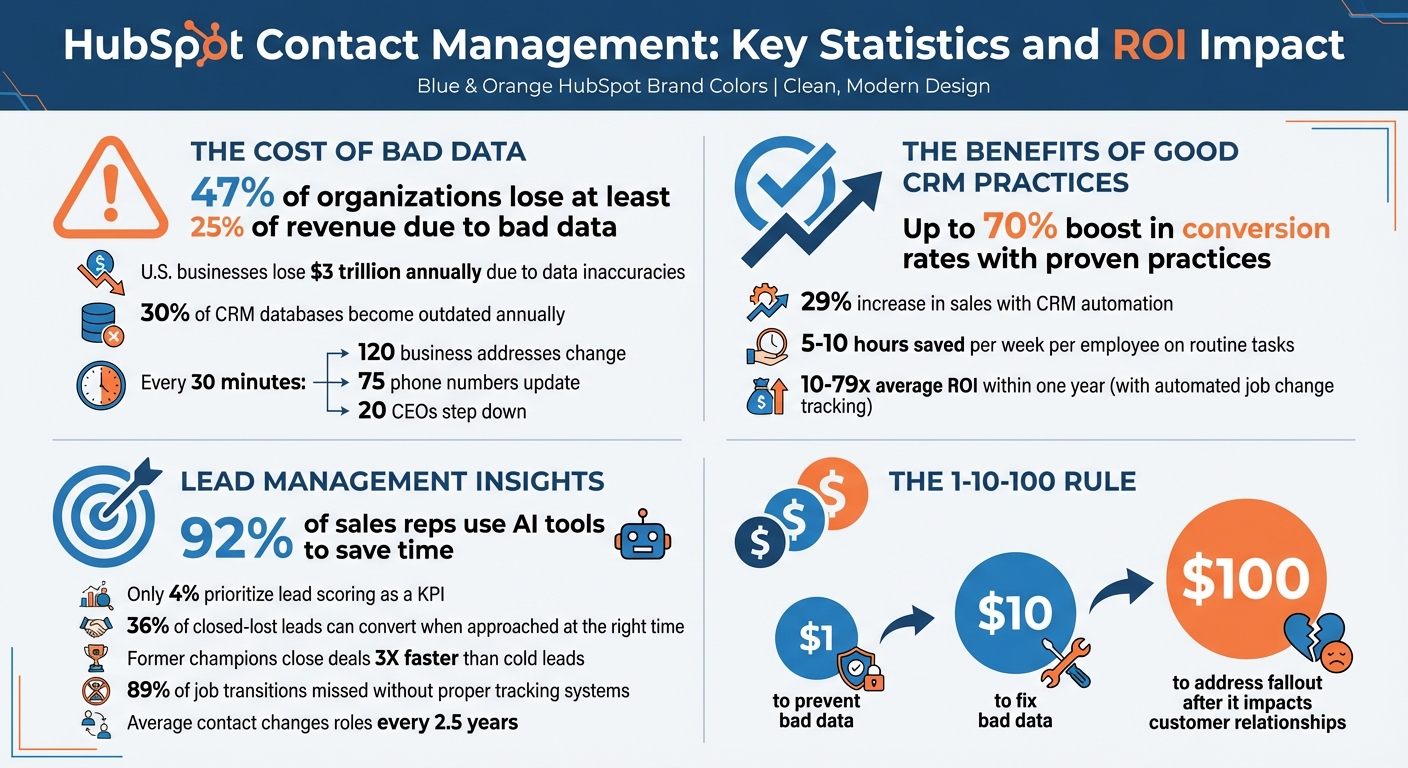
HubSpot Contact Management: Key Statistics and ROI Impact

A messy database can slow down sales teams and make it harder to identify prospects at the right time. The solution? Set up your HubSpot CRM so contacts are automatically sorted based on their sales stage and recent actions.
Active lists, also called smart lists, are a powerful way to keep your contacts organized. Unlike static lists that remain fixed, active lists update automatically based on specific criteria - adding or removing contacts as their information changes [4][2].
These lists can use up to 250 filters, pulling data from properties like companies, deals, or even engagement activity [4]. This flexibility lets you segment contacts by dynamic factors such as lifecycle stage, deal details, or recent interactions [4][2].
"When your contact records are up-to-date, your prospects are likely to receive the right information at the right point in the sales process. This not only streamlines your efforts but ensures your prospects stay engaged, improving your chances of closing the deal." - Lestraundra Alfred, HubSpot [2]
For example, you could create an "Upsell Ready" list for contacts who have purchased entry-level products or started a demos [2]. If your data shows that website visitors with 20-30 visits are more likely to convert, you can build a high-intent list that automatically tracks those visitors [2]. You can also exclude contacts from certain campaigns - like removing current customers from promotional emails about products they already own [2].
To enhance targeting, integrate lead scoring into your active lists. Assign points for specific actions, such as 25 points for starting a demo, 10 points for email clicks, and 5 points for website visits. Once a contact hits 30 points, they can automatically join your "Upsell Ready" segment [2]. Active lists are included with all HubSpot plans, though some advanced filters (like workflow enrollment) require Professional or Enterprise subscriptions [4][5].
For even more precision, use custom properties to refine how your CRM organizes and categorizes contacts.
While HubSpot doesn’t have a built-in tagging system, custom properties can achieve the same results. Dropdowns and checkboxes are especially useful for categorizing contacts [6].
To keep your CRM tidy, group custom properties into categories like "Sales Qualification" or "Event History" [8][10]. Standardize property names (e.g., 2026-02_Contact_Source) to make filtering and reporting easier [8]. Always include clear descriptions for each custom property so your team knows how to use them effectively [8].
"A disorganized CRM isn't just messy - it wastes time, misroutes leads, and confuses your team." - GHL Services [8]
Only create custom properties that directly support tasks like segmentation, lead scoring, or automation. Perform monthly audits to remove unused fields and keep your CRM running smoothly [8]. Before deleting any property, check the "Used In" tab to make sure it isn’t tied to active workflows, lists, or reports [9].
Focusing your sales efforts on the right leads can make all the difference. Not all leads are created equal, and spending too much time on low-potential prospects can drain valuable resources. By using data to prioritize leads, you ensure your team concentrates on the ones most likely to convert. Tools like HubSpot’s lead scoring and filtering systems make it easier to spot high-potential contacts and distinguish them from those needing more nurturing.
Lead scoring is all about assigning points to contacts based on their demographic details and behaviors. This process builds a detailed profile of each lead’s potential. For example, a fit score evaluates factors like job title, company size, or industry, while an engagement score tracks actions such as website visits, email clicks, or form submissions. Combining these scores gives you a well-rounded view of a lead’s readiness to buy [13][14].
You can reward specific actions with points - like visiting a pricing page - and subtract points for indicators that lower a lead’s priority, such as unsubscribing or using a personal email for business inquiries [14][17]. For instance, trial sign-ups or repeated site visits might earn points, while actions like opting out of emails might reduce them.
To keep scores relevant, use score decay, which lowers points over time if a lead becomes inactive. This ensures recent engagement carries more weight. You can also cap overall scores or limit how much a single action can influence the total, keeping things balanced [13][14].
"Savvy competitors have learned to swarm on the best opportunities as soon as they identify them, giving those prospects the highest level of personalized attention and service to win those crucial deals." – Mark Osborne, B2B Sales Expert [17]
It’s helpful to define clear thresholds for lead scores. You might use color-coded categories (like High, Medium, Low) or alphanumeric labels (e.g., A1 for high-fit/high-engagement leads). Automated workflows can then assign these leads to sales reps or trigger notifications once a lead crosses your “ready for sales” threshold [14][17]. Keep in mind, lead scoring tools are available with Marketing Hub Professional or Enterprise and Sales Hub Professional or Enterprise subscriptions. For AI-powered predictive scoring, you’ll need Marketing Hub Enterprise [13][14][16].
Once you’ve scored your leads, the next step is to organize and visualize them effectively. Dashboards let you filter and highlight leads with high scores and immediate intent. For example, you can create saved views in the Sales Workspace to quickly access leads with scores above a certain threshold - say, 75 or higher [15][20].
Use logical operators like AND for stricter conditions or OR to include leads meeting multiple criteria [19][21]. To streamline your workflow, pin up to five commonly used properties (e.g., "Lead Owner" or "Create Date") at the top of your dashboard for quick filtering [18][20].
Dashboard-wide filters can ensure consistency across all reports, so your team sees a unified view of priority leads [18]. Additionally, keeping an eye on activity properties - such as "Last contacted", "Recent sales email opened", or "Form submission" - can help you spot leads showing immediate interest [15][19].
Manually handling lead routing and follow-ups can eat up valuable time that could be spent closing deals. Skipping proper lead routing doesn’t just waste time - it can cost you serious money. Missing just two qualified leads per day could mean over $1.3 million in lost pipeline revenue annually [23].
HubSpot workflows take the hassle out of repetitive tasks, eliminating bottlenecks and freeing up your team to focus on what matters most. Businesses using CRM automation report up to a 29% increase in sales, with employees saving 5 to 10 hours per week on routine tasks [25]. By automating actions at the right moments, workflows streamline your sales process and make it more efficient and data-driven.
Once workflows are in place, the next step is ensuring leads get to the right person quickly. Speed and accuracy in lead assignment can make all the difference in conversion rates. HubSpot’s "Rotate record to owner" feature uses round-robin logic to distribute unassigned leads evenly across your team. For more complex routing, if/then branches allow you to assign leads based on specific criteria. For instance, demo requests can go directly to sales, while support inquiries land with customer service.
A clever method is routing leads by their "Recent Conversion Type", captured through a hidden form field that tracks the lead’s latest action. When setting up lead rotation, it’s a good idea to assign them to HubSpot Teams.
"Teams is better [for rotation] so you don't have to go back in and update the workflow if/when users leave the company." - Michael Dabrowski, Michael Strategy [23]
Workflows can also check if a contact already has an assigned owner. If so, they’ll notify the current owner instead of reassigning the lead, helping maintain continuity and trust with prospects.
HubSpot workflows can do more than route leads - they can also create follow-up tasks automatically. These tasks can include specific titles, priorities, due dates, and notes triggered by a lead’s actions or stage changes [22][24]. For example, when a lead moves into the "Attempting" stage, a task like "Follow up with [Contact Name] from [Company Name]" can be generated, with a 24-hour deadline. Similarly, workflows can shift leads to the "Connected" stage after successful calls or emails [22].
To ensure nothing gets missed, internal notifications work alongside task automation. Workflows can send email alerts or Slack messages to team members when high-value leads take action [25]. By automating both lead assignment and follow-up, your team can focus on building strong relationships while keeping your data accurate and actionable.
Even with automated workflows in place, contact data can quickly become outdated. On average, a key contact changes roles every 2.5 years, and sales teams miss 89% of these transitions without proper tracking systems in place [26]. When a former customer or advocate moves to a new company, they represent a valuable warm lead - if you catch the change in time. By updating contact details proactively, you can seamlessly integrate this data into your workflows, reducing downtime between transitions and follow-ups.

KeepSync simplifies the process of tracking job changes by monitoring your HubSpot contacts across more than 30 data sources, including company websites and press releases. It updates contact records with verified new emails (boasting 97%+ deliverability rates), direct phone numbers, and updated company information. With a quick, 5-minute integration that requires no technical expertise, KeepSync achieves 94% accuracy through triple verification [26]. By keeping tabs on role transitions, it fine-tunes your CRM and strengthens your automation processes.
"Before this, we were completely blind to job changes. Our reps would manually check LinkedIn maybe once a month, and we'd constantly hear about champions moving to new companies weeks after the fact. Now we're first to reach out every time." – Marcus Rodriguez, RevOps Manager, Streamline Analytics [26]
KeepSync opens up three key revenue opportunities:
Research shows that 36% of closed-lost leads can convert when approached at the right time [26].
Take your automation further by pairing KeepSync’s job change data with HubSpot workflows. When KeepSync identifies a job change, you can trigger HubSpot sequences to engage the contact within 2–3 weeks. This integration ensures that every transition becomes a sales opportunity. Use workflows to assign these leads to the right reps through smart routing or send real-time Slack alerts for high-priority changes. Former champions are particularly valuable - they close deals three times faster than cold leads because they already understand your product's value [26].
"The ROI was immediate. Within 45 days, two deals closed from former customers in new roles. Our SDRs love it because these are actual warm leads, not cold calls." – Sarah Kim, Director of Sales, Velocity Commerce [26]
You can also set up alerts for when product owners leave an account, allowing your Customer Success team to re-engage and protect recurring revenue. With automated job change tracking, businesses report an average ROI of 10–79X within a year [26].
Bad data is expensive - U.S. businesses lose about $3 trillion every year due to inaccuracies, and 30% of CRM databases become outdated annually[32][12]. Think about this: every 30 minutes, 120 business addresses change, 75 phone numbers are updated, and 20 CEOs step down from their roles[32]. Without routine upkeep, your sales team might waste valuable time chasing outdated leads, ultimately eroding trust in your CRM.
HubSpot's Data Quality Command Center can be a lifesaver. It keeps tabs on duplicates, formatting issues, and property errors in real time. The dashboard refreshes daily, giving you a clear view of what needs fixing[27]. With the "Fix and Automate" feature, you can handle formatting problems - like inconsistent name casing - as new records are added[27]. Plus, enabling the "Continuously enrich existing records" option ensures your data is updated monthly with fresh information[11].
For a proactive approach, activate the Data Quality digest in your notification settings. This sends you weekly email updates summarizing changes and flagging issues[27]. It’s also a good idea to schedule monthly or quarterly reviews to clean up hard bounces, unsubscribes, and disengaged contacts[12][1]. When using enrichment tools, set overwrite rules wisely. For instance, choose "Fill empty values only" for sensitive fields like First Name to preserve manual entries, while "Overwrite" works better for dynamic fields like Job Title[11].
"Keeping your CRM data tidy is vital to the success of your business. Otherwise, a messy and inconsistent database could impose negative effects on your sales productivity, marketing initiatives, and customer retention." – Tina Aita[12]
Don’t forget the "1-10-100" rule: it costs $1 to prevent bad data, $10 to fix it, and $100 to address the fallout after it impacts a customer relationship[32]. To maintain consistency, make key fields mandatory during record creation. You can also use Smart Lists to automatically segment contacts based on real-time property updates[2].
Once your data is in good shape, aligning your teams and setting proper permissions will take your CRM’s performance to the next level.
Organizing your sales teams in HubSpot can save you from overlapping outreach and messy data. Use team assignments and permissions to streamline workflows. For example, set CRM object permissions to "Their team's" or "Their own", and create role-based permission sets like "Sales Manager" or "Regional Rep." Restrict bulk actions to administrators to maintain control and professionalism[28][31].
"Utilizing permission sets and teams can help businesses with overlapping or regional departments from emailing or communicating with contacts outside of their region or department." – Sara Sprenger, CMO, Lynton[31]
Workflows can also help. For instance, you can automatically add users or teams to the "Shared users/teams" property when collaboration is needed, without changing record ownership[29]. If you’re an Enterprise user, take advantage of hierarchical team structures. Parent teams can access all data owned by their nested teams, while nested teams are restricted from viewing parent-level data[30][31]. This setup not only safeguards your data but also boosts your team’s efficiency.
Managing contacts effectively in HubSpot isn’t just about organization - it’s about driving results. Tools like smart lists, lead scoring, and automated workflows help your team focus less on tedious admin work and more on closing deals. Here’s the kicker: 92% of sales reps use AI tools to save time and tailor their outreach, but only 4% prioritize lead scoring as a key performance indicator (KPI) [3].
Timing is everything. Studies show that reaching out to new leads within five minutes of submission can significantly improve conversion rates [3]. Features like automated routing and SLA timers ensure that no qualified lead falls through the cracks. Keeping contact records up-to-date and logging every interaction means prospects get the right information at just the right time in their journey. This combination of timely follow-ups and accurate records ensures your team stays connected with potential customers at every step.
"A CRM provides structure; lead management provides motion." – Erin Pennings, Writer [3]
When it comes to contact properties in HubSpot, there’s no magic number to stick to. The key is tailoring them to suit your business needs while keeping your data clean and relevant. Focus on creating and organizing properties that directly support your sales processes, help with lead segmentation, and enhance reporting. Make it a habit to review and update these properties regularly to ensure they stay practical and in line with your team’s goals.
A lead score of 70 or higher is often suggested as the benchmark for starting sales outreach. This score indicates a strong potential for conversion, making it easier to focus on leads that are most likely to drive results. However, you should tailor this threshold to align with your team’s objectives and past performance data for better outcomes.
Automate repetitive tasks like filling in contact properties from emails, managing record associations, or updating lists based on set conditions. These processes save time and help maintain consistency across your data.
For updates that require context or judgment, handle them manually. Tasks like merging duplicate records, verifying data accuracy, or adding detailed notes benefit from human oversight. Manual input ensures data quality and addresses more complex or sensitive changes effectively.