
Digital Marketing
·
April 10, 2026
How SaaS Companies Handle Billing Disputes & Chargebacks
Learn how SaaS billing disputes happen, what triggers chargebacks, and how both sides can resolve them faster.

How automated job-change alerts keep CRMs accurate, trigger HubSpot workflows, and uncover fast, high-intent sales opportunities.

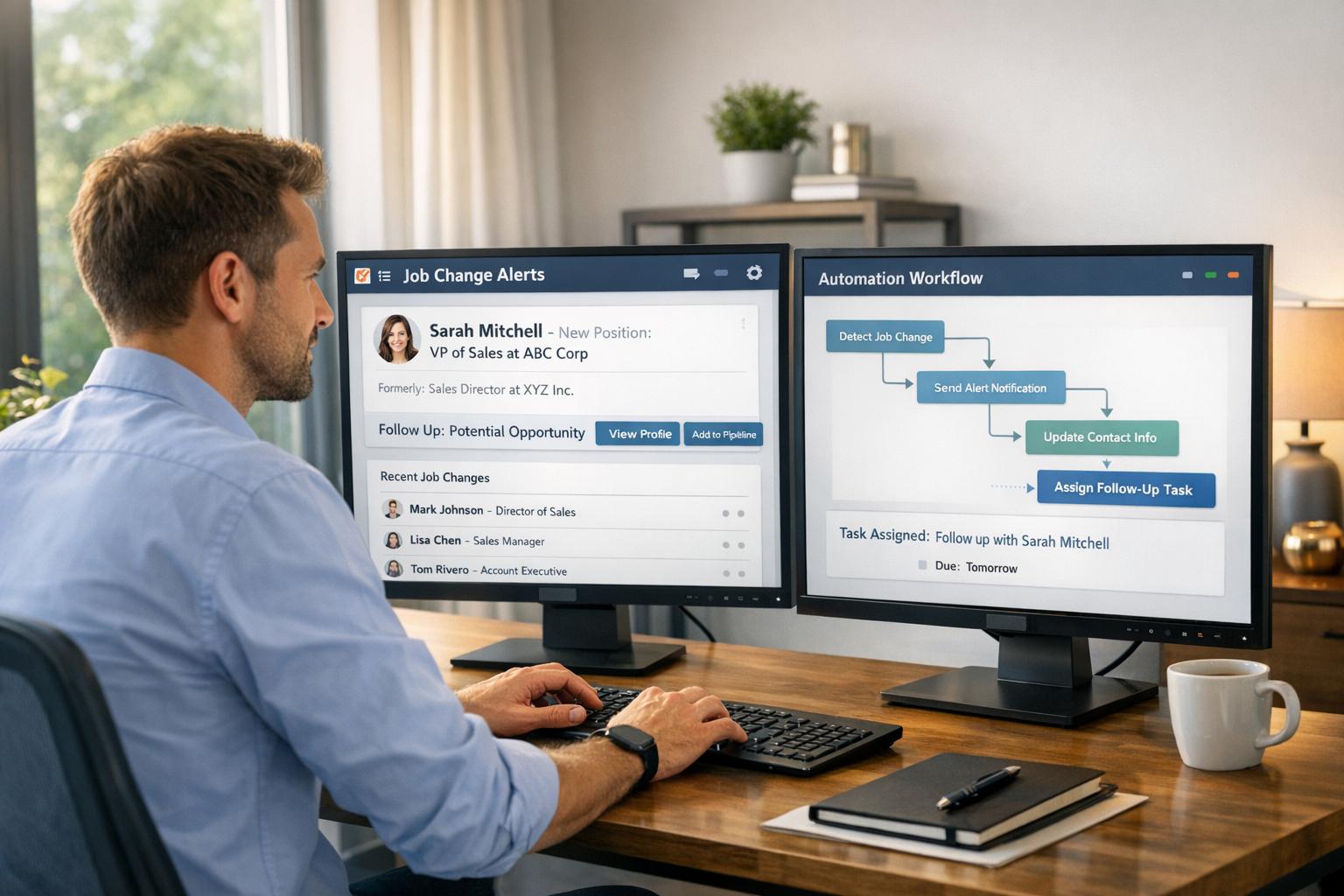
Want to close deals faster and keep your CRM accurate? Job change alerts notify you when your contacts switch roles, helping sales teams act at the right moment.
Here’s why they matter:
Job change alerts automate role updates, sync them with tools like HubSpot, and notify your team via Slack or email. This ensures you connect with decision-makers at the perfect time, re-engage past clients, and protect existing accounts. Tools like KeepSync simplify this process, offering features like LinkedIn URL verification and advanced CRM workflows.
Key benefits include:
Stop losing deals to outdated data - leverage job change alerts to stay ahead.
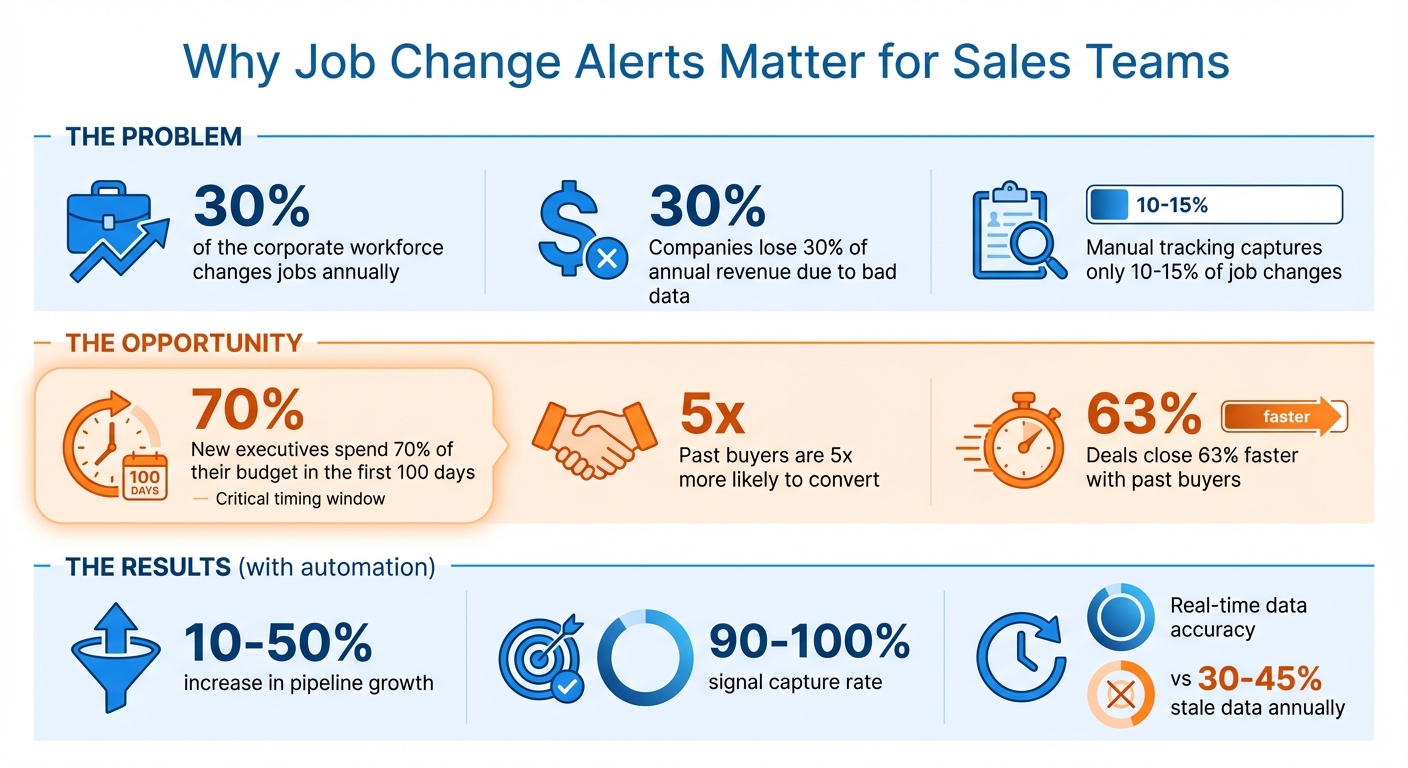
Job Change Alerts Impact on B2B Sales Performance
Job change alerts are notifications that keep your CRM up to date whenever a contact changes roles, moves to a new company, or transitions within their organization [2]. These updates are powered by automated tools that scan platforms like LinkedIn and instantly refresh your CRM with the latest job titles and contact details. Sales reps are then notified through Slack, email, or CRM tasks [2]. This ensures your CRM remains accurate and positions your team to act on key opportunities as they arise.
These alerts are especially useful for identifying warm leads - contacts who already know your brand or have previously used your product. When a former advocate moves to a new company, it opens a door to a potential target account that might otherwise be difficult to access.
Keeping your data accurate is just the beginning. Job change alerts give sales teams the ability to act at the right moment, capitalizing on shifts that signal potential opportunities. These alerts are particularly valuable during key moments when budgets are reallocated, and purchasing decisions are made.
Here’s how job change alerts can boost your pipeline:
Sales teams that leverage these alerts see impressive results, often generating 10–50% more pipeline [2]. This success comes from connecting with prospects during critical windows, such as when new executives are actively evaluating vendors and setting budgets. As Stuart Balcombe from ConnectedGTM highlights, "New executives spend 70% of their budget in the first 3 months" [2].
Additionally, bad data is a costly problem, with companies losing an average of 30% of their annual revenue due to outdated information. Considering that about 30% of the corporate workforce changes jobs annually, your CRM is constantly at risk of becoming obsolete [4][5]. Job change alerts tackle this issue by automating data updates, ensuring your team spends less time on admin tasks and more time on meaningful interactions.

Getting KeepSync up and running with HubSpot is quick and simple - it takes about five minutes to complete[6]. Start by connecting your HubSpot account through the KeepSync dashboard. Then, choose which contact lists you want to monitor - this could include active or static lists from your existing HubSpot database. During setup, you’ll need to map your LinkedIn URL property in HubSpot to ensure accurate tracking of job histories across different domains.
Next, decide how you want to receive alerts: via email, Slack, or as tasks within HubSpot. If you’re a HubSpot Enterprise user, you can take it a step further by creating Custom Objects to track job change signals and access advanced reporting options.
For an even faster setup, use the "Prefill Default Settings" button, which will automatically apply recommended CRM configurations. You can also fine-tune alerts by setting filters based on your Ideal Customer Profile (ICP), ensuring you only get notified about job changes that matter most to your team.
Once integrated, KeepSync offers powerful tools to take your job change tracking to the next level. With 94% data accuracy, it monitors your contacts weekly across more than 30 data sources, including Apollo, ZoomInfo, and Waterfall.io[2]. These sources are cross-referenced to keep your contact data fresh and reliable.
One standout feature is LinkedIn URL verification, which minimizes false positives by confirming that contact details and job histories are consistent across platforms. When a job change is identified, KeepSync automatically enriches the contact record with verified updates, such as new email addresses, phone numbers, and company information.
You’ll also receive instant alerts whenever a job change is detected. These alerts can trigger specific task queues in HubSpot, helping your team prioritize outreach to contacts who’ve recently been hired or promoted. On top of that, KeepSync’s native integration keeps your contact and account records up-to-date automatically, freeing your team from tedious administrative work and letting them focus on closing deals.
This combination of features makes it easier to automate HubSpot workflows and drive better sales results.
Set up filter-based workflows in HubSpot to automatically enroll contacts when key properties, such as "New Company" or "Job Change Status", are updated [7]. Make sure to enable re-enrollment so that every job change triggers the workflow again [7]. As Katja from HubSpot Support highlights:
"Setting the enrollment criteria to allow reenrollment whenever the property is known will trigger a contact to go through the workflow again every time the property changes" [7].
In these workflows, you can include actions like assigning a contact owner, enrolling contacts in tailored sequences (e.g., congratulatory or introductory emails), and updating the Lead Status to "Brand New Lead" or "Not Contacted" [8]. Add contextual details, such as the contact's previous company and their new title, to make your follow-ups more relevant.
For more advanced setups, use branching logic to route different types of job changes to the appropriate teams. For example, assign high-priority tasks to follow up with former champions, while mid-level hires can be added to nurture sequences [2]. You can also set up Slack or Microsoft Teams notifications to alert your sales team in real time when a key decision-maker changes roles [2][4].
These automated workflows ensure your team can respond quickly and effectively, laying the groundwork for more targeted outreach.
Once workflows handle the initial response, your team can focus on personalized outreach and better lead management. While automation takes care of the basics, personalization is what builds meaningful connections. Use personalization tokens, such as {previous_company} and {new_company}, in your automated sequences to acknowledge the contact's career move [2]. Referencing their past achievements or challenges can further demonstrate your understanding of their needs and why your solution is valuable.
Timing is everything. Research shows that new executives typically allocate 70% of their budget within the first three months of their new role [2]. To capitalize on this, prioritize contacts during their first 100 days. Setting up a dedicated "Job Change Signal" task queue in HubSpot allows your team to efficiently process these high-intent leads without cluttering their main activity feed.
Additionally, include a step to validate updated contact details [2][3]. Keeping your CRM clean is critical - update the "Primary Company" association whenever a contact moves to ensure accurate records and avoid duplicates [2].
Here’s a quick look at key workflow actions and their triggers:
| Workflow Action | Purpose | Recommended Trigger |
|---|---|---|
| Create Task | Alerts the rep to research and reach out | Property "New Job Title" is known |
| Enroll in Sequence | Automates initial outreach for job changers | Intent Object Created |
| Update Lead Status | Resets lead to "New" for better visibility | Company Property Change |
| Slack Notification | Sends real-time alerts for high-value leads | Association with "Target Account" |
Job change alerts can uncover real sales opportunities by signaling shifts in roles. When someone steps into a new position, their responsibilities, budgets, and decision-making power often change - opening doors to conversations that might not have been possible before. Here’s how you can make the most of these alerts:
Just because a deal fell through six months ago doesn’t mean it’s off the table forever - especially if your contact has moved to a new company. A new role might mean they now have a bigger budget, different team priorities, or more authority to make decisions [4]. However, 89% of contacts don’t proactively reach out to former vendors when they start a new job [2]. That’s where you come in.
Start by syncing your closed-lost lists in HubSpot with KeepSync to track "Job Started" alerts. When a notification pops up, check if the contact aligns with your Ideal Customer Profile. Then, craft a personalized message that references your previous interactions - like the products they evaluated or the challenges they mentioned. This approach can help transform a cold outreach into a warm, meaningful reconnection.
To make this process even smoother, automate your HubSpot workflows to flag high-value leads the moment they change roles. For particularly important relationships, consider a hybrid approach: let AI draft a message based on past deal history, and have a sales rep refine it before sending. This mix of automation and human touch ensures your outreach feels both efficient and personal.
Once you’ve re-engaged former leads, focus on safeguarding your existing accounts as key contacts transition out.
When a key contact leaves their role, it can create two opportunities: protecting the account they’re leaving behind and building a relationship with them in their new position. To navigate this, implement a dual strategy: an account protection plan for their former company and an expansion plan for their new role.
The moment KeepSync detects a job change, notify the relevant Account Executive or Customer Success Manager. Timing is critical - reach out within the first 100 days of their new role, as this is when they’re most likely to evaluate new tools and solutions [2].
Before contacting them, dive into your CRM to gather context. Look at the products they used, the length of their engagement, and their influence within the organization. Use this information to personalize your outreach - reference shared successes or past experiences to reinforce the value of your previous relationship. Track your efforts by monitoring renewal rates at their old account and any new business generated from their new position.
Job change alerts also open doors for proactive account expansion. When a new leader joins one of your target accounts, it often signals buying intent and creates an opportunity for account-based selling. New leaders frequently come with a mandate for change and may have the budget to implement new solutions.
If a past customer moves into a target account, they can act as a valuable advocate - helping you secure product evaluations or introductions to decision-makers [9]. Even contacts from closed-lost deals might become valuable if their new organization aligns better with your Ideal Customer Profile.
Keep an eye on hiring patterns as well. For example, if a company is hiring heavily in a specific department, it could indicate they’re ramping up efforts in that area and may need new tools to support their growth. Use KeepSync’s weekly monitoring of 30+ data sources to spot these trends early, giving you a head start on crafting timely outreach.
When a known contact lands at a target account, verify their updated details using KeepSync’s enriched data (like email, phone, and company information). Then, reach out with a personalized email or LinkedIn message. Mention their career move and connect your solution to challenges you know they’ve faced. This approach ensures your outreach feels relevant and well-timed, increasing the chances of a positive response.
Automated job change alerts and workflow optimizations are just the beginning - measuring their impact on your sales pipeline is where things get interesting. KeepSync's pipeline analytics make it possible to track the entire journey, from the moment a job change alert is triggered to the deal being marked as closed won. This complete visibility helps you pinpoint exactly how much pipeline value stems from tracking job changes.
One way to streamline this process is by creating an Intent Dashboard in HubSpot, filtered specifically for "Job Movement." This isolates deals sparked by job change alerts, making it easier to compare their response rates against your standard outreach efforts.
Keep an eye on key metrics like the number of alerts generated, opportunities created, response rates, and revenue impact. Weekly data monitoring is essential, as KeepSync can pick up on signals that manual methods often miss - capturing up to 90% of job changes that might otherwise go unnoticed [9]. Engaging new decision-makers early in their roles can speed up deal closures by as much as 63% [1]. By analyzing whether job change–triggered deals move through your pipeline faster than traditional opportunities, you'll have clear evidence of efficiency gains. This level of data transparency allows for a direct comparison between manual tracking and the insights provided by automation.
To showcase the ROI of KeepSync, start by establishing a baseline. Evaluate your CRM for outdated contacts, measure response rates from standard outreach, and calculate the average duration of your sales cycle. Then, compare these metrics after implementing automated job change tracking.
Here's what the analysis reveals:
| Metric | Before KeepSync (Manual) | After KeepSync (Automated) |
|---|---|---|
| Pipeline Growth | Baseline | 10%–50% increase [2] |
| Lead Conversion Rate | Baseline (cold leads) | 5x higher for past buyers [2] |
| Sales Cycle Length | Standard timeline | 63% faster [1] |
| Data Accuracy | 30%–45% stale annually [9] | Real-time updates [4] |
| Signal Capture Rate | 10%–15% [9] | 90%–100% [9] |
| Budget Capture Window | Often missed | 70% within first 100 days [5] |
These improvements don’t just stop at the metrics - they build momentum over time. With approximately 30% of the corporate workforce changing jobs annually [4], automated tracking ensures you’re consistently uncovering fresh opportunities. Capturing a higher percentage of these changes leads to shorter sales cycles and improved revenue performance. This is especially critical when you consider that inaccurate data can cost companies up to 30% of their annual revenue [5]. KeepSync not only helps you stay ahead but also ensures your pipeline thrives with accurate, timely insights.
Job change alerts are reshaping how B2B companies approach pipeline generation. With 30% of the corporate workforce changing jobs annually [4], staying on top of these shifts can give your business a serious edge. KeepSync takes this constant turnover and turns it into actionable insights by automatically tracking your contacts and syncing updates directly into HubSpot. It’s a game-changer for anyone looking to stay ahead in a fast-moving market.
Here’s why it matters: past buyers are 5x more likely to convert, and deals close 63% faster [2][1]. On top of that, new executives tend to allocate 70% of their budget within their first 100 days [5]. Timing is everything, and manual tracking through LinkedIn just can’t keep up with these opportunities. Automated alerts ensure you’re reaching out exactly when it counts.
"New executives spend 70% of their budget in the first 3 months." - Stuart Balcombe, ConnectedGTM [2]
KeepSync doesn’t just help you win new business - it also protects the relationships you’ve already built. When a key contact leaves a client account, immediate alerts empower Customer Success teams to connect with their replacement and reduce the risk of churn. This kind of accuracy can help prevent 30% of potential revenue loss [5], while automation allows your team to focus on the conversations that matter most.
Job change alerts give sales teams instant updates whenever key contacts transition to new roles. With this information, you can quickly update your CRM, automate outreach efforts, and follow up at just the right time, ensuring your communication stays relevant and timely.
Focusing on these alerts can help sales teams work more efficiently, shorten sales cycles, and even grow their pipeline by as much as 50%. Using this data keeps you ahead of the curve, allowing you to create stronger, more meaningful connections with your B2B prospects.
Integrating KeepSync with HubSpot is a simple way to stay on top of job changes and fine-tune your sales approach. Begin by cleaning up and standardizing your HubSpot contact records. This ensures that updates from KeepSync sync smoothly without any hiccups. To make the most of the integration, create custom properties in HubSpot, such as Previous Company or Job Started Since, to store job-change details.
Once your HubSpot account is prepped, connect KeepSync by authorizing the integration through the settings. Map KeepSync fields like New Job Title and Start Date to their matching HubSpot properties. After that, set up workflows to automate tasks like follow-ups or notifications whenever job changes are detected. You can also create dynamic lists to help your team prioritize outreach effectively. With this setup, your team can take full advantage of real-time job change alerts to boost efficiency and results.
Keeping track of job changes is crucial for keeping your CRM data accurate and up-to-date. When prospects or customers switch roles or companies, job change alerts provide instant updates to their contact information. This helps avoid problems like outdated details, bounced emails, or missed opportunities.
With real-time job change insights, your sales team can concentrate on strengthening relationships and spotting fresh opportunities, all without worrying about the setbacks caused by outdated data.