
Digital Marketing
·
April 10, 2026
How SaaS Companies Handle Billing Disputes & Chargebacks
Learn how SaaS billing disputes happen, what triggers chargebacks, and how both sides can resolve them faster.

Compare job-change tracking tools, HubSpot integration, contact enrichment, pricing, and setup to convert warm leads faster and reduce churn.


Looking to turn job changes into sales opportunities? Job change tracking software identifies when your CRM contacts move to new roles and notifies your team, helping you act fast on warm leads. Here’s why it matters:
With tools like KeepSync, you can automate detection, integrate directly with HubSpot, and get real-time alerts enriched with verified contact data. This ensures your team is the first to reach out, improving your sales pipeline and reducing churn. Plans start at $0/month for up to 1,000 contacts, making it accessible for teams of all sizes.
When it comes to job change tracking tools, not all are created equal. The difference between a platform that supercharges your pipeline and one that falls flat boils down to three key features: automated detection, native CRM integration, and enriched contact data with real-time alerts. Let’s dive into why these elements are crucial for success.
Relying on manual checks for job changes is like trying to find a needle in a haystack - it’s inefficient and misses most updates. Automated tools, however, monitor over 30 data sources, including company websites, press releases, and public records, to track job changes with up to 94% accuracy. These systems even pick up on subtle signals that manual efforts often overlook. With weekly monitoring, you can act within the critical 2–3 week window after a job change, a timeframe that can make or break a deal[1].
"Before this, we were completely blind to job changes. Our reps would manually check LinkedIn maybe once a month... Now we're first to reach out every time." – Marcus Rodriguez, RevOps Manager, Streamline Analytics[1]
The best systems go further by verifying updates through multiple sources and incorporating human checks for executive-level changes. This triple-verification process ensures your team isn’t wasting time on inaccurate or outdated data[1].
Automated detection is powerful on its own, but pairing it with native HubSpot integration takes it to another level. For teams using HubSpot, this integration embeds job change insights directly into your existing workflows, contact records, and deal stages. There’s no need for extra middleware or custom development - everything works seamlessly.
Here’s how it helps: when a former customer joins a target account, the system automatically creates a new contact record, enriches it with updated company details, and routes it to the appropriate sales rep. It can even trigger personalized HubSpot sequences and send instant Slack notifications when a job change is detected.
This level of integration not only simplifies setup but also delivers immediate value by ensuring every job change leads to a well-timed outreach within your HubSpot environment[1].
Job change alerts are only as effective as the data behind them. That’s why contact enrichment is essential. Advanced tools provide verified work emails with 97%+ deliverability rates, direct phone numbers, and updated company technographics the moment a contact changes roles. This gives your reps everything they need to act quickly without wasting time hunting for information.
Real-time alerts via Slack or email give your team a 30× speed advantage, turning warm leads into closed deals faster. Prioritizing alerts for high-value segments - like current customers, power users, decision-makers from closed-lost opportunities, or contacts from churned accounts - can boost conversion rates by 3–6× compared to cold outreach. Plus, these alerts help your Customer Success team step in when a key stakeholder leaves, reducing the risk of churn[1].
"Missing the first 2–3 weeks after a job change often kills the deal entirely." – KeepSync[1]
KeepSync's integration with HubSpot automates job change tracking and helps drive revenue. By connecting directly to your HubSpot database, it monitors contacts weekly across 30+ data sources. When a job change is detected, it triggers workflows, turning these signals into actionable leads.
The platform handles everything from creating leads to initiating outreach. For example, when a key contact moves to a new role, KeepSync creates a new HubSpot contact enriched with verified data. It then routes the lead to the appropriate sales rep and triggers personalized sequences, ensuring high-quality follow-ups. Instant Slack alerts keep your team ready to act immediately.
Setting up KeepSync with HubSpot is quick and straightforward - no technical skills required. In just five minutes, you can:
Once connected, KeepSync imports your existing HubSpot contacts and begins its weekly monitoring. Within days, you'll start receiving job change alerts. The platform uses AI to scan sources like company websites, press releases, and public records. For executive-level changes, human verification ensures accuracy.
KeepSync's real power lies in how it integrates with HubSpot workflows. When a job change is detected, you can automate actions such as assigning leads to specific reps, updating deal stages, or scoring leads based on how well the new company fits your Ideal Customer Profile. This turns job change signals into real pipeline opportunities. For high-priority contacts - like former champions or decision-makers from closed-lost opportunities - Slack alerts enable immediate, tailored outreach.
"With 1,500+ customers, manually tracking job changes was impossible. We were leaving money on the table every month. Now it's fully automated and integrated into our HubSpot workflows. Set it and forget it." – Julia Chen, VP Sales Operations, Nexus Software [1]
KeepSync also helps reduce churn by tracking when key stakeholders leave customer accounts. For example, you can set up a workflow to notify your Customer Success team when a product owner switches jobs. This gives your team the chance to engage the new contact and maintain the relationship. If you use other engagement tools, KeepSync can trigger sequences across your entire go-to-market stack.
These enhancements streamline your sales pipeline and help you get the most out of your HubSpot investment.
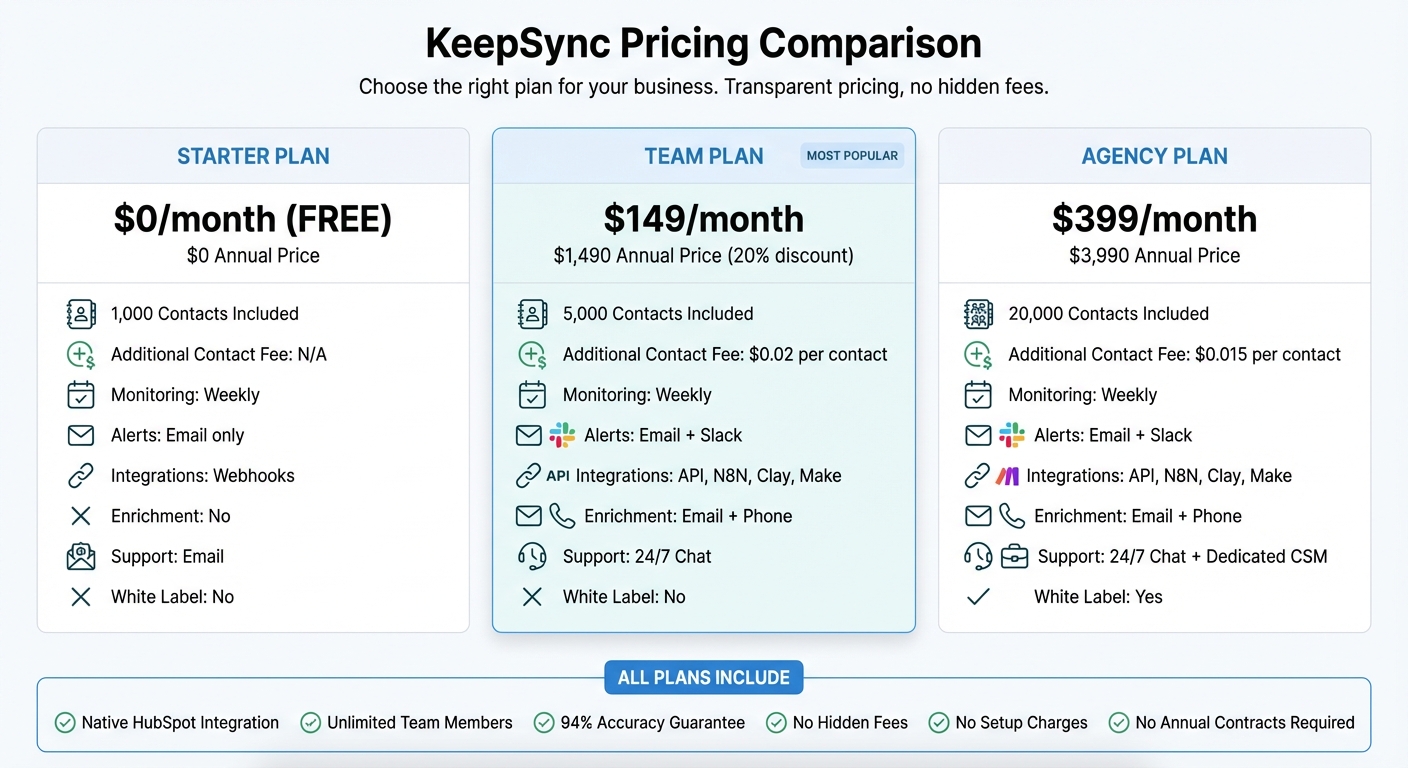
KeepSync Pricing Plans Comparison: Features and Costs
KeepSync provides three pricing options tailored to fit businesses ranging from startups to large agencies. The pricing is straightforward, with no hidden fees, setup charges, or annual contracts. Every plan includes native HubSpot integration, unlimited team members, and a 94% accuracy guarantee [3].
Starter Plan
The Starter Plan is completely free and allows tracking for up to 1,000 contacts per month. It includes weekly monitoring, email alerts, and webhook support, making it a great choice for small teams experimenting with job change tracking.
Team Plan
At $149 per month (or $1,490 annually with a 20% discount), the Team Plan covers up to 5,000 contacts. It offers Slack alerts, API access, email and phone enrichment, and 24/7 priority support. If you need to monitor more contacts, additional ones are billed at $0.02 each.
Agency Plan
Designed for agencies and larger revenue teams, the Agency Plan costs $399 per month (or $3,990 annually). It supports up to 20,000 contacts, with extra contacts priced at $0.015 each. This plan also includes white-labeling options and a dedicated Customer Success Manager to help streamline your workflows.
Here's a breakdown of the features and pricing for each plan:
| Feature | Starter | Team | Agency |
|---|---|---|---|
| Monthly Price | $0 | $149 | $399 |
| Annual Price | $0 | $1,490 | $3,990 |
| Contacts Included | 1,000 | 5,000 | 20,000 |
| Additional Contact Fee | N/A | $0.02 | $0.015 |
| Monitoring Frequency | Weekly | Weekly | Weekly |
| Alert Types | Email + Slack | Email + Slack | |
| Integrations | Webhooks | API, N8N, Clay, Make | API, N8N, Clay, Make |
| Enrichment | No | Email + Phone | Email + Phone |
| Support | 24/7 Chat | 24/7 Chat + Dedicated CSM | |
| White Label | No | No | Yes |
Automating job change tracking can deliver an average ROI of 10–79X within 12 months, especially when you focus on high-value contacts and measure the results effectively[1]. The key is transforming job change alerts into actionable revenue opportunities by targeting the right segments and refining your approach.
Your existing contacts hold untapped potential. Without proper tracking, 89% of job changes go unnoticed[1], which could mean losing deals to competitors who act faster. KeepSync focuses on high-value segments like former champions who loved your product, closed-lost leads now armed with new budgets, and competitors' customers already familiar with your category.
Former champions are a goldmine - they convert at 3–6X higher rates than cold leads[1]. Why? Because they’ve already seen the value of your product. When a power user joins a new company that fits your Ideal Customer Profile, they often advocate for bringing your solution with them.
Closed-lost deals are another key area to watch. These leads convert 36% of the time when contacted at the right moment[1]. The sweet spot? Reaching out 30–60 days after a job change[2]. This timing gives contacts a chance to settle into their new roles while they’re still open to fresh ideas during their "honeymoon period."
And don’t forget churn. Real-time alerts about stakeholder exits give you a chance to re-engage and potentially save accounts before they slip away[1].
These strategies provide a clear roadmap for targeted outreach and set the foundation for tracking and optimizing your campaigns.
KeepSync’s analytics make it easy to connect your tracking efforts to real outcomes. You can measure ROI by source, compare response rates across different contact types, and identify which former customers or closed-lost leads deliver the best returns[1]. Armed with this data, you can fine-tune your messaging and focus on the most promising opportunities.
"Before this, we were completely blind to job changes. Our reps would manually check LinkedIn maybe once a month, and we'd constantly hear about champions moving to new companies weeks after the fact. Now we're first to reach out every time." – Marcus Rodriguez, RevOps Manager, Streamline Analytics[1]
The platform also tracks campaign performance, making it easier to demonstrate pipeline impact to leadership. Deals sparked by job changes tend to close 25–40% faster[2] than cold outreach because the relationship groundwork is already laid. Use these insights to calculate incremental revenue and showcase the value of investing in warm lead generation.
Relying on manual LinkedIn monitoring means missing out on 89% of job changes, which can result in lost revenue opportunities. KeepSync removes the guesswork by automatically tracking job changes weekly across over 30 data sources. With an impressive 94% accuracy, the platform pushes verified contact updates directly into your HubSpot workflows. Best of all, the native integration takes just five minutes to set up - no technical skills required.
The numbers speak for themselves. Businesses using automated job change tracking report an average ROI of 10–79X within a year. Warm leads - those who already know your value - convert three times faster than cold leads, turning once-distant prospects into meaningful conversations[1].
KeepSync bridges the gap between insight and action. By triggering HubSpot sequences and sending real-time Slack alerts, the platform ensures your team connects with transitioning contacts immediately. It also enriches your records with verified emails and phone numbers, so you never miss an opportunity to engage at the perfect moment.
With pricing starting at $0/month for up to 1,000 contacts, KeepSync is trusted by over 500 revenue teams powered by HubSpot. Its 4.9/5 rating from more than 12,000 users underscores its ability to deliver results[1].
Stop missing out on job changes that could transform your sales pipeline. Start using KeepSync today and see how quickly those warm leads can drive real growth.
When someone changes jobs, it can be a golden opportunity to reconnect - especially if they were a former customer or a promising lead. These individuals are often much more likely to convert compared to reaching out to cold leads.
To make the most of this, focus on segmenting your contacts based on their history with your business. For example, prioritize past clients or key decision-makers from target accounts. These are the people who already know your value and are more likely to engage again.
Also, double-check that their LinkedIn profiles are up-to-date. Accurate information ensures you're reaching out with relevant insights and opportunities. To stay ahead, automate tracking for these high-value contacts. This way, you’ll know exactly when to follow up at the right time, without missing a beat.
When HubSpot detects a job change, you can set up automations to simplify your sales process and keep things moving smoothly. Here’s how:
These steps not only save time but also help you strengthen connections and close deals more efficiently.
To gauge the ROI of job change alerts in HubSpot, focus on tracking metrics like pipeline growth, conversion rates, revenue impact, and workflow performance. HubSpot’s reporting tools allow you to link deal value or revenue directly to these alerts, giving you a clear picture of their contribution. Use dashboards and custom reports to analyze how effectively these alerts enhance your sales pipeline and overall return on investment.