
Digital Marketing
·
April 10, 2026
How SaaS Companies Handle Billing Disputes & Chargebacks
Learn how SaaS billing disputes happen, what triggers chargebacks, and how both sides can resolve them faster.

Lower hard and soft bounces with list hygiene, double opt-in, real-time verification, segmentation, and automation to protect sender reputation.


Every bounced email means lost opportunities and risks to your sender reputation. Keeping your email bounce rate under 2% is essential to avoid being flagged or blacklisted by providers like Gmail or Outlook. Here’s how you can achieve it:
A clean email list and automated processes not only protect your sender reputation but also boost your email campaign performance. Let’s dive into the details.

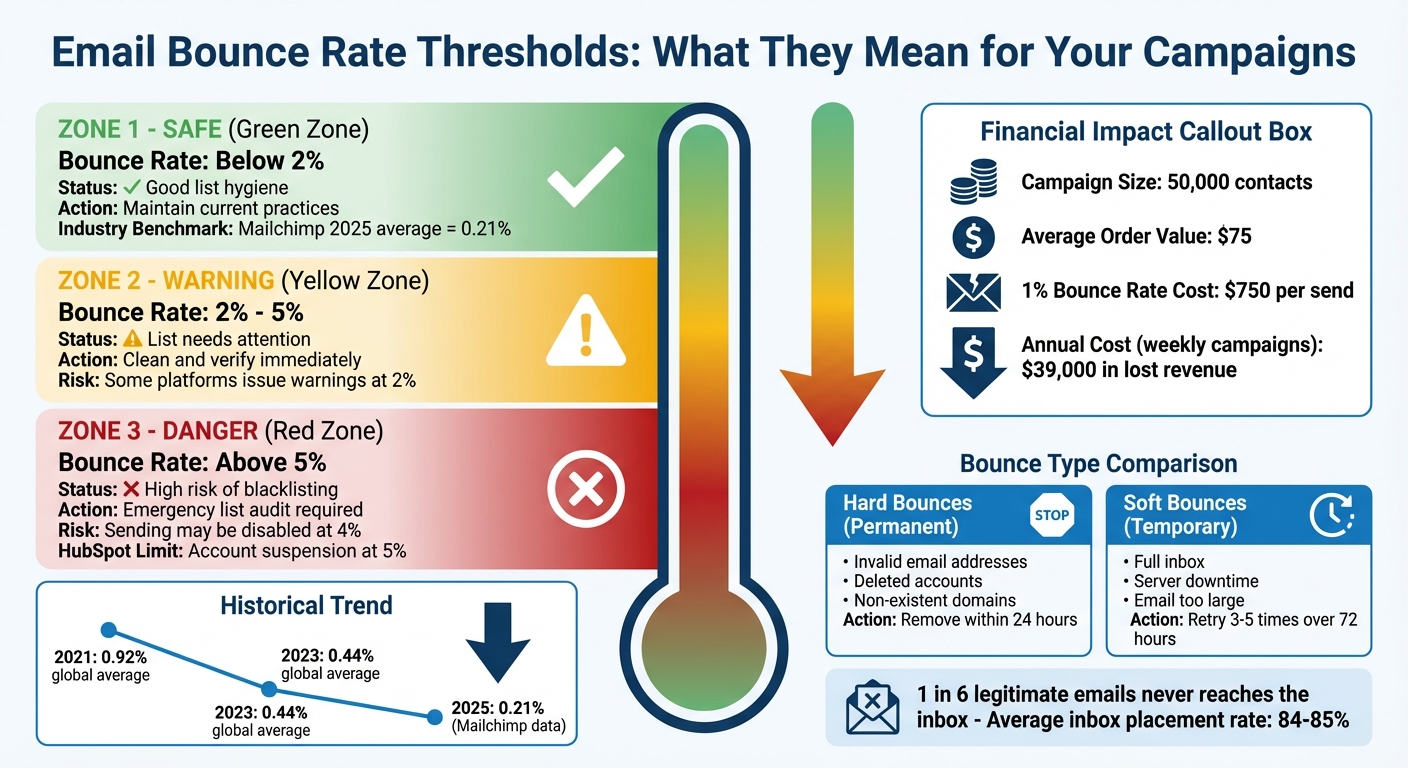
Email Bounce Rate Thresholds and Impact on Sender Reputation
When an email bounces, it means the recipient's server has rejected it. This happens for two main reasons, and understanding these is key to protecting your sender reputation and keeping your sales pipeline on track. Knowing the types of bounces helps you clean your email lists and verify data effectively.
Hard bounces are permanent failures. They occur when the email address is invalid, doesn’t exist, or the recipient’s server has permanently blocked your domain. This often happens due to typos, deleted accounts, or domains that no longer exist [1].
Soft bounces, on the other hand, are temporary setbacks. The email address is valid, but something is preventing delivery at that moment. This could be a full inbox, server downtime, or an email that's too large [1]. Most email systems will retry soft bounces 3–5 times over a 72-hour period. If the issue remains unresolved, the address is treated as a hard bounce and should be removed [1].
Why does this distinction matter? Because your response needs to match the type of bounce. Hard bounces require quick removal - ideally within 24 hours - to protect your reputation. Soft bounces, however, allow for a few retries before taking further action. Email providers like Gmail and Outlook monitor bounce patterns closely, and consistently high bounce rates can make you appear as an untrustworthy sender [1].
Bounce rates are a critical trust signal for mailbox providers. A bounce rate below 2% shows good list hygiene and proper sending practices [1]. Rates between 2% and 5% indicate your list needs attention, while rates above 5% put you at risk of being filtered, blocked, or even blacklisted [1].
The impact of high bounce rates can be severe. Some platforms issue warnings when your bounce rate hits 2% and may completely disable sending at 4% to protect their own IP reputation [1]. For instance, if you’re sending to 50,000 contacts with an average order value of $75, even a 1% bounce rate could cost you $750 per send. Over the course of a year, with weekly campaigns, that adds up to $39,000 in lost revenue [1].
It gets worse. High bounce rates can trigger a "deliverability death spiral" [1]. As your reputation as a sender drops, even valid emails may start landing in spam folders. This doesn't just affect marketing emails - it can also disrupt sales follow-ups, onboarding communications, and even executive-level messages. This misdirection skews your metrics and makes it harder to fine-tune your strategy [2].
"Keep an eye on email addresses that consistently bounce. High bounce rates can harm your sender reputation, so it's crucial to manage and update your list accordingly." - Natalie Sullivan, former retention marketing manager, Avex Designs [10]
In 2026, Mailchimp reported an average hard bounce rate of just 0.21%, with global rates dropping from 0.92% in 2021 to 0.44% in 2023 [9]. These numbers show that maintaining clean email lists isn’t just possible - it’s now the industry standard. Up next, learn how to effectively manage your lists to keep bounce rates low.
Maintaining a clean, verified email list is essential for reducing bounce rates and improving email performance. Why? Because B2B data doesn’t stay fresh forever - it decays at a rate of about 2% each month. Over the course of a year, this can render up to 30% of your CRM data outdated [11][12][5]. Job changes, company closures, and domain migrations are just a few reasons this happens. Without regular upkeep, even the best email content can’t save you from rising bounce rates.
To combat this, consistent email verification and cleaning are non-negotiable. For instance, in October 2026, a mid-sized B2B software company with a database of 200,000 contacts faced a bounce rate of 9%. After conducting a bulk audit, they removed 30,000 invalid and 10,000 role-based addresses. They also implemented a real-time verification API, which blocked 2,500 invalid sign-ups in just three months. The payoff? Their bounce rate plummeted to 1.8%, open rates surged by 35%, and their email service provider lifted sending restrictions [16]. The lesson: keeping your data clean works.
Double opt-in is one of the simplest ways to stop bad data from entering your system. When someone fills out your form, they receive an automated email asking them to confirm their subscription by clicking a link [17][8]. This step helps catch typos (like @gmal.com instead of @gmail.com), blocks fake addresses, and ensures that the person genuinely wants to hear from you.
If you’re using HubSpot, enabling double opt-in is straightforward. Go to your form settings, turn on the feature, and set up an automated follow-up email to send immediately after someone submits their details [17]. The email should include a clear confirmation link and explain why they’re receiving it. To protect yourself from consent disputes later, record key data points like the confirmation timestamp, IP address, and policy version [8].
"One bad list upload can undo years of work. I watched a three-year-old client domain collapse in under 48 hours... because a single list with a 12% bounce rate slipped through unchecked." - Hans Dekker [5]
Once you’ve secured accurate new entries, the next step is ongoing maintenance.
Email verification isn’t a one-and-done task. Data degrades over time. In an 8-week experiment, 5.5% of previously verified emails became unreliable - 2.3% were completely invalid, and 3.2% turned into "accept-all" addresses, which are harder to verify [12]. So even if you’ve recently cleaned your list, some of it may already be outdated.
To stay ahead, integrate automated verification into your CRM. Tools like APIs or platforms such as Zapier can verify every new lead in real time [11][5]. For existing contacts, re-verify your list before launching any major campaign, especially if the data hasn’t been updated in weeks [12][15]. Features like HubSpot’s "graymail suppression" can also help by automatically excluding unengaged contacts based on their activity history, saving you time and effort [14].
Handle bounces immediately. Remove hard bounces after the first failure. For soft bounces, retry 2–3 times over 72 hours, but treat persistent failures as permanent [5][13]. Additionally, set up a quarterly routine to scrub your list of role-based accounts like @info or @sales, which tend to have low engagement and higher spam risks [4][13]. Aim for a bounce rate below 0.5% to maintain a healthy sender reputation [13].
Regular list cleaning is crucial, but automation takes it a step further by identifying and fixing errors before they cause problems. Relying on manual email verification is both slow and prone to mistakes. By integrating your CRM with verification tools, automation ensures that problematic data is flagged early, safeguarding your sender reputation. For example, HubSpot’s built-in validation, combined with specialized integrations, strengthens data accuracy through automation.
Here’s why this matters: HubSpot enforces a strict hard bounce limit of 5%. If your account exceeds this, it gets suspended [20]. Most Internet Service Providers (ISPs) prefer bounce rates to stay below 1% for better deliverability [18][20]. Even a spam complaint rate as low as 0.1% (just 1 out of 1,000 emails) can result in sending restrictions [7][20]. This makes automation a must-have for protecting your email campaigns.
HubSpot’s native email validation tools are designed to catch common mistakes like syntax errors and invalid domains. For instance, it can flag typos such as “gmial.com” or improperly formatted addresses during form submissions [20]. Its Breeze AI-powered Data Quality features also scan for duplicates and formatting issues [19]. By enabling the "Fix and automate" feature, you can address recurring issues without needing manual oversight [19].
However, while HubSpot excels at catching basic errors, it doesn’t confirm whether specific mailboxes exist. For that, you’ll need third-party tools like Hunter, Instantly, or myEmailVerifier. These tools integrate with HubSpot workflows or APIs to perform advanced checks, such as SMTP pings, to verify if an inbox is active [18][11][20].
Here’s how it works: When a new contact is created, a verification API checks the email and updates a custom property, like "Email Verification Status." Contacts flagged as "Invalid" or "Risky" can then be routed to a review queue, ensuring they don’t enter your sales sequence [11][20].
"If your hard bounce rate exceeds 5%, spam complaints exceed 0.1%, or unsubscribe rate exceeds 3%, HubSpot will suspend your marketing email sending." – myEmailVerifier [20]
This process keeps your campaigns free from bad data. Plus, these tools offer flexible pricing: Hunter includes Starter plan ($79/mo) with API access [11], myEmailVerifier offers 100 free verifications daily [20], and Instantly’s Growth plan starts at $37 per month [18].
But email verification is just one piece of the puzzle. Keeping your data relevant also means tracking when contacts change jobs.

Even the most accurate email lists can become outdated when contacts move to new roles. That’s where KeepSync comes in. This tool monitors professional transitions with an impressive 94% accuracy, pulling data from over 30 sources weekly. When a contact changes jobs, KeepSync updates your CRM with their new email address and phone number.
This proactive approach eliminates the risk of sending emails to abandoned inboxes. For example, if a key client contact switches companies, KeepSync ensures their information is updated so you can re-engage them in their new role. Alerts can be sent via Slack, email, or directly in HubSpot, triggering workflows to keep your outreach relevant. Best of all, KeepSync integrates seamlessly with HubSpot in just five minutes, with no technical expertise required.
Personalizing and segmenting your emails can significantly boost engagement while safeguarding your sender reputation by cutting down on bounce rates. When recipients actively engage with your emails, providers see your content as valuable, leading to better inbox placement. This creates a solid foundation for using dynamic personalization and smart segmentation to improve email deliverability even further.
Here’s a compelling stat: segmented email campaigns can lead to 50% higher click-through rates and 30% more opens compared to generic emails [21]. Even more striking, 77% of email marketing ROI comes from campaigns that are segmented, targeted, and triggered [21]. On the flip side, low engagement can hurt your sender reputation, making it critical to focus on delivering relevant, targeted content [7].
HubSpot makes personalization easy with its powerful personalization tokens. These tokens can automatically fill in details like a recipient's first name, company, or job title, allowing you to craft messages that feel tailored to their specific role or needs [21]. But personalization isn’t just about adding a name - it’s about customizing the entire message. For instance, you could send ROI-focused insights to CFOs while providing managers with in-depth how-to guides [21].
Dynamic segments take this a step further by updating automatically based on user behavior. For example, if someone downloads a pricing guide or visits your demo page, they’re immediately added to a high-intent segment. This ensures your content stays relevant and engagement remains high. It’s worth noting that 74% of customers find it frustrating when email content doesn’t align with their interests [21]. Keeping your messaging relevant can prevent this frustration while also keeping bounce rates low.
Smart segmentation allows for even more refined outreach. Start by creating tiers based on engagement levels:
Focus on sending emails to your most engaged groups first. Their positive interactions signal email providers that your content is valuable, improving inbox placement for less active segments later [22].
Another layer of segmentation involves tracking job changes. Tools like KeepSync can detect when a contact moves to a new company, triggering re-engagement workflows tailored to their new role. This prevents emails from being sent to outdated addresses, cutting down on hard bounces. Additionally, segmenting by seniority allows you to fine-tune your messaging. For example, you can share concise, strategic content with C-level executives, while offering detailed tactical guides to individual contributors [21]. This precise targeting not only keeps engagement high but also protects your sender score by avoiding unnecessary bounce rate spikes caused by irrelevant emails.
Once you've nailed clean list management and personalized outreach, the next step is tracking your metrics. Why? Because monitoring performance is the only way to know if your emails are hitting the mark with the right audience [14].
"Email deliverability is a feedback loop for whether you're sending the right content to the right contacts at the right time." - HubSpot Knowledge Base [14]
The stakes here are no joke. On average, email marketing delivers a $36 return for every $1 spent [23]. But with an average inbox placement rate of about 84-85%, one in six legitimate emails never reaches its destination [23]. That's a lot of potential ROI slipping through the cracks. Keeping an eye on your metrics helps you maintain low bounce rates and safeguard your investment. Tools like HubSpot Analytics can make this process precise and actionable.
HubSpot's Email Health tool is a great way to keep tabs on your email performance. It offers a 30-day performance snapshot, helping you identify patterns and quickly spot spikes in bounce rates [14]. The tool also assigns an Email Health Score (on a scale from one to ten) based on your engagement metrics. This score gives you a quick read on your sender reputation, and aiming for a perfect 10 should be your goal [24].
To stay in the clear, keep your bounce rate below 2% - this is the safe zone [25]. If it creeps up to 5% or higher, it's time to act fast. HubSpot automatically tracks both hard and soft bounces, moving permanently bounced contacts to a "Not Sent" tab for future campaigns. This protects your sender reputation [27]. You can also use the "Delivery" tab to check if certain providers, like Gmail or Outlook, are handling your emails differently [26].
Beyond bounce rates, focus on deliverability. The best campaigns hit inbox placement rates of 90% or higher, and spam complaints above 0.1% should set off alarms [7][23].
Once you've got a handle on your metrics, automation can take things to the next level. Data decay is a real issue - up to one-third of your CRM data can become outdated within a year [11]. This is where automation tools like KeepSync come in.
KeepSync simplifies data hygiene by integrating email verification directly into your CRM. With its 94% accuracy rate, the platform automatically updates workflows when it detects job changes, ensuring your emails always reach valid addresses [11]. Instead of manually cleaning your lists, KeepSync turns this into an automated background process.
The platform also tracks response rates and conversion metrics tied to job change triggers. This means you can identify which contacts are worth pursuing and which are likely to bounce. By automating these workflows, you keep your lists accurate and your bounce rates consistently low - no constant manual effort required.
Using the strategies outlined here, you can effectively lower bounce rates and protect your sender reputation.
Reducing bounce rates directly impacts the ROI of your email campaigns. Even small gains in deliverability can lead to noticeable revenue increases. To achieve this, focus on maintaining clean email lists, automating verification processes, personalizing content, and segmenting your audience based on engagement levels. Remove hard bounces immediately, use double opt-in for new subscribers, and aim to keep your bounce rate below 2% [6]. Since B2B contact data typically decays at a rate of about 2% per month [11], regular upkeep of your list is an absolute must.
Tools like HubSpot's Email Health feature provide critical insights to monitor performance and catch potential issues early. Meanwhile, automation tools like KeepSync simplify data maintenance. With a 94% accuracy rate in tracking job changes [11], KeepSync ensures your CRM remains up-to-date without requiring manual intervention. These practices not only protect your sender reputation but also enhance your campaign results.
The stakes are high: one in six legitimate emails never makes it to the recipient [6], and a single campaign with excessive bounces can undo months of effort [3]. By combining regular list cleaning, automation, and targeted segmentation, you can ensure your emails reach the right audience and maintain your sender reputation.
Keep an eye on your metrics, verify your lists, and let automation handle data accuracy. These steps will lower bounce rates, improve engagement, and allow your sales team to focus on closing more deals.
Experts suggest checking your B2B email list every 8 weeks. Why? Because email data goes out of date fast - sometimes in just a few weeks. Regularly verifying your list keeps it clean, lowers bounce rates, and safeguards your sender reputation. To avoid potential issues, double-check your list right before starting a campaign to catch invalid or outdated email addresses.
To keep your email list healthy, it's important to address soft-bouncing email addresses. If an address keeps bouncing over multiple attempts or for an extended period, and the issue can't be fixed, it's best to remove it. This practice not only protects your sender reputation but also ensures your emails are delivered to active, valid recipients.
Keeping your contact information accurate and up-to-date with job-change updates can significantly cut down on hard bounces. When people switch jobs, their old email addresses often become invalid, leading to delivery failures. By routinely refreshing your contact data, you can maintain a cleaner email list and boost your email deliverability rates.