
Digital Marketing
·
April 10, 2026
How SaaS Companies Handle Billing Disputes & Chargebacks
Learn how SaaS billing disputes happen, what triggers chargebacks, and how both sides can resolve them faster.

Champify requires a Salesforce sync and starts at $2,000/month for HubSpot-only teams; KeepSync offers native HubSpot integration, better job-change accuracy, and lower pricing.


If you’re a HubSpot user debating whether Champify is the right tool for you, here’s the quick answer: Champify is built for Salesforce, not HubSpot. While it offers strong job-change tracking and automation features, its reliance on Salesforce makes it a complicated and expensive choice for HubSpot-only teams. In contrast, KeepSync is designed specifically for HubSpot, offering a native integration, simpler setup, and more affordable pricing.
Key Takeaways:
Quick Comparison:
| Feature | Champify | KeepSync |
|---|---|---|
| HubSpot Integration | Requires Salesforce sync | Native, 5-minute setup |
| Job Change Accuracy | 86% | 94% |
| Starting Price | $2,000/month | Free (up to 1,000 contacts) |
| Automation | Via Salesforce | Direct HubSpot workflows |
| Additional Costs | Requires Salesforce license | None |
For HubSpot-only teams, KeepSync is the simpler, cost-effective choice. If your team already uses Salesforce, Champify’s advanced features may be worth exploring.
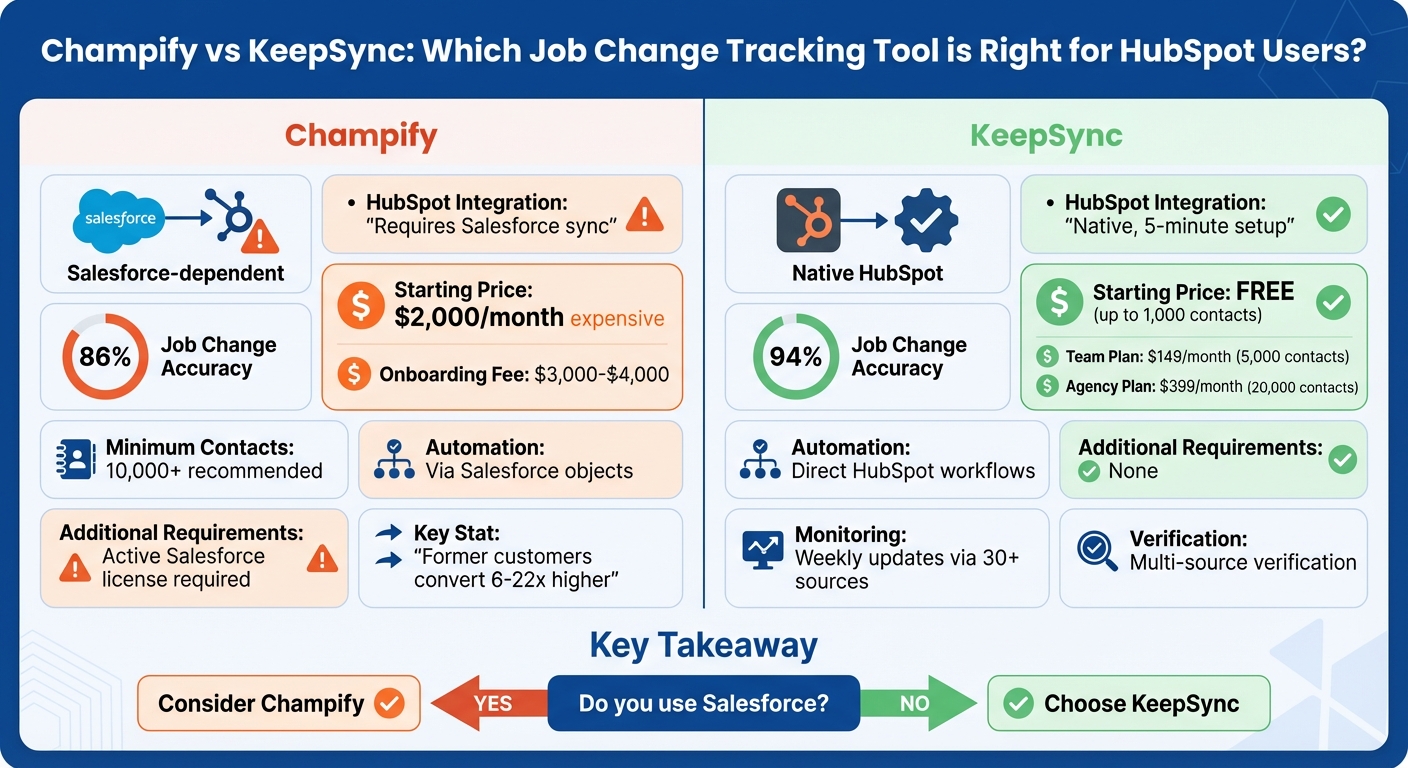
Champify vs KeepSync: Feature and Pricing Comparison for HubSpot Users

Champify doesn’t come with a native HubSpot integration. Instead, it operates as a Salesforce-native application, requiring a sync between Salesforce and HubSpot. This setup adds extra steps, which can make workflows more complicated and potentially less efficient. The platform connects with Salesforce objects like Leads, Contacts, and Accounts, but for teams that rely on HubSpot, this workaround introduces additional complexity and possible points of failure.
Let’s now take a closer look at how Champify handles job change tracking - a key feature of its platform.
Champify updates its contact data every 14 days [7], delivering an average match rate of 86% [10]. It boasts 80% fewer false positives and 30% more matches compared to LinkedIn Sales Navigator [9], while maintaining about 85% email coverage for new job contacts [10]. These stats are especially important for HubSpot users aiming to improve lead conversion rates. Data shows that former customers tracked through Champify convert 6× to 22× more often than other outbound signals [1]. Additionally, opportunities involving these former champions have a 39% win rate, significantly higher than the 19% SaaS industry average [8]. without Champify alternatives or automated tools, CRMs typically miss 78% of former champions who have switched jobs [8].
Champify’s pricing starts at $2,000 per month for the Core plan, which monitors 15,000+ contacts. The Pro plan, designed for tracking 40,000+ contacts, costs $3,000 per month, while the Enterprise plan, supporting 150,000+ contacts, is priced at $6,000 per month [5]. Onboarding fees generally fall between $3,000 and $4,000 [4]. The platform recommends tracking at least 10,000 contacts to achieve the best return on investment [4]. For larger organizations with over 2,000 employees, Champify includes safeguards to ensure compliance with Salesforce’s Apex Governor Limits, helping to avoid disruptions in critical workflows [2].
Now, let’s explore how Champify’s automation tools streamline CRM tasks.
Champify simplifies CRM management by automating essential processes like field mapping, account matching, routing, and deduplication [5][2]. Its Calendar Sync feature automatically adds stakeholder details to the CRM as enriched contacts linked to the appropriate opportunities [6]. Additionally, the Insider AI tool analyzes call transcripts, emails, and CRM data to identify the best moments to re-engage with closed-lost opportunities [1]. The platform also sends personalized alerts via Slack or email whenever tracked contacts switch jobs [5][2].
"With Champify we were able to mitigate key person risk and operationalize our [Champion Channel] by bringing the data into our CRM so that we could easily take action" [5].

KeepSync is designed specifically for HubSpot, offering an easy-to-use, native integration that takes just five minutes to set up. It connects directly to your HubSpot CRM, eliminating the need for middleware or additional platforms. This straightforward approach reduces complexity and avoids the risks that come with syncing across multiple systems. Plus, it works effortlessly with HubSpot workflows, so you can automate tasks like lead routing and outreach campaigns without leaving your current tools. This integration lays the groundwork for accurate job change tracking, which we'll dive into next.
KeepSync keeps a close eye on your contacts, monitoring them weekly through more than 30 sources with an impressive 94% accuracy rate for detecting job changes. To ensure reliability, it uses multi-source verification to weed out false positives. Whenever a tracked contact switches jobs, you’re notified instantly through Slack, email, or directly in HubSpot. These alerts come with enriched details, including verified email addresses, phone numbers, and updated company information, so your sales team can act quickly and confidently with accurate data.
KeepSync offers flexible pricing to suit businesses of all sizes.
These plans not only offer cost-effective solutions but also simplify CRM management with automation tools that save time and effort.
KeepSync takes the hassle out of managing job changes by automating the entire process - from detection to outreach. When a contact makes a career move, the platform enriches their profile, assigns them to the right sales rep based on your HubSpot criteria, and triggers personalized emails. This automation ensures that your outreach is both timely and accurate.
Beyond that, KeepSync provides pipeline analytics to track response rates and measure ROI, giving you a clear picture of how job changes translate into new opportunities. It also lets you monitor former champions, closed-lost deals, and contacts from competitor accounts, offering multiple ways to tap into warm leads. With these features, KeepSync makes staying ahead of job changes seamless and efficient.
Deciding between these tools largely depends on how your CRM is set up. Champify is designed specifically for Salesforce, meaning it requires a Salesforce-to-HubSpot sync to function with HubSpot. This setup demands an active Salesforce account and adds layers of complexity to the integration process.
On the other hand, KeepSync offers a native HubSpot integration that takes just five minutes to set up. It eliminates the need for middleware, ensuring job change alerts are delivered instantly, so you can take action without delays caused by syncing data between platforms.
Pricing is another key difference. Champify starts at $2,000 per month, while KeepSync starts at $79/month for 1,000 contacts and charges $149 per month for 5,000 contacts. For HubSpot users without a Salesforce license, Champify’s dependency on Salesforce introduces additional costs.
| Feature | Champify | KeepSync |
|---|---|---|
| HubSpot Integration | Requires Salesforce + sync workaround | Native, 5‑minute setup |
| Job Change Accuracy | Not specified | 94% with multi‑source verification |
| Starting Price | $2,000/month (high‑tier) | Free (up to 1,000 contacts) |
| Workflow Automation | Via Salesforce objects | Direct HubSpot workflow support |
| Additional Requirements | Active Salesforce license needed | None - works standalone with HubSpot |
This comparison underscores the key differences in integration, accuracy, pricing, and automation. While both tools effectively track job changes, Champify's dependence on Salesforce can complicate workflows for teams solely using HubSpot. KeepSync’s native integration simplifies lead management and outreach, making it a more efficient choice for HubSpot users.
For teams exclusively using HubSpot, Champify's dependency on Salesforce adds layers of complexity and cost that may not be necessary. With pricing starting at $2,000 per month, it’s a hefty investment that typically only makes sense for organizations managing at least 10,000 contacts or boasting very high average contract values.
The return on investment (ROI) becomes harder to evaluate due to the lack of native HubSpot integration. While Champify boasts impressive conversion rates - former customers convert 6–22x higher than cold leads[1] - this performance comes with intricate workflows and additional resource requirements.
KeepSync provides a straightforward alternative for mid-market teams, offering a native HubSpot integration that’s up and running in just five minutes. Its pricing is far more accessible, ranging from $79/mofor up to 1,000 contacts to $149 per month for 5,000 contacts. This simplicity allows teams to focus on converting leads without the headaches of managing complex integrations.
Choosing between these options hinges on your CRM setup. For Salesforce users with enterprise-level budgets, Champify might be worth the investment, as evidenced by its 9.6 out of 10 TrustRadius score[3]. But for HubSpot-focused teams, KeepSync’s seamless integration, clear pricing, and 94% accuracy rate make it the more practical choice, avoiding the technical challenges tied to Champify's reliance on Salesforce.
Champify’s job-change tracking transforms former customers and post-sale contacts into a reliable source of fresh revenue. By automatically detecting when a buyer or product user switches to a new company, it pinpoints contacts who are six times more likely to convert. This means your sales team gets access to a high-quality pipeline without the hassle of manual research.
With approximately 23% of buyers changing jobs every year, Champify ensures you don’t miss these valuable opportunities. Its advanced system delivers 30% more matches and 80% fewer false positives compared to other tools, offering unmatched precision. Plus, all job-change signals integrate directly into Salesforce, enabling your team to act immediately through alerts, playbooks, or automated workflows.
These capabilities help revenue teams expand their reach, reconnect with repeat buyers, and maintain strong relationships to reduce churn as contacts transition to new roles.
Champify doesn't directly integrate with HubSpot. Instead, it uses a two-step process. First, it connects with Salesforce to collect and organize data. Then, by using the Salesforce-to-HubSpot connector, you can sync that data with HubSpot. This approach lets you take advantage of Champify's tools while ensuring your HubSpot CRM stays current.
Champify's pricing begins at $2,000 per month for the Core tier. If you're looking for more advanced options, the Pro tier is priced at $3,000 per month, while the Enterprise tier comes in at $6,000 per month. On top of the monthly subscription, there's also a one-time onboarding fee, which typically falls between $3,000 and $4,000.
For teams using HubSpot exclusively, you’ll need to budget at least $2,000 per month as a starting point, along with the upfront implementation fee. It’s important to weigh your team’s specific needs to ensure the features align with your goals and justify the cost.