
Digital Marketing
·
April 10, 2026
How SaaS Companies Handle Billing Disputes & Chargebacks
Learn how SaaS billing disputes happen, what triggers chargebacks, and how both sides can resolve them faster.

Use real-time sales signals - job changes, engagement, and intent data - to rank accounts, automate follow-ups, and reach high-priority prospects faster.


When your sales team is juggling hundreds of leads, prioritizing the right accounts is essential to focus on those most likely to convert. Sales signals - real-time, data-driven insights like website visits, email engagement, or job changes - help you identify prospects showing clear buying intent. This approach ensures your team spends less time chasing low-priority leads and more time closing deals.
Key takeaways:
Zeroing in on signals that show genuine buying readiness can help you focus your efforts where they matter most. Three key signal categories - job changes, engagement metrics, and intent data - offer insights into an account's potential. Let’s break them down to help refine your account prioritization.
When someone starts a new role, they often lean on familiar vendors or explore new solutions to build their tech stack. This makes job changes a goldmine for sales teams. For instance, if a former customer or advocate moves to a new company, it’s a clear opportunity to establish a relationship with that account [3].
On the flip side, signals like job terminations or email bounces point to potential risks. In these cases, you’ll need to act quickly to identify and connect with a new contact [1][3]. Tools like HubSpot’s intent tracking can even backfill up to 30 days of signals, including job changes, giving you a head start on personalized outreach [3].
New C-level hires often signal shifts in strategy or budget priorities. These transitions present an opening to propose solutions that align with the new executive's vision [3].
Engagement metrics - like website visits, email clicks, form submissions, and meeting requests - are direct indicators of interest [1]. The trick lies in analyzing the frequency and type of engagement. For example, if an account repeatedly visits your pricing page or requests a demo, they’re signaling readiness for immediate follow-up [8].
Drill down into specific behaviors, such as unique visitor counts or high-value page views. Pages like pricing, product demos, or case studies often suggest that an account is progressing in its buying journey [9].
Intent data uncovers when prospects are actively researching solutions, even if they haven’t engaged with your team yet. This includes both visits to your website and broader online activity [1][4]. HubSpot’s intent data is powered by insights from over 200,000 websites, offering a clear view of the topics companies are exploring across the web [4].
Research activity is categorized by month-over-month increases: High indicates a spike of over 160%, Moderate ranges from 111% to 160%, and Mild falls between 85% and 110% [4]. If a topic related to your solution shows "High" activity, that account should immediately become a top priority. Using reverse-IP technology, HubSpot can even identify anonymous visitors as companies, allowing you to track intent before they fill out a form [3][4].
Spotting sales signals is just the beginning - you need tools that turn those insights into action. By combining KeepSync with HubSpot CRM, you can automate signal detection and prioritization, giving your team more time to focus on closing deals.

KeepSync scans over 30 data sources weekly - like company websites and press releases - to identify when key contacts, such as champions, power users, or decision-makers, change jobs. Without a systematic approach, 89% of these changes often go unnoticed by sales teams [10].
When KeepSync spots a job change, it automatically creates a new lead or deal in HubSpot, complete with details about the contact's past relationship with your company. The system then routes these opportunities to the appropriate sales rep and kicks off personalized outreach. For high-priority changes, like a former champion landing a C-level role at a larger company, you can even set up real-time Slack alerts [10].
"The ROI was immediate. Within 45 days we had closed two deals from former customers who moved to bigger companies. Our SDRs love it because these are actual warm leads, not cold calls." - Sarah Kim, Director of Sales, Velocity Commerce [10]
With a 94% accuracy rate in detecting job changes, KeepSync delivers real results. Former champions often convert at rates 3–6 times higher than cold leads [10]. A great example? UserTesting secured over $1M in new business within a year by automating outreach to contacts who had moved to new roles [10].
While KeepSync is your go-to for tracking job changes, HubSpot CRM simplifies engagement and intent data, offering a broader view of sales signals. HubSpot centralizes data to highlight buying indicators [1][3]. By adding HubSpot's tracking code to your website, you can match anonymous IP addresses with known companies and define specific page paths - like pricing or product pages - as intent signals [11].
The "Top Signals" card on company records aggregates data such as email clicks, form submissions, and website visits [1]. HubSpot also lets you monitor when companies search for industry-specific terms across its network of 200,000+ websites [4]. Plus, when you start tracking a new company, HubSpot provides a 30-day history of intent signals [11].
To make the most of these insights, you can set up rule-based tracking for companies marked as "Target Accounts." For example, workflows triggered by key events - like a spike in research activity or a funding announcement - can notify sales reps instantly or enroll the account in an outreach sequence [11].
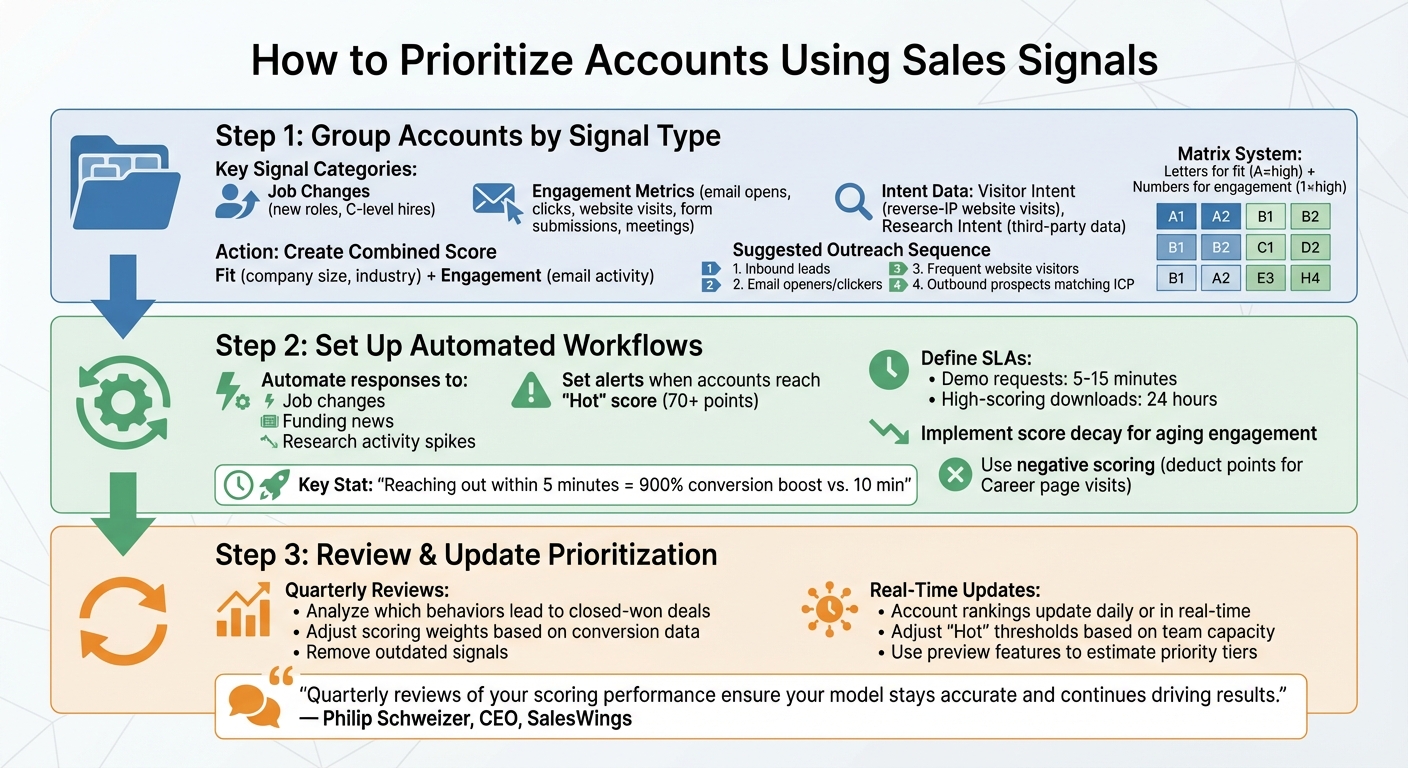
3-Step Framework for Prioritizing Sales Accounts Using Signals
Once you've pinpointed the most important sales signals, the next step is creating a structured approach to rank accounts. This ensures your team focuses on the right opportunities, avoiding wasted effort on low-value leads while high-priority accounts get the attention they deserve.
Start by organizing accounts based on key signals like job changes, engagement metrics, and intent data. Engagement metrics include actions such as email opens, clicks, website visits, form submissions, and meetings booked [12]. Intent data can be broken down into two categories: Visitor Intent, which uses reverse-IP technology to identify website visits, and Research Intent, which comes from third-party data showing companies researching topics like "CRM" [3][4].
To make this actionable, tools like HubSpot's Custom Views can help track highly engaged contacts, while Active Lists automatically update based on user behavior [12]. For a more advanced strategy, calculate a Combined Score that blends "Fit" (e.g., company size, industry) with "Engagement" (e.g., email activity) to rank accounts [6]. You can also use a matrix system where letters represent fit (A = high) and numbers represent engagement (1 = high). This way, you can quickly spot accounts that might be low-fit but highly engaged [6][13].
When it comes to outreach, a suggested sequence could start with inbound leads, followed by email openers and clickers, then frequent website visitors, and finally outbound prospects that perfectly match your ideal customer profile [5]. Once accounts are categorized, automation can take over to streamline the process.
Manual prioritization can only take you so far - it's time-consuming and doesn’t scale. Instead, leverage HubSpot workflows to automate responses to key signals like job changes, funding news, or spikes in research activity. For example, you can set up Slack or email notifications to alert reps when a company reaches a "Hot" score threshold (e.g., 70+ points) or repeatedly visits your pricing page [3][7].
Quick follow-ups are critical for conversions [7]. Define service level agreements (SLAs) for different lead types - such as responding to demo requests within 5–15 minutes or high-scoring content downloads within 24 hours. If a high-priority lead isn’t contacted within the SLA, use escalation workflows to reassign the lead or notify a manager [7].
To keep your team focused on fresh opportunities, implement score decay, which gradually lowers engagement scores over time. Negative scoring can also help refine your prioritization by deducting points for less promising signals, like visits to "Career" pages [6][7]. Once workflows are in place, regularly review and refine them to ensure they stay aligned with your goals.
Even with a well-organized system, your prioritization strategy needs regular updates. Conduct quarterly reviews with your sales and marketing teams to analyze which behaviors (e.g., attending webinars vs. downloading whitepapers) are leading to closed-won deals, and adjust your scoring model accordingly. For instance, if webinar attendees are converting better than whitepaper downloaders, increase the score assigned to webinar participation [7].
While strategic reviews happen quarterly, account rankings should update daily or in real time to reflect immediate changes in behavior [7]. Adjust "Hot" lead thresholds based on your team’s capacity - if reps can handle 100 leads but are receiving 500, raise the threshold to focus on the most promising opportunities [7]. Use preview features in your CRM to estimate how many accounts will fall into each priority tier before making changes [6].
"Quarterly reviews of your scoring performance ensure your model stays accurate and continues driving results." - Philip Schweizer, CEO, SalesWings [7]
Finally, remove outdated signals that no longer align with conversion trends - like interactions with obsolete content - to keep your prioritization model relevant and effective. By staying proactive, you ensure that your team is always focused on the best opportunities.
Sales signal prioritization shifts your team's efforts toward what truly matters. By focusing on accounts showing clear buying intent, you can sidestep the 79% non-conversion rate associated with poorly nurtured leads [7].
Timing is everything. Reaching out to leads within 5 minutes boosts conversions by a staggering 900% compared to waiting just 10 minutes [7]. Pairing KeepSync's automated job change tracking alternatives with HubSpot's engagement and intent data creates a system that identifies the best opportunities at the perfect moment. This means your team spends less time chasing uninterested leads and more time engaging with prospects who are ready to buy.
The numbers speak for themselves. Automated workflows ensure hot leads are routed to the right reps, alerts are triggered when scores hit key thresholds, and rankings are updated in real time as new signals emerge. This automation allows sales teams to focus on what they do best - building relationships and closing deals. To keep the system effective, regular quarterly reviews are essential to fine-tune scoring weights based on actual conversion trends.
"Everyone is looking for prioritization - how can I get my sellers to focus on the things that drive revenue. With signals, I know there is a reason for me to reach out to the customer for a meaningful conversation." - Salesloft Resource [2]
When you combine automated processes with smart prioritization, the impact on revenue becomes clear. Targeting accounts actively researching your solutions leads to faster follow-ups and higher win rates through tailored outreach. By leveraging sales signals, your team can turn prioritization into a measurable ROI driver. This streamlined, signal-based approach ties together the workflows and strategies we've explored, ensuring your team stays focused on opportunities that truly matter.
When it comes to prioritizing accounts, three key sales signals stand out: buying signals, research intent, and job changes.
Buying signals are like flashing neon signs that say, "We might be ready to buy!" These include things like recent purchases, noticeable shifts in technology usage, or even patterns of increased spending. They hint that an account could be close to making a decision, making them prime candidates for outreach.
Research intent is another powerful indicator. This involves tracking online behaviors, such as engaging with relevant content or specific search queries. These actions suggest that a prospect is exploring solutions and might be open to a conversation.
Finally, there's job changes, which can be a goldmine for sales teams. When a former customer or a key decision-maker moves to a new company or role, it can open doors to fresh opportunities. Tools like automation platforms make it easier to stay on top of these shifts, allowing sales teams to reconnect and build new relationships quickly.
By focusing on these signals, you can zero in on high-potential opportunities and make the most of your resources, ultimately boosting your ROI.
KeepSync makes tracking job changes effortless by automatically updating contact records with real-time details, like shifts in job title or company. This keeps your team informed about important updates, enabling timely and tailored communication.
With seamless integration into platforms like HubSpot, KeepSync sends automated alerts and launches workflows whenever a key job change happens. This not only simplifies your sales process but also helps you zero in on valuable opportunities and re-engage with past customers in their new positions. It’s an efficient way to stay ahead and boost your sales efforts.
Reaching out to high-priority leads right away is key to capturing their attention when they’re most engaged or ready to make a decision. Acting promptly on signals like website visits, content downloads, or job changes gives you a better shot at closing deals before your competition has a chance to step in.
Quick follow-ups also let you address a lead’s needs while they’re still fresh in their mind. For instance, connecting with someone who just started a new job can be a game-changer. People in new roles are often open to solutions that help them succeed, making them more receptive to your pitch. By focusing on timely outreach, you can zero in on leads with the greatest potential, improving both your conversion rates and overall revenue.