
Digital Marketing
·
April 10, 2026
How SaaS Companies Handle Billing Disputes & Chargebacks
Learn how SaaS billing disputes happen, what triggers chargebacks, and how both sides can resolve them faster.

Automate job-change alerts in HubSpot, enrich contact records, trigger Slack notifications and workflows, and prioritize warm leads to grow pipeline.


When a contact changes jobs, it creates a unique opportunity to re-engage and build trust. HubSpot, combined with KeepSync, automates job change tracking, helping BDR managers act quickly on these signals. Here's how it works:
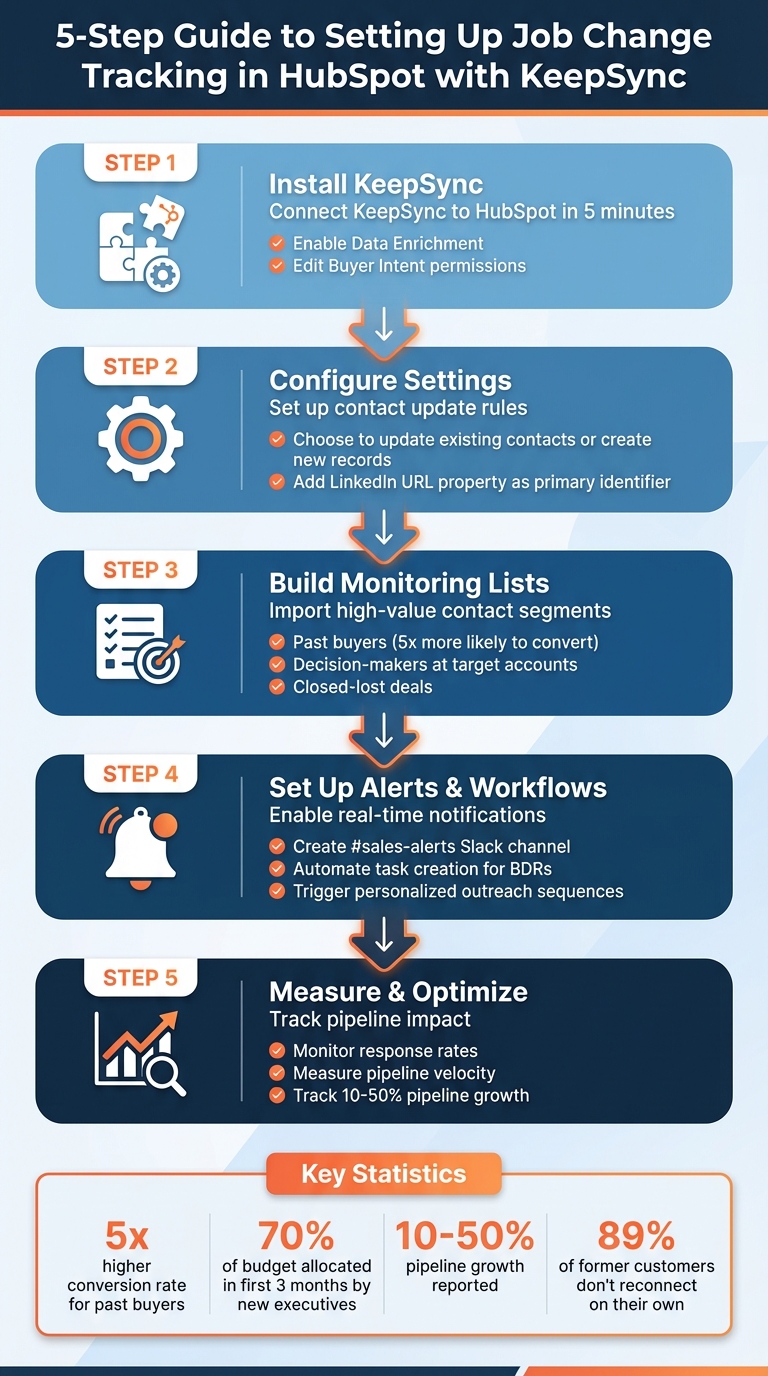
5-Step Guide to Setting Up Job Change Tracking in HubSpot with KeepSync

You can have KeepSync up and running in HubSpot in just five minutes. Start by heading to your HubSpot settings and navigating to the integrations or marketplace section. Before you proceed, make sure you have the necessary permissions for Data Enrichment and Edit Buyer Intent.
Once you’ve connected KeepSync, it’s time to configure how it works with your CRM. Decide whether you want the integration to update existing contacts, create new records when job changes are detected, or generate tasks for your business development reps (BDRs). You’ll also need to choose whether KeepSync will replace existing data (like job titles and company names) or only fill in blank fields. Many BDR managers prefer the "replace" option to ensure contact details stay current as people switch roles.
A key part of this setup is the LinkedIn URL property. KeepSync relies on these URLs as the primary identifier to track job changes. If your HubSpot contacts are missing LinkedIn URLs, consider running a LinkedIn URL finder automation first to boost match rates. This simple step can make a big difference in the effectiveness of the integration.
Once everything is configured, the next step is to decide which contacts you want to monitor.
With KeepSync installed and ready, it’s time to focus on the contacts that matter most for your sales pipeline. Start by importing your existing HubSpot lists directly into KeepSync. Prioritize your most valuable segments, such as:
These groups often deliver the best results since past buyers are five times more likely to convert compared to cold leads[1].
To avoid getting overwhelmed with alerts, apply filters based on your Ideal Customer Profile (ICP). Focus on tracking key roles at your target companies and consider segmenting contacts by their relationship history. For example, you can create separate lists for categories like "Past Customers", "Open Opportunities", and "Target Accounts." This segmentation allows you to tailor your follow-up strategies more effectively.
If you’re just getting started, begin with a smaller list to test the integration’s accuracy and fine-tune your filters as needed.
When KeepSync is monitoring your contacts, having a system to act on opportunities instantly is key. The platform offers alerts through Slack, email, or HubSpot, but most BDR managers find Slack to be the most effective. Why? Slack notifications are immediate and visible to the entire team, making it easy to stay on top of things.
To make the most of this, create a dedicated Slack channel - something like #sales-alerts - where KeepSync can post updates. This keeps everyone aligned and ensures no important signals get lost in a sea of emails. For added visibility, enable desktop notifications through your browser so BDRs get pop-up alerts, even when working in other tabs. Timing is everything here - reaching out within hours of a detected job change can make all the difference.
For high-value contacts, like former champions or decision-makers at target accounts, take it a step further. Use HubSpot to set up task queues tied to these alerts. When KeepSync detects a job change, it can automatically create a high-priority task, assign it to the contact owner, and add it to a "Job Changes" queue. This approach allows BDRs to dedicate focused time each day to engaging these warm leads - ensuring no opportunity slips through the cracks.
Once real-time alerts are running smoothly, you can take things to the next level by linking them to automated workflows.
The real magic happens when job change alerts feed directly into automated workflows in HubSpot. Start by creating a workflow that triggers whenever KeepSync detects a "Job started" signal. This workflow should tackle three key tasks: managing data, notifying your team, and initiating outreach.
First, update your CRM by flagging the old contact record as "No longer at company" while keeping the relationship history intact. Then, create a new contact record with refreshed details like the new company, title, and updated contact information. With everything organized, the workflow can launch a personalized outreach sequence.
To scale this effectively, use HubSpot's property tokens to personalize messages with details like the contact's Previous Company and New Company. This type of tailored communication makes your outreach feel relevant and thoughtful.
To avoid overwhelming your team, apply ICP (Ideal Customer Profile) filters to your workflow criteria. This ensures you're only targeting job changes that align with your high-value opportunities. By focusing on the right people, you reduce unnecessary alerts and keep your team zeroed in on what matters most. Additionally, use the "Rotate record to owner" action to automatically assign new contacts to the appropriate BDR based on territory or company size.
Don’t forget to enable re-enrollment for your workflows. If a contact changes jobs again down the line, they’ll automatically re-enter your process. Over time, staying connected through multiple career shifts can be a game-changer for your pipeline. Warm relationships tend to deliver far better results than cold outreach, making this a strategy worth investing in.
With KeepSync, your contact records stay up-to-date effortlessly. Whenever a contact moves to a new company, the platform verifies and updates their details, such as a new email address, phone number, company domain, and job title. It even enriches records when a contact changes roles, ensuring your database reflects the most accurate information.
To streamline this process, you can configure overwrite rules for fields like Job Title and Employment Seniority. Set these to "Fill empty values and overwrite existing values" to automatically replace outdated data. Without these settings, outdated titles might linger in your CRM, potentially leading to misdirected communications.
HubSpot's Continuous Enrichment feature takes this a step further by updating records monthly, keeping your database current and reliable [2][5]. This automation not only saves time but also ensures your records are optimized for segmentation, reporting, and automation. By reducing manual data entry, you gain more time to focus on strategic initiatives.
To identify updated records, use the "Has been enriched" property and filter it to True [2]. With verified and refreshed contact details, you’re ready to build precise segments for targeted outreach.
Enriched data opens the door to smarter segmentation. Use custom HubSpot views to filter contacts by properties like "Job started since," "Previous Company," and "Previous Title." These filters help pinpoint contacts who’ve recently transitioned into new roles - especially those now working at companies that match your Ideal Customer Profile.
For example, you can create a "Recent Job Changes - Target Accounts" segment. Focus on contacts who changed jobs in the past 30 days and now work at companies with 100+ employees. This tailored list provides your BDRs with warm leads to prioritize each week.
You can also segment contacts by Employment Role and Employment Seniority to group them into tiers, such as decision-makers versus individual contributors [2]. This approach helps concentrate your efforts on high-value prospects.
To keep your pipeline fresh, create active lists that automatically update as new job changes are detected. This eliminates the need for manual updates and ensures your BDRs always have an up-to-date list of leads. Additionally, use bulk enrichment tools within your CRM to further streamline your segmentation process [2].
Once you've set up job change alerts and workflows in HubSpot, the next step is to measure their impact. To do this, create a custom object, such as ‘Intent’, to track job changes. This allows you to associate these changes with specific contacts and companies, making it easier to analyze their influence over time [1].
HubSpot's Custom Report Builder is a powerful tool for combining data from multiple sources like Deals, Companies, and Intent records. For example, you can create a pipeline growth report by plotting total deal amounts against their creation dates, segmented by Intent. To focus on closed-won revenue, filter by the Closed Won stage, use Close Date on the X-axis, and sum up the deal amounts.
To evaluate the success of your outreach efforts, build a response rate report. Use Sequences as your primary data source, with Intent signals as a secondary dataset. A vertical bar chart can visually display the number of replies, categorized by Intent type. If you're using HubSpot Enterprise, you can enable Property change events on the Job Title field. This feature provides a timestamped audit trail for every update, making it easier to track changes over time [4]. Reports built using this method automatically refresh every two hours, but you can manually update them every 15 minutes for a more immediate view [6].
Understanding the key metrics tied to job change tracking helps you see its impact on sales. For instance, past buyers are five times more likely to convert compared to cold leads, and new executives often allocate 70% of their budgets within their first three months [1].
One essential metric to monitor is pipeline velocity, which you can calculate with this formula:
(Number of Opportunities × Win Rate × Average Deal Value) ÷ Sales Cycle Length (in days) [7]. Additionally, track response rates from job change–triggered outreach, total pipeline value generated from these signals, and the number of closed-won deals originating from job change alerts. Companies that implement job change tracking often report a 10% to 50% increase in pipeline generation.
To get a full picture, set up a HubSpot dashboard that combines sequence response rates with deal stage progression. Pay attention to metrics like deal close rate, average deal size, and sales cycle length. These insights reveal how job change signals can reduce friction in your sales process [7].
| Metric | What to Measure | How to Visualize in HubSpot |
|---|---|---|
| Response Rate | Percentage of replies | Vertical bar chart categorized by Intent |
| Pipeline Generated | Total pipeline value | Deal analytics with an Intent property filter |
| Closed-Won Revenue | Revenue linked to job changes | Custom report filtered by Closed Won stage |
| Pipeline Velocity | Speed of revenue generation | Custom calculation using deal metrics |
Use these insights to fine-tune your approach and continuously improve your pipeline performance.
Tracking job changes can be a game-changer for BDR managers looking to grow their sales pipeline. KeepSync takes the heavy lifting out of the process by automating detection, enriching data, and enabling immediate outreach.
Here’s why automation matters: without it, valuable opportunities can slip through the cracks. In fact, 89% of former customers don’t proactively reconnect when they switch roles[1]. That’s where KeepSync steps in.
With its native HubSpot integration, KeepSync keeps your CRM organized and up-to-date. Automated workflows handle everything from updating contact details to creating tasks for your BDRs. It even enrolls past champions into personalized outreach sequences - completely eliminating manual data entry[3]. By applying filters for ideal customer profiles (ICP) and personas, your team gets notified only about job changes that align with your priorities, ensuring they focus on high-value opportunities[3].
The results speak for themselves. Companies using job change tracking have seen pipeline growth of 10–50% and report converting up to 3x more discussions into opportunities[1]. With less time spent on admin work, your BDRs can focus on building relationships that drive sustainable revenue growth.
Set up your tracking lists and workflows today. Stay connected as your contacts move forward in their careers, and watch your pipeline grow.
KeepSync takes the hassle out of tracking job changes in HubSpot, turning what used to be a tedious manual task into an effortless, real-time process. By integrating directly with HubSpot, it keeps an eye on updates like role changes, company names, and email addresses, instantly refreshing your CRM with verified, up-to-date contact details. This not only keeps your data accurate but also lowers email bounce rates and uncovers opportunities when former customers land new roles.
For BDR managers, KeepSync offers automated alerts through Slack, email, or HubSpot workflows, so you're always in the loop. It also fills in fields such as Previous Company and Job Started Since, making it easy to build targeted outreach lists - no coding required. Setup is simple, and with 94% verified data accuracy, it’s a cost-effective solution for maintaining warm leads and safeguarding your pipeline, all within HubSpot’s ecosystem.
Using Slack for job change updates means your team gets instant notifications when a contact’s role or company changes in HubSpot. Unlike email, which can lag, Slack delivers these updates in real time to a specific channel, allowing your team to respond quickly while the opportunity is still fresh.
What’s more, Slack simplifies teamwork by keeping everything in one place. From receiving notifications to discussing outreach strategies and assigning follow-up tasks, everything happens in the same channel. This eliminates the need to juggle multiple tools and keeps everyone on the same page. Once the HubSpot-to-Slack integration is set up, the entire process runs automatically - saving time, cutting down on manual efforts, and ensuring no opportunity slips through the cracks.
Keeping your HubSpot contact data up-to-date with KeepSync is both easy and efficient. Start by tidying up your current records in HubSpot - standardize fields like Job Title, Company Name, and Email. You might also want to add custom properties, such as “Previous Company” or “Job Start Date”, to better track changes over time.
Once your data is cleaned up, connect KeepSync to HubSpot in just a few minutes. Activate its multi-source verification engine to get real-time job change alerts with impressive accuracy. This keeps you informed about important updates to your contact list without any guesswork.
From there, automate your HubSpot workflows to make the most of these alerts. For instance, set up notifications via Slack or email, auto-update custom fields, or even launch outreach campaigns when contacts get promoted or switch companies. With KeepSync continuously refining your data, you’ll lower bounce rates and enjoy a steady stream of warm leads - all without adding extra manual tasks.