
Digital Marketing
·
April 10, 2026
How SaaS Companies Handle Billing Disputes & Chargebacks
Learn how SaaS billing disputes happen, what triggers chargebacks, and how both sides can resolve them faster.

Compare a unified CRM vs a sales engagement platform to choose between integrated pipeline management or high-volume, multi-channel outbound automation.


When deciding between HubSpot Sales Hub and Sales Engagement Platforms (SEPs), the choice boils down to your team's sales process and priorities:
| Feature | HubSpot Sales Hub | Sales Engagement Platforms |
|---|---|---|
| Primary Role | Full CRM for sales lifecycle | Outbound sales automation |
| Data Management | Unified platform | Requires external CRM |
| Multi-Channel Outreach | Limited (email, calls) | Advanced (email, SMS, LinkedIn) |
| Setup Time | ~36 days | Several months |
| Pricing | $9–$150/seat/month | $50–$160/user/month |
Bottom Line: Choose HubSpot if you need an all-in-one solution for managing your pipeline and customer data. Opt for an SEP if your focus is outbound prospecting with high-volume, multi-channel campaigns.
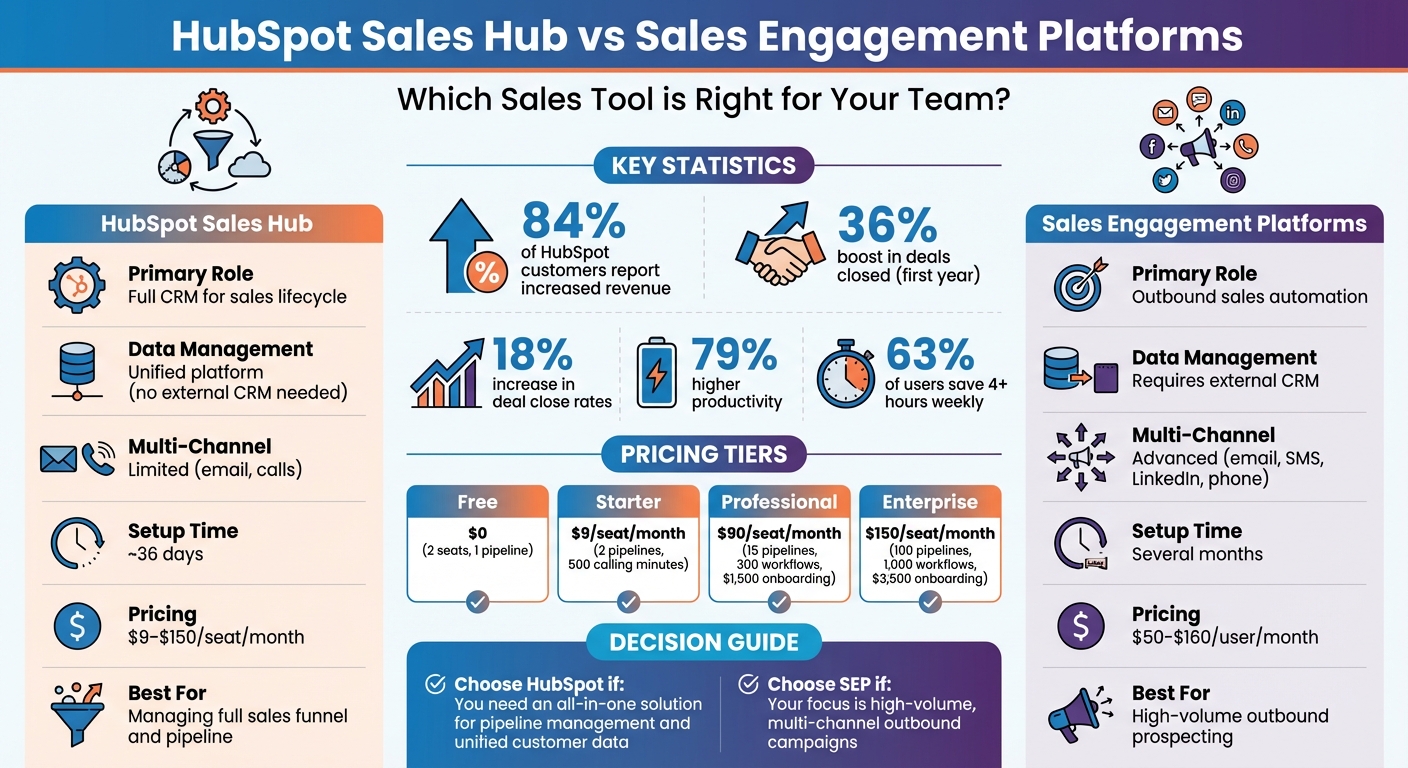
HubSpot Sales Hub vs Sales Engagement Platforms: Feature and Pricing Comparison
HUBSPOT SALES AUTOMATION
Automate Job Change Tracking in HubSpot
KeepSync monitors your contacts for job changes and updates HubSpot automatically. Free up to 1,000 contacts.
Request Early Access →
HubSpot Sales Hub is a comprehensive CRM platform designed to manage your entire sales funnel from a single, centralized location. Built on HubSpot's Smart CRM, it seamlessly integrates data across sales, marketing, and service teams, eliminating the hassle of manual syncing.
By combining tools like email sequences, meeting schedulers, and deal trackers in one workspace, Sales Hub reduces "tool sprawl" and simplifies workflows. The results speak for themselves: 84% of customers reported increased revenue after adopting Sales Hub, while users saw a 36% boost in deals closed within the first year [3]. These features and benefits make it a powerful solution for sales teams.
Sales Hub supports every stage of the sales process. At the top of the funnel, it offers AI-driven prospecting tools, automated email sequences, and a dedicated workspace to help sales reps quickly identify and engage leads [3][5]. Moving into the middle of the funnel, customizable deal pipelines, task automation, and meeting schedulers help streamline the sales process [3]. Toward the bottom of the funnel, features like sales forecasting, branded quotes, eSignatures, and integrated payment management simplify closing deals [3][5]. Additionally, Sales Hub integrates with over 1,500 apps - including LinkedIn Sales Navigator, Gmail, and Outlook - keeping all sales activities centralized [3].
Automation is a standout feature, saving 63% of users at least four hours weekly through tools like task queues and automated sequences [3]. Higher-tier workflows allow these sequences to trigger automatically, enabling sales reps to focus on building relationships instead of handling repetitive tasks [3].
The platform's impact is evident in real-world examples. In 2026, COPA-DATA adopted HubSpot's prospecting workspace, leading to a fivefold increase in captured sales activities and tripling the speed of lead qualification [6]. Similarly, Market Financial Solutions transitioned from Excel spreadsheets to Sales Hub, achieving a 30% rise in new user inquiries and a 45% increase in loan value by centralizing contacts and pipelines [6].
Sales Hub offers a flexible seat-based pricing model with four tiers, making it adaptable to teams of all sizes. It differentiates between Sales Seats (full access to advanced features) and Core Seats (limited access for team members who only need to view data or approve deals) [3].
| Plan | Monthly Cost (Annual Billing) | Monthly Cost (Monthly Billing) | Key Features |
|---|---|---|---|
| Free Tools | $79/mo | $79/mo | 2 seats, 1 pipeline, basic meeting scheduler, Breeze Assistant |
| Starter | $9/seat | $15/seat | 2 pipelines, 500 calling minutes, 5,000 templates, no HubSpot branding |
| Professional | $90/seat | $100/seat | 15 pipelines, 300 workflows, sequences, forecasting (with a $1,500 onboarding fee) |
| Enterprise | $150/seat | N/A | 100 pipelines, 1,000 workflows, conversation intelligence (with a $3,500 onboarding fee) |
Annual billing provides savings of 10% to 40% per seat compared to monthly billing [3]. Professional and Enterprise tiers require one-time onboarding fees of $1,500 and $3,500, respectively, with most teams fully operational within 36 days [1]. All tiers include the Breeze AI Suite, which features AI-powered tools like prospecting agents, meeting assistants, and call transcript enrichment to automate tedious tasks [3]. This tiered structure allows businesses to scale their tools and features as their needs grow.
HubSpot Sales Hub focuses on centralizing customer data, while sales engagement platforms (SEPs) are all about executing outbound sales actions. SEPs are built specifically for high-volume outbound efforts. Unlike HubSpot Sales Hub, which serves as a full CRM managing the entire customer lifecycle, SEPs act as a "system of action" [7]. They don’t store customer history - that’s the CRM’s job. Instead, they handle what comes next in the sales process by automating multi-channel outreach and syncing those activities back into the CRM [15,16].
As Sybill's Mamta Tainwala puts it, "a CRM without an SEP is like having a cookbook with no kitchen" [7].
SEPs integrate with CRMs like Salesforce or HubSpot, pulling contact data to power outreach campaigns and syncing completed tasks back to the CRM. This ensures a complete view of the customer journey while maintaining clear boundaries between the two tools [15,16].
SEPs bring all your communication channels - email, phone, SMS, LinkedIn, and video - into one workspace. This allows sales development reps (SDRs) and account executives to hit their daily activity goals efficiently [3,17]. A standout feature is sequence automation, which creates multi-step "cadences" that send follow-ups automatically, pause when prospects reply, and adjust based on prospect behavior [4,17].
What sets SEPs apart from basic email tools is their deliverability systems. These include automated inbox warmup (slowly increasing email volume over 30 days), monitoring for bounce rates and spam complaints, and controls that randomize send times to protect sender reputation. Built-in verification ensures emails are sent to valid addresses, keeping hard bounce rates below 1% [8].
AI takes these platforms further by automating repetitive tasks. It can draft personalized messages at scale, classify reply intent (e.g., interest or objections), and recommend the best times to send emails [3,16]. Some SEPs even include conversation intelligence, analyzing call recordings for sentiment, competitor mentions, and buyer hesitation [15,8]. The result? Sales reps spend less time on admin tasks - cutting that time by about 25% - and more time selling [8].
While SEPs and CRMs both support sales teams, their focus and scope differ significantly. SEPs excel at tracking execution-level metrics, such as sequence performance, email open rates, reply rates, and call connection rates. They also help identify where prospects drop off in outreach cadences [4,17]. On the other hand, HubSpot Sales Hub focuses on deal progression, stage conversion, and revenue attribution across the entire customer lifecycle [2].
| Feature | Sales Engagement Platforms | HubSpot Sales Hub |
|---|---|---|
| Primary Role | Drives interactions (action layer) | Stores customer history (data repository) |
| Core Focus | High-volume outbound execution | Managing the full customer lifecycle |
| Data Architecture | Engagement layer requiring a separate CRM | Unified data in one platform |
One key advantage of HubSpot is its simplicity. Everything operates within one system, avoiding the sync delays or data conflicts that can happen when connecting multiple tools. SEPs, although offering more advanced multi-channel sequencing, often require more setup time and dedicated resources. While teams can get started with HubSpot in about 36 days, enterprise SEPs can take several months to fully implement [1,17].
Here's a breakdown of key sales automation features in HubSpot Sales Hub and sales engagement platforms side by side:
| Feature | HubSpot Sales Hub | Sales Engagement Platforms |
|---|---|---|
| Email Sequences | Up to 5 emails plus tasks with personalized messaging [2][1] | Multi-step sequencing across email, SMS, LinkedIn, and phone [2] |
| Multi-Channel Support | Email, calling, and meeting scheduling within a unified CRM | Email, phone, SMS, and LinkedIn [2] |
| AI Personalization | Breeze AI for forecasting, deal risk, and prospecting agents [3][4] | Sequence optimization, coaching, and task prioritization [4] |
| Pipeline Analytics | Unified revenue, pipeline, and activity dashboards [2] | Execution-level metrics (open rates, reply rates, sequence performance) [2] |
| CRM Integration | Native, with an all-in-one unified database [1] | Requires external CRM with bi-directional sync [1][2] |
| Job Change Tracking | Utilizes the Breeze Prospecting Agent for account research [10] | Automated data enrichment (varies by platform) [11] |
| Setup Time | Typically 36 days [1] | Several months for enterprise implementations [1] |

HubSpot's unified CRM system eliminates delays caused by syncing across tools, ensuring marketing, sales, and service teams operate with identical customer data. This streamlined approach saves reps at least 4 hours per week through automation tools like task queues and sequences [3].
These platforms shine in managing high-volume outbound campaigns, offering advanced multi-step sequencing that adapts dynamically to prospect responses [2]. They also provide sophisticated branching logic tailored for SDR teams. However, achieving this functionality often requires longer setup times and ongoing resources to maintain CRM synchronization.
While the table highlights technical differences, let’s delve into the specific strengths of each tool. This can help sales teams align their needs with the right solution.
HubSpot Sales Hub is a powerhouse for managing the entire sales lifecycle. Teams using HubSpot report an 18% increase in deal close rates, 79% higher productivity, and 48% faster deal closures [1][3]. Its centralized platform ensures seamless tracking of contacts and deals, which directly improves efficiency and results.
"HubSpot is the central place for the life of our marketing and sales teams... It's where the contacts come in, the deals are created, the opportunities are tracked and moved through the funnel." [1]
On the other hand, sales engagement platforms excel in outbound sales. They support multi-channel, high-volume campaigns with dynamic sequencing that adjusts based on engagement [2]. While these platforms require more setup time, they deliver robust tools for outbound productivity, particularly for SDR teams.
In short, HubSpot simplifies and speeds up the sales cycle with its unified system, while sales engagement platforms specialize in maximizing outbound efficiency through advanced sequencing capabilities.
When comparing platforms, it's crucial to look beyond the monthly seat fees and consider the broader costs, such as onboarding fees, add-ons, and usage credits. HubSpot stands out with its straightforward seat-based pricing model, while other sales engagement platforms often include additional charges.
| Platform | Starting Price (Annual) | One-Time Onboarding Fee | Key Considerations |
|---|---|---|---|
| HubSpot Sales Hub Starter | $9/seat/month | None | Includes 2 pipelines and 500 calling minutes |
| HubSpot Sales Hub Professional | $90/seat/month | $1,500 | Offers unlimited pipelines and 3,000 calling minutes |
| HubSpot Sales Hub Enterprise | $150/seat/month | $3,500 | Features 1,000 workflows and 12,000 calling minutes |
| Klenty | $50–$100/user/month | None | No implementation fees |
| Outreach | $100–$160/user/month | $1,000–$8,000 | Requires an external CRM |
| Salesloft | $125–$165/user/month | Varies | Dialer comes as a paid add-on |
| Apollo.io | $49–$119/user/month | None | Relies on credit-based data lookups |
One of HubSpot's advantages is its unified CRM, which eliminates the need for external CRM integrations, cutting down on extra expenses. Additionally, HubSpot offers flexibility by allowing businesses to mix Sales Seats (full access) with Core Seats (limited CRM access) in its Professional and Enterprise plans. This means you can reserve full-feature licenses for team members who need advanced tools. Opting for annual billing further reduces costs compared to monthly payments [3].
This table gives a clear picture of upfront costs, setting the stage to evaluate the returns each platform can deliver.
Once pricing is understood, the next step is assessing ROI. HubSpot customers report impressive results within their first year of use. For instance, 84% of users see revenue growth, deal close rates improve by 109%, and deals closed increase by 36%. Productivity among sales reps jumps by 79%, while automation features cut the average time to close a deal by 48%. HubSpot's unified CRM also drives a 2.5× boost in pipeline volume and a 61% increase in average deal size. On top of that, 63% of users save at least 4 hours weekly thanks to automation tools [3].
In contrast, sales engagement platforms often focus on ROI metrics like cost per meeting booked, which is particularly useful for high-volume outbound campaigns. However, their reliance on external CRM integrations and usage-based pricing can add complexity and hidden costs. HubSpot’s integrated approach avoids these pitfalls, reducing administrative overhead and delivering a more streamlined experience.
When calculating ROI, it's important to account for factors like seat costs, onboarding time, and administrative workload. HubSpot’s faster learning curve and quicker ramp-up period help businesses cut these additional expenses, making it a practical choice for many teams.
HubSpot Sales Hub is part of a unified CRM platform, allowing data to flow effortlessly between sales, marketing, and service teams - no need for complicated external syncing. The App Marketplace offers over 1,500 integrations, including popular tools like Slack, Zapier, LinkedIn Sales Navigator, and Google Workspace, many of which are included in your plan [3].
This built-in integration approach delivers real results. On average, sales teams get fully operational in just 36 days [9]. HubSpot also scored an impressive 9.1 out of 10 for implementation, compared to platforms like Outreach, which scored 4.5 out of 10 [12]. Additionally, 97% of users reported that HubSpot's implementation met their expectations, compared to 88% for Outreach [12].
"It was not only SUPER easy to implement, we had some amazing support from HubSpot. They scheduled a call to go over each individual tool with our team and provided guidance and best practices." – Stephanie Casstevens, Marketing Manager [12]
These seamless integrations lay the groundwork for using specialized tools that enhance tracking and data management.
Sales engagement platforms often focus on automating outbound processes but rely on external CRMs to handle the entire sales pipeline. This dependency can lead to data syncing issues when fields don’t align perfectly between platforms.
HubSpot’s Professional plan supports up to 300 customizable workflows, while the Enterprise plan expands this to 1,000 workflows. These workflows automatically sync data back to the CRM, reducing the risk of incomplete records and providing actionable insights for timely follow-ups [3][13].

Building on HubSpot's capabilities, KeepSync takes tracking to the next level by monitoring job changes automatically. Designed specifically for HubSpot, this tool tracks when your contacts switch jobs, scanning over 30 data sources weekly - including company websites and press releases - with a 94% accuracy rate. For executive changes, it even includes human verification [14].
Setup is quick, requiring just 5 minutes and no technical expertise [14]. Once integrated, KeepSync automatically generates leads or deals, assigns them to the right reps, and sends real-time Slack alerts for high-priority changes. It also works with other sales engagement platforms to trigger automated sequences based on these job change signals [14][15].
The numbers speak for themselves: 89% of job changes go unnoticed by sales teams without a system in place, and 36% of closed-lost deals can be revived when timing improves due to a job change [14]. Warm relationships with former champions are especially valuable, converting three times faster than cold leads. With automated job change tracking, businesses can see an average ROI of 10-79X within a year [14].
KeepSync offers straightforward pricing, starting at $79/month for 1,000 contacts. For 5,000 contacts, including Slack alerts and API access, the cost is $149/month. Larger teams can opt for the $399/month plan, which supports 20,000 contacts and includes white-label options [14].
HubSpot Sales Hub isn't just about integration; it's about transforming those integrations into tangible sales results. It provides sales teams with a clear, detailed view of every prospect's journey - from their first website visit to the most recent email exchange. This comprehensive tracking empowers sales reps to work smarter and more effectively.
Take Ceros, for example. By leveraging the enhanced visibility offered by Sales Hub, they saw a 180% increase in deals from open meeting opportunities and an 18% growth in sales-qualified leads[6]. Douglas Botchman, Director of Revenue Operations at Ceros, shared:
"Sales Hub helps us prospect smarter. It makes our prospecting reps more productive, enables more relevant and personalized outreach, and empowers reps to get back to what they do best: connecting with prospects."[6]
For businesses handling large volumes of prospects, HubSpot stands out by eliminating the inefficiencies of multi-tool setups. Unlike platforms that rely on syncing across multiple systems, HubSpot's unified architecture avoids issues like sync delays and duplicate records[1][2]. Market Financial Solutions is a great example: by replacing Excel spreadsheets with Sales Hub, they achieved a 30% increase in new user inquiries and a 45% boost in loan value by centralizing their contact and pipeline management[6].
Reposit Power's story highlights how HubSpot supports rapid scaling. They grew their weekly sales calls from just 20 to 1,000 and boosted monthly sales from 2 to 35 - all in just five weeks[6].
Pipeline management is just the start. HubSpot also excels in improving lead quality through tools like KeepSync, which integrates seamlessly to enrich contact data. KeepSync monitors multiple data sources weekly, achieving 94% accuracy by combining automation with human verification[14]. When it detects a contact's job change, it automatically creates leads or deals, assigns them based on territory rules, and sends real-time Slack alerts for high-priority updates.
KeepSync doesn't stop there - it enriches records with verified emails, phone numbers, and company information, triggering personalized workflows within HubSpot. Setup is quick and easy, taking just five minutes, and pricing starts at $79/mo for up to 1,000 contacts. This makes it an accessible yet powerful tool for businesses looking to stay ahead in lead management.
While HubSpot Sales Hub offers a wide range of features, it may not meet the needs of teams looking for highly advanced engagement tools. For example, its built-in email sequence capabilities are relatively basic compared to those in dedicated sales engagement tools. If you're after features like conversation intelligence or in-depth call analytics, you’ll need to rely on third-party integrations.
Key features like automated email sequences and 1:1 video messaging are only available in the Professional and Enterprise plans, which come with higher costs. These advanced features aren't accessible to entry-level users, making it harder for smaller teams to leverage them. Additionally, HubSpot imposes usage limits, such as:
While email and task automation are handled effectively, HubSpot doesn't offer native support for automated SMS or advanced LinkedIn integrations, which can be a drawback for teams relying on these channels.
Another concern is with its Salesforce integration, which some users find cumbersome when mapping data beyond basic fields like Accounts and Contacts. Building complex workflows often requires technical expertise or external support, adding to operational challenges.
Sales engagement platforms, while offering their own strengths, come with a different set of hurdles. These tools act as an engagement layer that integrates with your existing CRM, rather than replacing it. This setup can lead to issues like sync delays, data conflicts, and challenges with field mapping, all of which require constant administrative attention.
Another challenge is the risk of creating data silos. Without a unified data model, sales activity data often remains disconnected from marketing and service data, making it harder to get a complete view of revenue performance. These platforms also tend to focus on execution-level metrics - like email sequence performance and call reply rates - while offering limited insights into broader pipeline metrics such as deal progression or conversion rates.
Costs can escalate quickly. Most sales engagement platforms are priced between $100 and $160 per user monthly, and they typically require annual contracts. Onboarding fees, which can range from $1,000 to $8,000, add to the financial burden. For smaller teams with modest outreach needs, this pricing structure can feel excessive. Additionally, while these platforms offer advanced automation, the complexity of their workflows can create a steep learning curve, with even simple tasks requiring multiple steps to complete.
"Outreach is a sales engagement layer that sits on top of your CRM, not a replacement for it. You still need a system of record for contacts and deal tracking." – HubSpot Staff
Being aware of these limitations helps ensure that your team selects tools that align with operational goals and avoids unnecessary complications.
Selecting the right sales tool hinges on understanding your team's structure and sales process. For teams managing the entire sales cycle, HubSpot Sales Hub offers a unified platform that integrates marketing, sales, and service data. On the other hand, teams using an SDR-to-AE handoff model and handling high-volume prospecting (think 50+ touches per day) often benefit from the specialized automation features of sales engagement platforms [2].
Your choice will directly affect ROI and overall sales efficiency. For example, consider email volume: HubSpot's Starter plan, priced between $9–$15 per seat monthly, is ideal for teams sending around 50–100 emails per month. However, for higher volumes, advanced automation tools might be worth the investment, even if they come with a learning curve. Notably, HubSpot users have reported an 18% increase in deal close rates and a 35% improvement in maintaining a consistent sales process [1].
HubSpot's impact on productivity and deal closure is significant. As Nathan Bliss, Chief Sales Officer at Kinsta, shared:
"We wouldn't have been able to scale to that level of revenue had we not implemented HubSpot." [1]
For teams looking to enhance lead conversion and gain real-time insights, pairing HubSpot with tools like KeepSync can be a game-changer. KeepSync delivers automated job change tracking with 94% accuracy, monitoring contacts across 30+ data sources. It provides real-time alerts for role changes, enriched contact details, and native workflow automation, all while ensuring seamless data synchronization.
Ultimately, the right tool depends on your specific needs: whether it's a unified system with quick implementation (averaging 36 days) and full revenue visibility, or a specialized platform designed for high-volume, multi-channel outreach [2].
Yes, you can use HubSpot Sales Hub together with a sales engagement platform. Many businesses pair these tools to improve sales efficiency and automation. This combination allows teams to leverage HubSpot’s powerful CRM features alongside the advanced communication and sequencing tools offered by sales engagement platforms. The result? Smoother workflows, better lead management, and more effective tracking of sales activities.
To figure out which platform best suits your team, take a close look at your sales processes and priorities. HubSpot Sales Hub works well if you’re looking for something user-friendly, with clear pipeline visibility and a built-in CRM. However, if your team needs more advanced automation features or multi-channel outreach capabilities, a specialized sales engagement platform might be a better choice. Consider whether your focus is on simplicity and integration or on automation and scalability, and align that with the platform's strengths.
To keep tabs on contact job changes in HubSpot, you can set up job change alerts by keeping an eye on fields like Job Title and Company Name. Create custom properties, such as "Previous Employer", and use workflows to automate the process. Alternatively, you can integrate tools like KeepSync for automatic detection and real-time notifications. This approach helps you stay on top of updates, ensures your records are current, and turns job changes into sales opportunities by simplifying follow-ups.
📚 HubSpot Sales Automation Series