
Digital Marketing
·
April 10, 2026
How SaaS Companies Handle Billing Disputes & Chargebacks
Learn how SaaS billing disputes happen, what triggers chargebacks, and how both sides can resolve them faster.

Job change tracking turns past clients into warm leads—track role moves in HubSpot, automate alerts, and convert new executives faster.


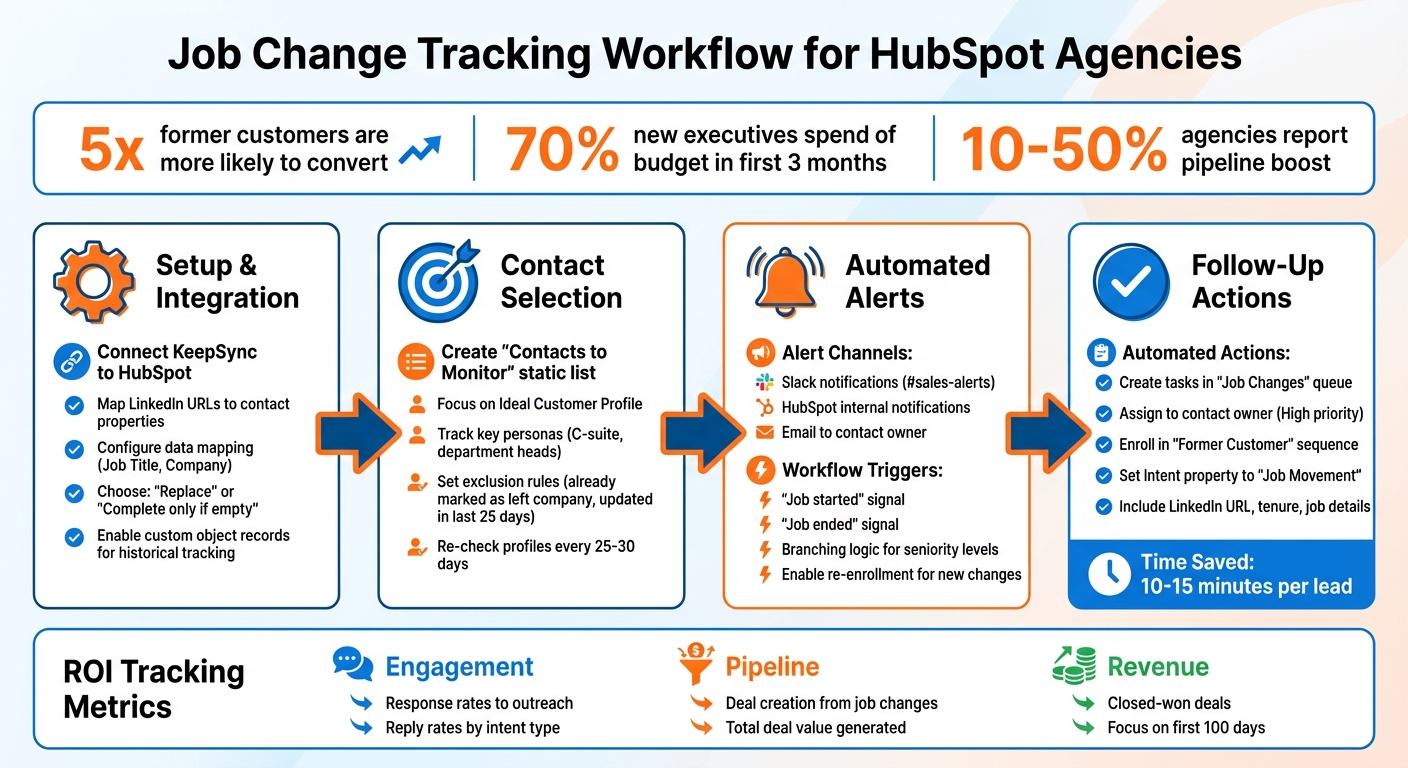
Job change tracking helps you monitor when your contacts switch companies or take on new roles. For HubSpot agencies, this is a powerful way to reconnect with past clients and generate leads. Former customers are 5x more likely to convert into revenue, and new executives spend 70% of their budget within the first 3 months of starting a role. Using tools like HubSpot's native signals or third-party integrations like KeepSync, you can automate tracking, update records, and set up workflows for timely follow-ups.
Job change tracking is an efficient way to build relationships and drive revenue from warm leads.
How to Set Up Job Change Tracking in HubSpot: Complete Workflow


Getting KeepSync integrated with HubSpot is quick and straightforward. Start by heading to KeepSync's settings within your HubSpot account. The first step is selecting the contact property that stores LinkedIn URLs. This step is essential for accurate matching and tracking of contacts between platforms.
Next, map critical HubSpot properties - like job title and company - to the corresponding fields in KeepSync. You'll have two options here: "Replace" existing data or "Complete only if empty." To avoid overwriting manually updated information in HubSpot, choose the "Complete only if empty" option. This ensures missing details are filled in without altering existing data. Additionally, you can enable automation actions, such as updating contact or account information and creating tasks. For better reporting, configure KeepSync to generate custom object records in HubSpot whenever it detects a job change. This way, each job change is stored as a historical record rather than overwriting prior data.
Make sure your HubSpot contacts include LinkedIn URLs for precise tracking. Once that’s set, decide which contacts you want to monitor to keep the process efficient.
To streamline your tracking, create a static HubSpot list named "Contacts to Monitor." Focus this list on your Ideal Customer Profile and key personas, such as C-suite executives or department heads. This ensures you only get alerts for job changes that are relevant to your business. For example, you might want to track a CMO moving to a similar role, but not someone transitioning into an unrelated industry.
Set up exclusion rules to avoid unnecessary tracking. For instance, filter out contacts already marked as "No longer at company" or those updated in the last 25 days. Configure KeepSync to re-check profiles every 25–30 days, ensuring you capture any changes within a monthly cycle. Lastly, automate task creation for high-priority changes and assign them directly to the appropriate contact owner for immediate follow-up.
When KeepSync detects a job change, you can set up instant notifications through multiple channels. HubSpot workflows allow you to act on these changes using "Contact signal events" like the "Job started" or "Job ended" triggers [4].
For immediate visibility, configure Slack notifications to send updates to the #sales-alerts channel. Alternatively, you can set up internal HubSpot notifications or automated emails to inform the contact owner. These alerts can be customized with key data points like the contact's name, previous company, new company, and new job title.
"New executives spend 70% of their budget in the first 3 months" - Stuart Balcombe, Founder, ConnectedGTM [1]
To ensure that your team focuses on the right opportunities, use branching logic in your workflows. For example, prioritize alerts for senior-level executives like C-suite changes, while routing notifications for junior roles differently. Enable re-enrollment in workflows so that every new job change triggers the process again [7].
Once alerts are in place, the next step is to automate follow-up tasks to make the most of these notifications.
Workflows can also streamline follow-up actions. Use the "Create task" action to assign specific tasks, such as sending a congratulatory message or enrolling the contact in a "Former Customer" sequence. Funnel these tasks into a dedicated "Job Changes" task queue to help sales reps prioritize effectively.
Include important details like the contact's LinkedIn URL, tenure, and job change specifics in the task description. This standardized format can save sales reps 10–15 minutes of research per lead [1]. For high-volume tracking, leverage the "Enroll in sequence" action (available in Sales Hub Professional or Enterprise) to kick off personalized email outreach automatically.
Additionally, use the "Set property value" action to update the contact's "Intent" property to "Job Movement." This update not only enables segmented reporting and targeted list building but also supports advanced tracking. For instance, creating a custom "Intent" object can log job change data over time without overwriting existing records. This approach enhances ROI visibility and helps track response rates more effectively.
| Alert Type | Action | Benefit |
|---|---|---|
| Slack Notification | Send to #sales-alerts channel | Instant team visibility |
| HubSpot Task | Assign to Contact Owner with "High" priority | Direct accountability |
| Sequence Enrollment | Enroll in "Former Customer - New Role" sequence | Automated personalized outreach |
| Record Update | Set "Intent" property to "Job Movement" | Segmented reporting and list building |
Job changes can unlock two powerful lead sources: former champions moving to new companies and contacts who now have budget authority in their new roles.
"Rather than starting with cold prospecting, this approach begins with your existing customers, the people who already know and trust your product." - Taimoor Tariq, Lead at Clay Club Berlin [5]
Start by focusing on contacts who are already familiar with your agency's work. When a former client transitions to a new company, they bring with them a built-in trust for your services. Before reaching out, take a moment to review their previous interactions in HubSpot - look at the services they used, their deal history, and the strength of your past relationship. Highlighting specific successes they experienced with your agency can make your outreach more compelling [5].
Not every job change will be worth pursuing immediately. Use filters like company size, revenue, or industry to identify opportunities that align with your Ideal Customer Profile (ICP). For instance, if your agency specializes in businesses with at least 100 employees, prioritize leads whose new employers meet that threshold before adding them to your pipeline [5][6].
When a contact changes jobs, update their old record by marking it as "No longer at company" and create a new record for their current role. Linking these records ensures you keep the historical context intact without cluttering your active pipeline [3][5]. These insights help you fine-tune your pipeline strategy to match evolving roles.
Once you've identified leads from job changes, refine your pipeline stages to manage these opportunities effectively.
Consider creating a custom object in HubSpot, such as "Intent", to track job movements separately from standard contact properties. This method preserves historical data while enabling detailed reporting to analyze how job changes impact your pipeline over time [1]. Use dashboards to monitor key metrics like response rates to job-change outreach, pipeline value generated from these opportunities, and closed-won deals tied to job-change alerts. These insights can sharpen your forecasting and help you assess ROI from tracking efforts.
Take advantage of HubSpot's built-in "Job started" and "Job ended" signals to automate updates to lifecycle stages. For example, when KeepSync detects a job change, workflows can move contacts into the appropriate pipeline stages based on their new role and company fit. For high-value former clients, use a hybrid approach: let AI draft outreach messages, and allow sales reps to review and personalize them via Slack before sending [5]. This blend of automation and human touch ensures efficiency without sacrificing personalization.
Finally, factor in historical context when evaluating deal probabilities. A former champion with a track record of strong engagement is likely a more promising opportunity than someone with limited prior interaction. Analyze details like their tenure at previous companies, the products they used, and the quality of your past relationship to make accurate forecasts about their conversion potential [5].
Accurate data is the backbone of effective job change tracking. Tools like KeepSync achieve an impressive 94% accuracy by combining multiple data sources with human verification. To maintain this level of precision, it’s crucial to establish strong internal processes.
For example, when configuring HubSpot data enrichment, set "Job Title" and "Employment Seniority" to "Fill empty values and overwrite" and "First Name" to "Fill empty values only. This ensures that your CRM stays updated without compromising existing data.
When KeepSync flags a job change, don’t overwrite the original contact record. Instead, mark the old record as inactive and create a new one. This approach preserves historical data while keeping your pipeline organized[3].
"This method follows HubSpot's recommended data hygiene practices: keeping your CRM clean while maintaining a full contact history. It avoids overwriting contact data, duplicating company records, or losing relationship context." – Petra, PhantomBuster[3]
You can also use HubSpot property change events to create audit trails that log updates and identify who made them[8]. To address potential data gaps, consider building an active list of contacts whose properties haven’t been updated in nine months. Use automated verification surveys to prompt updates and maintain data accuracy[2].
With a solid data foundation, you’ll be better positioned to align your sales and marketing strategies effectively.
When sales and marketing teams work together using job change data, the results can be transformative. HubSpot Custom Objects are a great tool to store job change signals, making this data readily available for marketing segmentation and sales outreach[1]. You can even set up real-time Slack notifications so your team can follow up immediately.
Marketing teams can leverage this information to create ad audiences based on a contact’s new company, while sales teams can craft personalized LinkedIn messages and email sequences. Before reaching out, pull historical data from HubSpot - such as past deal history and relationship context - to ensure your message is tailored and relevant[5].
A great way to streamline this process is by adopting a human-in-the-loop workflow. Let AI draft initial messages and have sales reps review and personalize them in Slack before sending[5]. Don’t forget to involve your customer success team, especially when job changes happen at existing accounts. They can help identify new opportunities or address risks if a key contact leaves[1].
With clear communication between teams, you’ll be set up to measure ROI effectively using KeepSync Analytics.
To understand the value of job change tracking, measure ROI through engagement, pipeline, and revenue metrics. With clean data and aligned teams, you can ensure that your insights lead to tangible outcomes.
Start by creating a HubSpot Custom Object specifically for job change signals. This allows for advanced reporting and better long-term visibility into ROI[1].
Track ROI across three key stages:
Using job change signals effectively can boost your pipeline by 10–50% - a significant impact on overall performance[1]. To ensure accurate attribution, set up HubSpot workflows to automatically stamp the "Record Source" property whenever KeepSync identifies a job change. This lets you compare the success of job change-triggered outreach with standard prospecting methods[1][9].
| Report Type | Data Source | Key Metrics |
|---|---|---|
| Response Rates | Sequences & Intents | Replies and reply rate by intent type |
| Pipeline Generated | Deals & Companies | Total deal amounts and number of deals |
| Closed-Won Revenue | Deals & Companies | Revenue from closed-won deals |
Focus your efforts on executives within their first 100 days. This is often the ideal time for them to evaluate tools and make budget decisions[1]. Use filters like "Intent Type" to isolate job change-triggered emails and analyze their performance compared to standard outreach campaigns. This level of tracking ensures your efforts are not just effective but measurable.
Job change tracking is a game-changer for building an agile sales strategy. It reshapes how HubSpot agencies generate leads and strengthen client relationships. By keeping tabs on contacts who already trust your services as they move to new companies, you’re reaching out to warm leads instead of starting from scratch with cold prospects.
"The logic is simple: when a customer moves to a new company, they bring their positive experience with your product along with them. They're your best advocates." - Taimoor Tariq, Lead at Clay Club Berlin [5]
This creates a short but powerful opportunity to reconnect with past clients and close deals more quickly. With HubSpot workflows, you can automate follow-ups, keep contact records up to date, and route leads seamlessly.
To make the most of this strategy, ensure your data stays clean, align your sales and marketing teams around job change signals, and track ROI at every step - from the first touchpoint to closing the deal. Agencies that embrace job change tracking have reported pipeline growth of 10–50% [1].
Start by focusing on your current customers and past closed-lost deals. These relationships already come with trust, context, and a proven track record - everything you need to turn one successful connection into many. Use these insights to build stronger relationships and drive revenue growth.
Job change tracking turns career transitions into actionable sales opportunities. When a contact’s Job Title, Company, or Email changes, HubSpot can automatically flag the record and update it with details like the Previous Company or Job Start Date. This sets off workflows that notify your sales team instantly, giving them the chance to connect with prospects who already know your agency’s value - right at a pivotal career moment.
With targeted lists and automated follow-ups, agencies can focus their outreach efforts, boost response rates, and see real pipeline growth. It also helps protect existing revenue by notifying teams when a key contact leaves a client account. This ensures renewal discussions or account transitions happen without delay. In short, job change tracking can supercharge lead generation, strengthen client retention, and streamline your sales pipeline.
Integrating KeepSync with HubSpot keeps your CRM fresh and relevant by converting job changes into actionable insights in real time. It automatically updates contact records with crucial details like previous company or new job start date, cutting down on tedious manual data entry. This means your team can spend more time building meaningful connections instead of wrestling with outdated information.
Thanks to its native HubSpot integration, these updates can instantly kick off workflows - whether that’s sending out personalized emails, reassigning contacts, or adding them to targeted campaigns. This ensures you can act quickly, nurture relationships, and seize new sales opportunities while improving efficiency and maximizing ROI.
By ensuring your data stays accurate and your workflows run smoothly, KeepSync turns career changes into a strategic edge, so you’re always ready to reconnect with key contacts as they step into new roles.
To keep track of job changes accurately, the first step is to clean and organize your CRM data. Pay attention to key fields like job titles, company names, and email addresses. Adding custom fields such as Previous Company or Job Start Date can make it easier to track transitions and maintain clarity. Regularly auditing your data and running deduplication checks is equally important to eliminate outdated or duplicate information.
Once your data is in good shape, use automation to stay on top of updates. HubSpot workflows, for instance, can capture real-time signals from trusted data enrichment sources, ensuring your contact records reflect any job changes as they happen. Tools like KeepSync can also help verify and enrich job-change data, reducing errors and enabling you to act quickly on new opportunities.